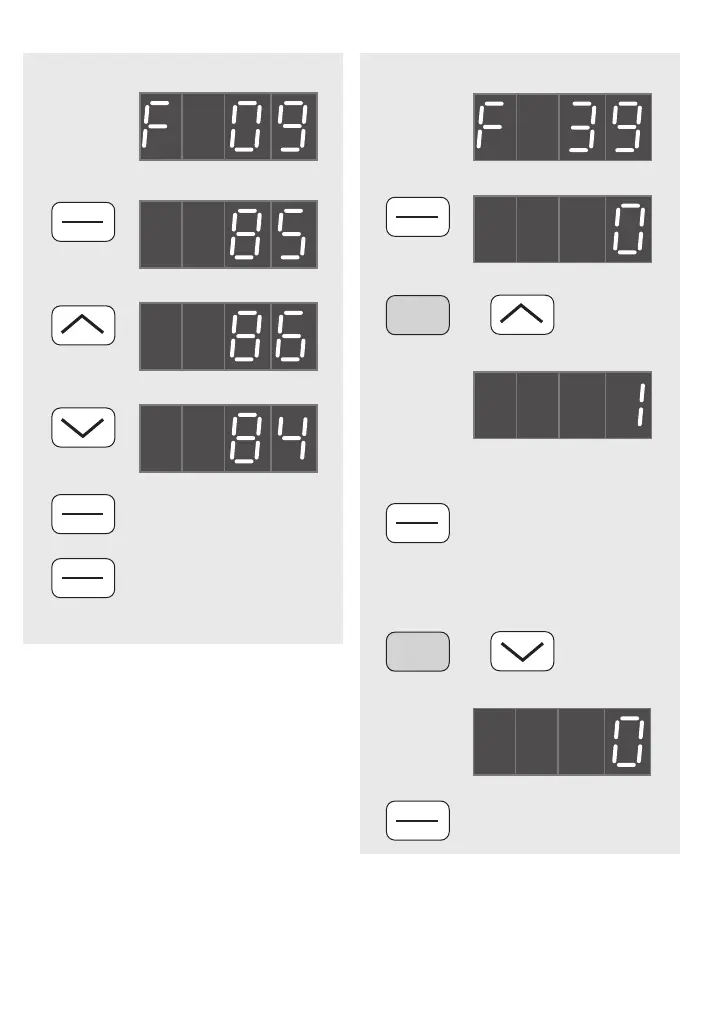
To ADJUST Function data
NOTE All Functions can be adjusted in
STOP mode. In RUN mode, some
Functions are ‘read only’. Refer to
Chapter 7.
To RESTORE Function Data to Default
20
PRG
RESET
OR
To CANCEL a change,
RESTORE the previous
data, and return
to RUN or STOP mode.
then
Either —
PRESS
Or —
PRESS
FUNC
DATA
PRESS
Example —
Function selected…
Present data value…
To STORE the data and
go to the next Function.
FUNC
DATA
PRESS
NOTE All custom data will be lost.
PRESS
FUNC
DATA
PRESS
Select…
Present data value…
and
STOP
New data value…
To RESTORE the data
to factory-set defaults.
FUNC
DATA
PRESS
together
OR — to cancel F39 = 1…
Then EITHER…
PRESS
and
STOP together
Data value changed back to…
To resume custom settings
FUNC
DATA
PRESS
NOTE If Function Data is protected, neither of the
procedures shown on this page is possible. Refer to
Function 00 page 26, and Function 57 page 37.



 To Next Page