Setting range 10 to 100 in unit steps
Factory-set default = 24
FMP pulse frequency =
Inverter O/P frequency x Function 42.
The multiplier should be chosen so that the
output from terminal FMP is not greater than
6kHz.
0 = Terminal X4-P24 acts as a command to
select accel./decel. time 2, Functions 63
and 64. Factory-set default.
1 = Terminal X4-P24 acts as a command to
extend the available number of preset
speeds to 15. Refer to Functions 06, 07,
21 to 27 and 44 to 51.
2 = Terminal X4-P24 acts as a command to
select base frequency 2 (Function 62)
when using a second motor. When base
frequency 2 is selected in this way,
accel./decel. time 2 (Functions 63 and
64), torque boost 2 (Function 65) and
electronic thermal overload relay 2
(Functions 66 and 67) are also selected
simultaneously.
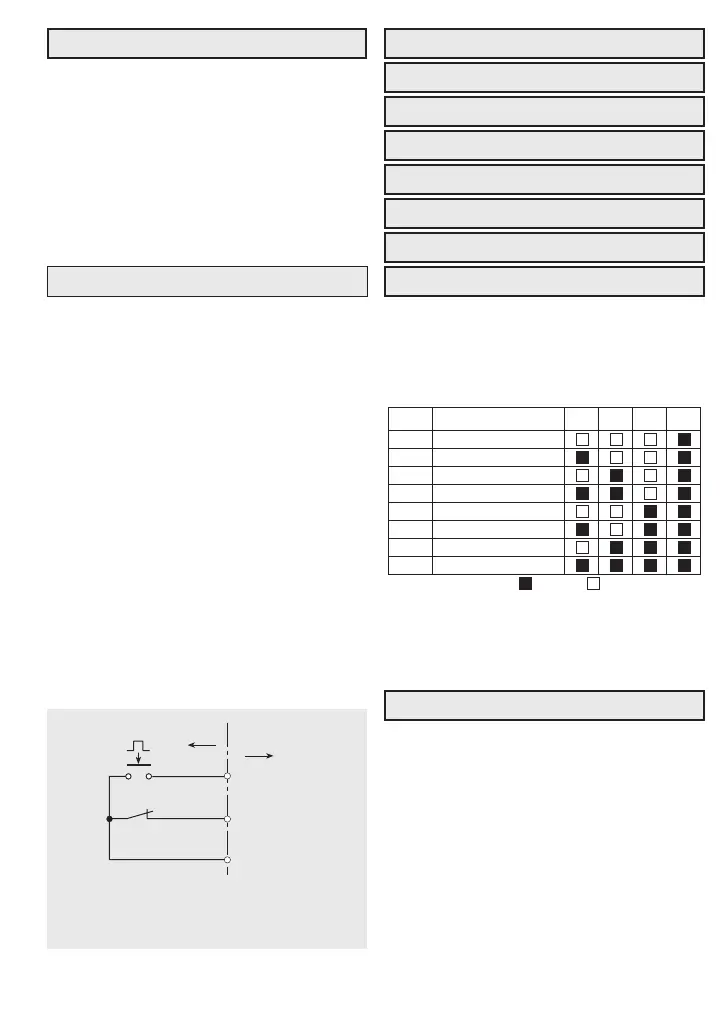
3 = Terminal X4-P24 functions as a ‘hold’
(HLD) signal for operating commands, ie
RUN inputs are latched when a pulsed
signal is given at FWD/REV-P24.
These Functions can be activated only if
Function 43 = 1.
All selections using terminals X1, X2, and X3
remain available, with the additional selec-
tions shown in the table below.
Setting range 0.0s to 5.00s in steps of 0.02s.
Function 52 sets the time constant for the digi-
tal input filters to eliminate the effect of elec-
tronic ‘noise’ on the analog signals and con-
trol inputs.
If the time constant is too long, the system lag
may become unacceptable.
35
43 Terminal X4 functions
44 Preset speed 8
45 Preset speed 9
46 Preset speed 10
47 Preset speed 11
48 Preset speed 12
49 Preset speed 13
50 Preset speed 14
51 Preset speed 15
44
45
46
47
48
49
50
51
Func.
Frequency setting
Preset speed 8
Preset speed 9
Preset speed 10
Preset speed 11
Preset speed 12
Preset speed 13
Preset speed 14
Preset speed 15
X1 X2 X3
= ON = OFF
X4
52 Frequency reference filter
42 Terminal FMP pulse rate
Example: Function 43 = 3.
Pulse FWD/REV-P24 to RUN.
Open X4-P24 to STOP.
Jaguar
VXS
X4
Field
FWD/REV
P24



 To Next Page