3-11
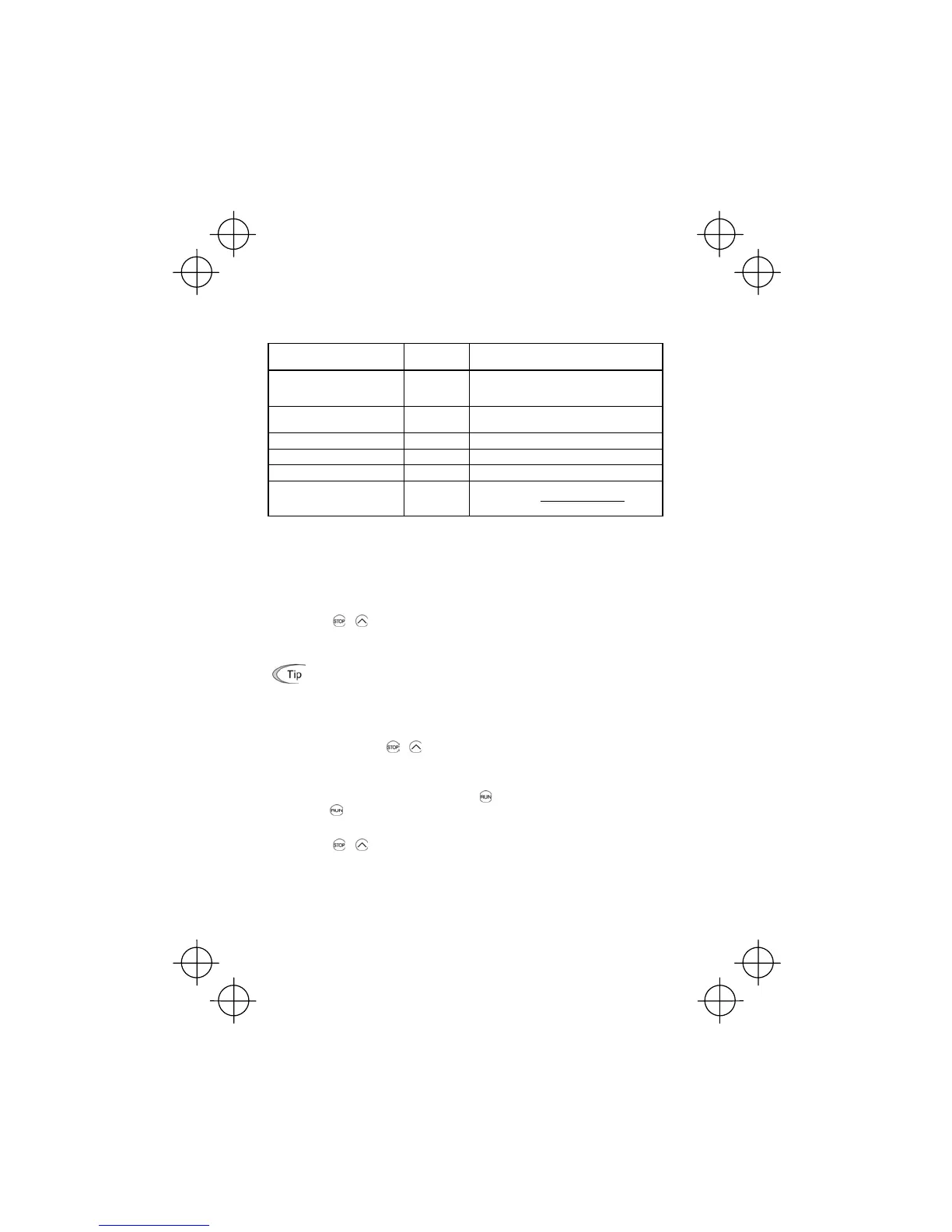
Table 3.4 lists the display items for the speed monitor that can be chosen with function code E48.
(Refer to Chapter 5.)
Table 3.4 Display Items on the Speed Monitor
Speed monitor items
Function code
E48 data
Meaning of Displayed Value
Output frequency (before slip
compensation) (Hz)
(Factory default)
0 Before slip compensation
Output frequency (after slip
compensation) (Hz)
1 Frequency actually being outputted
Set frequency (Hz) 2 Final set frequency
Load shaft speed (rpm) 4 Display value = Output frequency (Hz) x E50
*
Line speed (m/min) 5 Display value = Output frequency (Hz) x E50
*
Constant rate of feeding time
(min)
6
Display value =
E39×frequencyOutput
E50
*
*
Output frequencies contained in these formulas are output frequencies before slip compensation.
(4) Jog (Inch) the Motor
To jog the motor, follow the procedure given below.
c Making the inverter ready for jogging (The JoG
appears on the LED monitor.)
1) Switch to Running mode. (Refer to page 3-2 for details.)
2) Press the
+ keys at the same time (simultaneous keying).
The LED monitor shows the jogging frequency for approx. 1 second and returns to the
JoG
display.
• During jogging, the jogging frequency (C20) and acceleration/deceleration time fo
ogging (H54) will apply. They are exclusively prepared for jogging and required to
be set up individually.
• Using the external input signal command (JOG) also allows the transition between
the ready-to-jog state and usual running state.
• The transition (
+ keys) between the ready-to-
og state and usual running
state is enabled only when the inverter is not in operation.
d Jogging the motor
1) The inverter will jog the motor only while the
key is held down, and contrarily the mo-
ment the
key is released, the inverter will decelerate and stop the motor.
e Exiting the ready-to-jog state
1) Press the
+ keys at the same time (simultaneous keying).



 To Next Page