22
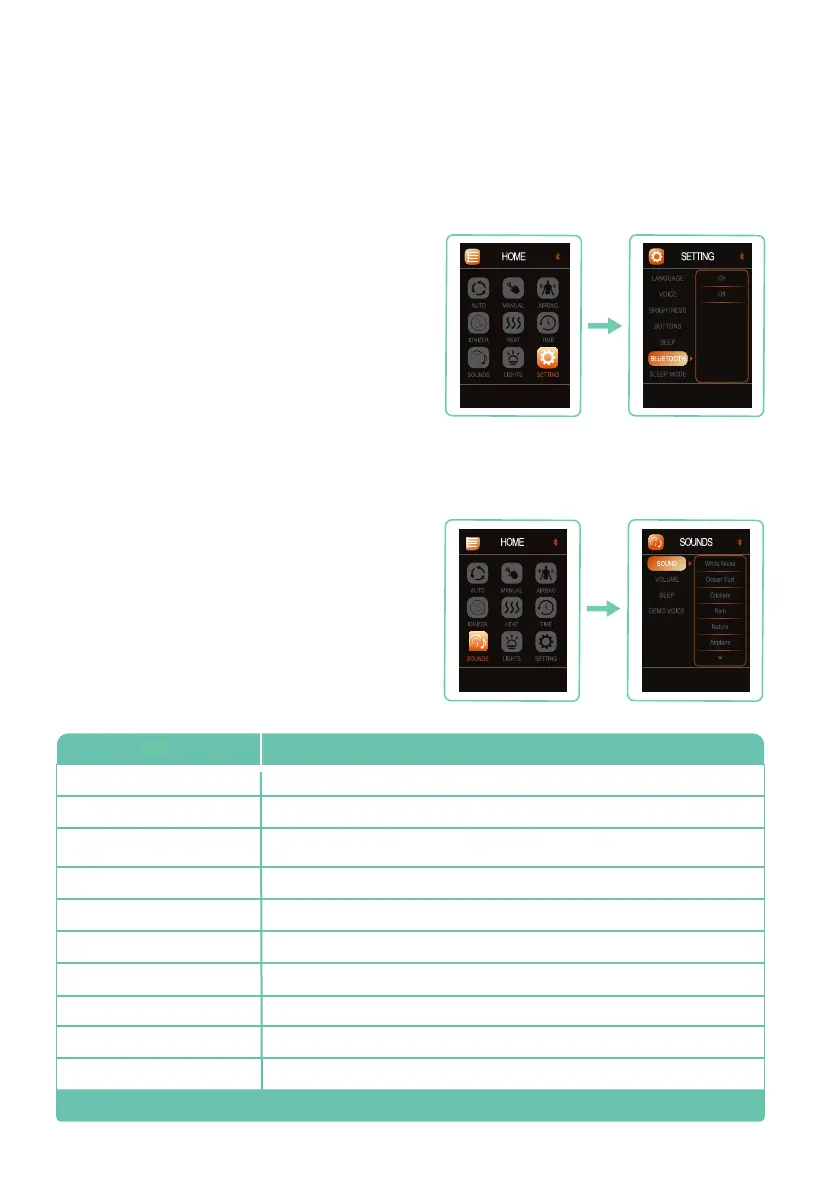
Press SOUNDS from Home display, press right
button then press up or down button to navigate
among: SOUND, VOLUME, BEEP, and DEMO
VOICE. Press OK button to enter the sounds
setting you desire to control.
Note: Bluetooth must be turned on in settings for
Sounds to work.
Sounds
Set your Environment
Your massage chair includes Bluetooth
®
compatibility so you can play and enjoy your
favorite music. To turn on your chair’s Bluetooth
®
,
select SETTING from Home display, then press
up or down button to navigate to BLUETOOTH.
Press right button, then press up or down button
to select your desired Bluetooth
®
setting: On or
Off. Press OK to select setting.
Open Bluetooth
®
from audio device and pair with
Evolution Max to play music.
Bluetooth
®
Audio
White Noise
SoundsW hat is it?
Nature
Ocean Surf
Air Plane
Crickets
Thunderstorm
Car Ride
Rain
Windy Night
Fireplace
A constant, even loop of pure white noise to mask out distractions
Soothing ocean waves rolling onto the shore
Night time in the suburbs. Churping Crickets, water trickling from a pond, and faint
traffic noises
Quiet, light, refreshing rain falling to the ground
Refreshing sounds of small birds peacefully singing along a tranquil stream.
A Cessna propeller airplane motor idling
Calming inner-city traffic featuring cars, trucks, and motorcycles
Crackling of fire in a fireplace
Heavy rainstorm with thunder
Heard from inside a cabin, a howling wind blows constantly outside
Note: Bluetooth must be ON for sounds to work.
W










 To Next Page