27
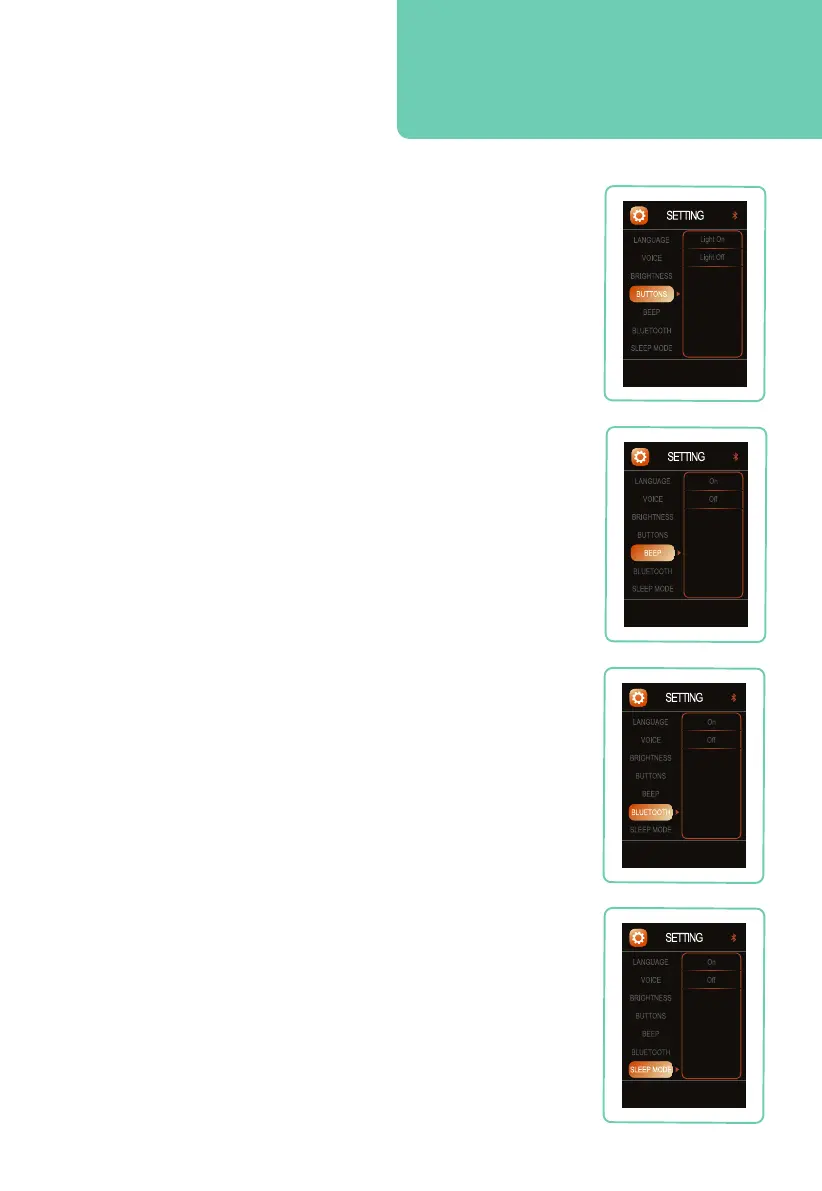
Button Lights
Navigate to BUTTONS, press right button, then press up or
down button to select your desired remote key back-light
setting: On, or Off. Press OK button to select the setting.
Remote Control Sound
Navigate to BEEP, press right button, then use the up or
down button to select your desired remote control beep
setting: On or Off. Press OK button to select setting.
Bluetooth
®
Audio
To turn on your chair’s Bluetooth
®
, Navigate to BLUETOOTH,
press right button, then use the up or down button to select
your desired Bluetooth
®
setting: On or Off. Press OK button
to select setting. Open Bluetooth from audio device and pair
with Evolution Max to play music.
In order to to use the chair app, play in-built sounds from your
chair, or to play music from your Bluetooth
®
enabled audio
device, Bluetooth
®
must first be turned on in settings.
Sleep Mode
Navigate to SLEEP MODE, press right button, then use the up
or down button to select your desired sleep mode setting: On
or Off. Press OK button to setting.
When sleep mode is on the chair will stop in the reclined
position after Auto Programs, when sleep mode is off the chair
will return to a fully upright position after each Auto Program.
Smart tip: In order to play music from your
Bluetooth enabled audio device, Bluetooth
must first be turned on in settings.










 To Next Page