28
Build your own
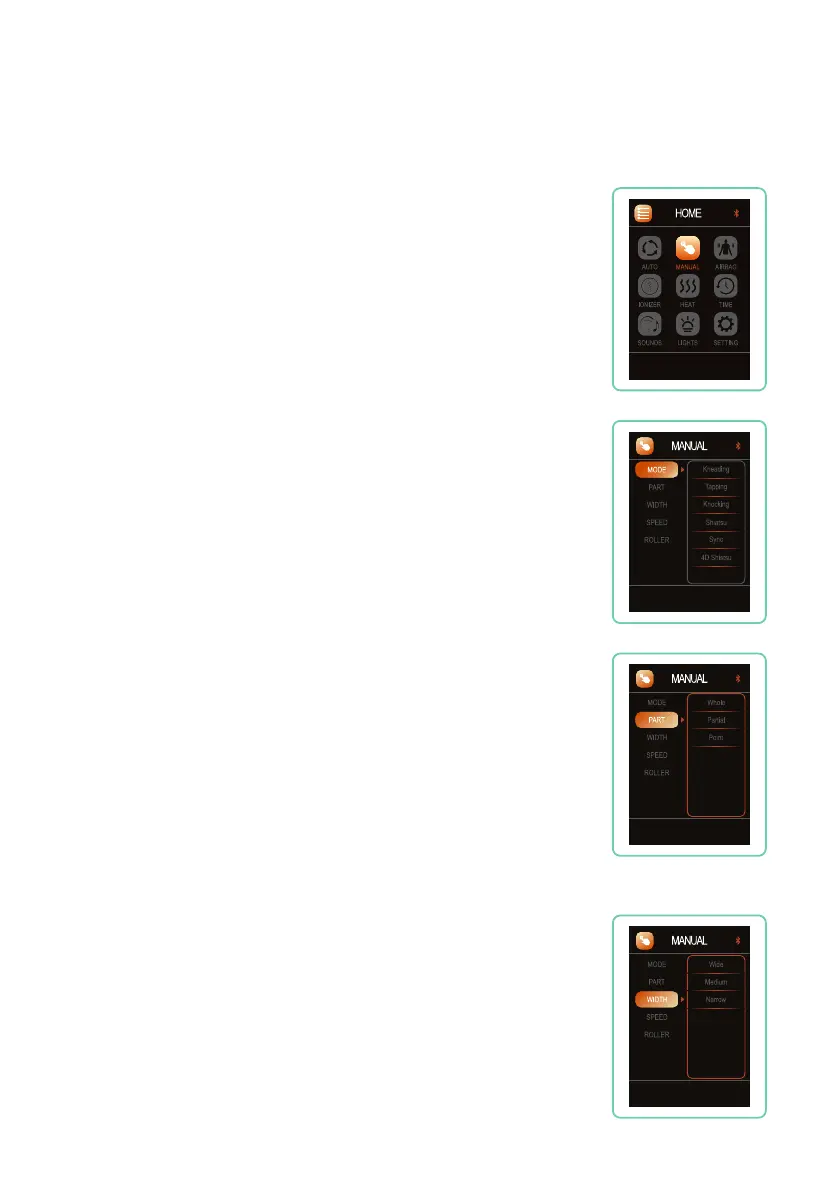
In Manual mode you can operate components of your massage
chair individually or combine them to create unique massage
scenarios.
Press MANUAL from Home display, press up or down button to
navigate among: MODE, PART, WIDTH, SPEED, and ROLLER.
Manual Programs
Back Massage Technique Mode
Navigate to MODE, press right button, then use the up or down
button to select your desired mode: Kneading, Tapping, Knocking,
Shiatsu, Sync, or 4D Shiatsu. Press OK button to select mode.
Massage Part (Back Region)
Navigate to PART, press right button, then use the up or down
button to select your desired region: Whole, Partial, and Point
massage. Press OK button to select region.
Whole travels the entire length of the track, Partial travels a short
distance and reverses direction for focused relief, Point stops on
the track for targeted relief. Partial and Point location can be fine
tuned using the arrow up or arrow down buttons.
Back Node Width
Navigate to WIDTH, press right button, then use the up or down
button to select your desired width: Wide, Medium, and Narrow
roller width. Press OK button to select mode. (Massage Width can’t
be adjusted when in Kneading, or Sync Manual modes).










 To Next Page