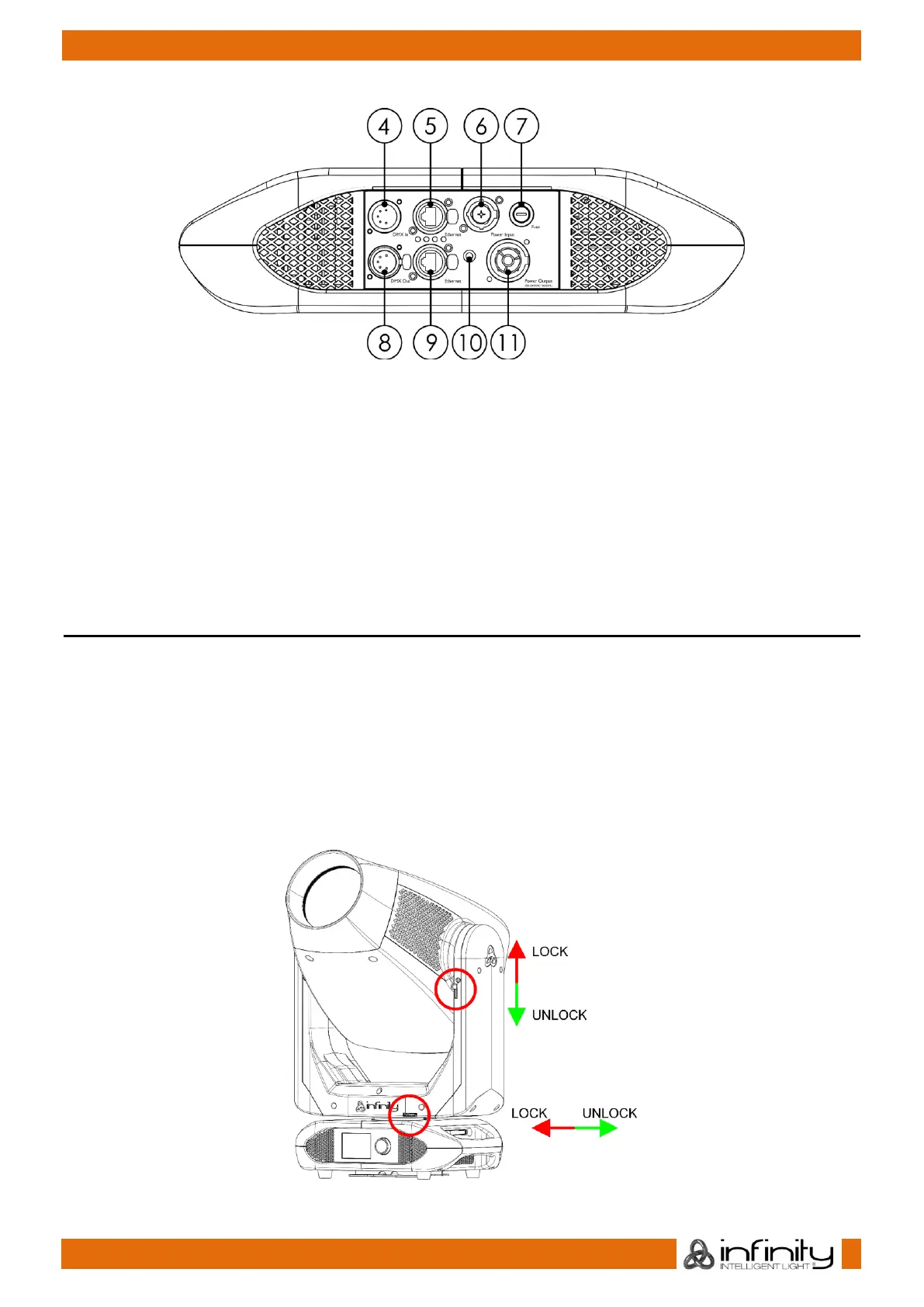
04) 5-pin DMX signal connector IN
05) RJ45 ArtNet connector
06) Neutrik PowerCON True1 power connector IN
07) Fuse F13AL/250V
08) 5-pin DMX signal connector OUT
09) RJ45 ArtNet connector
10) Ground/earth connection
11) Neutrik PowerCON True1 power connector OUT
Installation
Remove all packing materials from the Infinity S601 Profile. Check if all foam and plastic padding is
removed. Connect all cables.
Do not supply power before the whole system is set up and connected properly.
Always disconnect from electric mains power supply before cleaning or servicing.
Damages caused by non-observance are not subject to warranty.
Lock/Unlock the Moving Head
You can lock the moving head by sliding the lock pin to the left (horizontally) for Pan or upwards
(vertically) for Tilt (Red arrows). You can unlock the moving head by sliding the lock pin to the right
(horizontally) for Pan or downwards (vertically) for Tilt (Green arrows).



 To Next Page