9
Adjusting the image
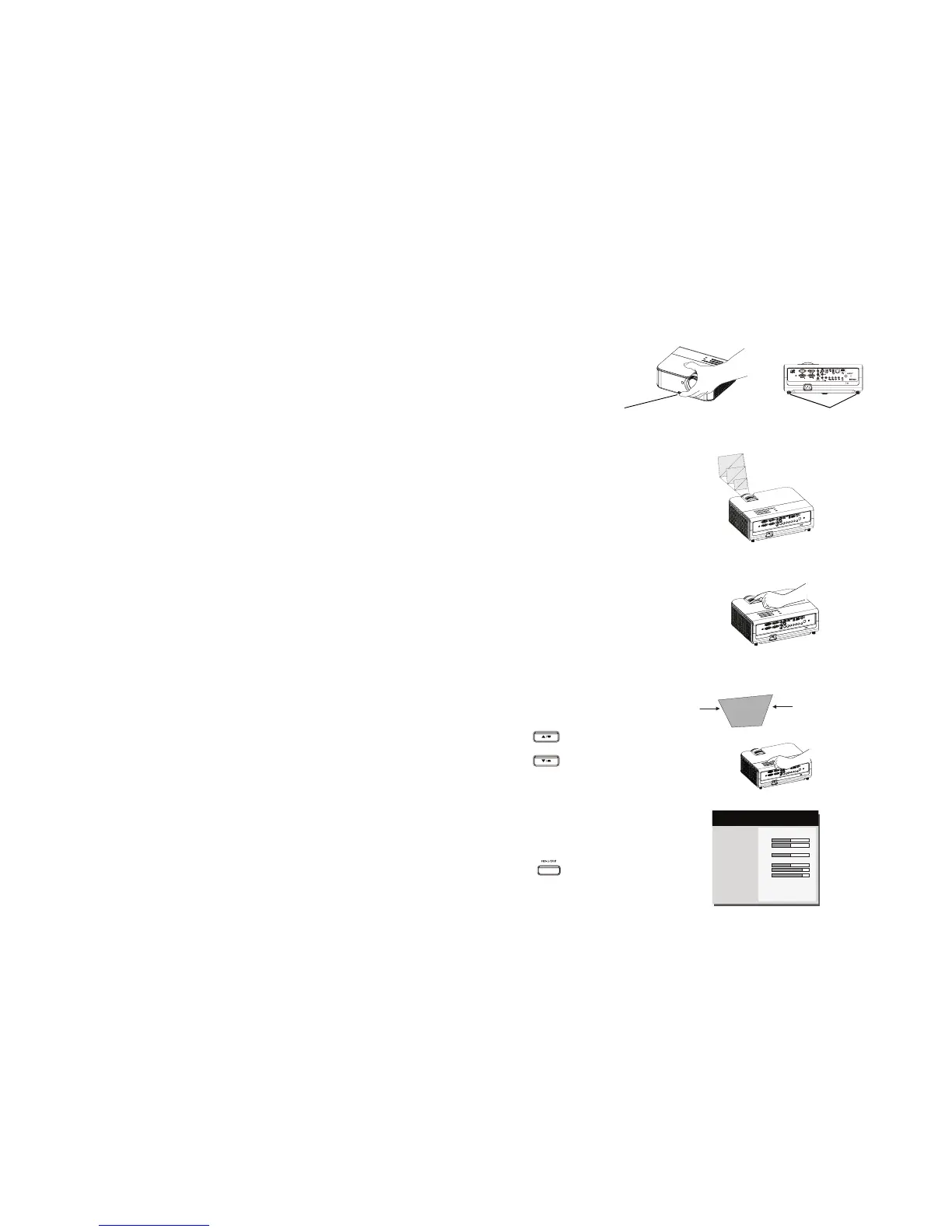
If necessary, adjust the height of the projector by pressing the elevator foot release button to
extend the foot.
If necessary, rotate the leveling feet located at the rear of the projector.
Position the projector the desired distance from the screen at a 90 degree angle to the
screen.
See page 6 for a table listing screen sizes and distances.
Adjust the zoom or focus.
If the image is not square, first make sure that the projector is perpendicular to the screen. If
the image is larger or smaller on the top or bottom edge of the screen, press the top
Keystone button to reduce the upper part of the image, and press the bottom Keystone
button to reduce the lower part.
If the left or right side of the screen is larger or smaller the other, you can turn the projector
to the left or to the right a few degrees to square the image.
Adjust the Contrast or Brightness in the Basic Menu. See page 25 for help with these menu
adjustments.
adjust distance
adjust zoom and focus
adjust keystone
adjust Basic Menu
Aspect Ratio
Auto Image
Brightness
Contrast
Auto Keystone
Keystone
Presets
Sharpness
Volume
Microphone Volume
Ceiling Mount
Advanced Menu
◄ Auto ►
Execute
50
50
Off
0
Presentation
16
15
8
Off
( Basic Menu )
MDL: IN3124
FW: 1.02
adjust height
elevator foot release button
leveling feet



 To Next Page