29
Appendix
Remote control discrete codes
You can use these codes to program another remote to learn the projector’s
remote functions.
To activate discrete mode, press and hold the Custom button on the remote for
10 seconds. The back light blinks twice when discrete mode is entered. The
remote buttons are now remapped to new functions as listed below. To return to
normal remote mode, press and hold the Custom button on the remote for 10
seconds. The remote also returns to normal mode automatically if no activity is
detected for 2 minutes.
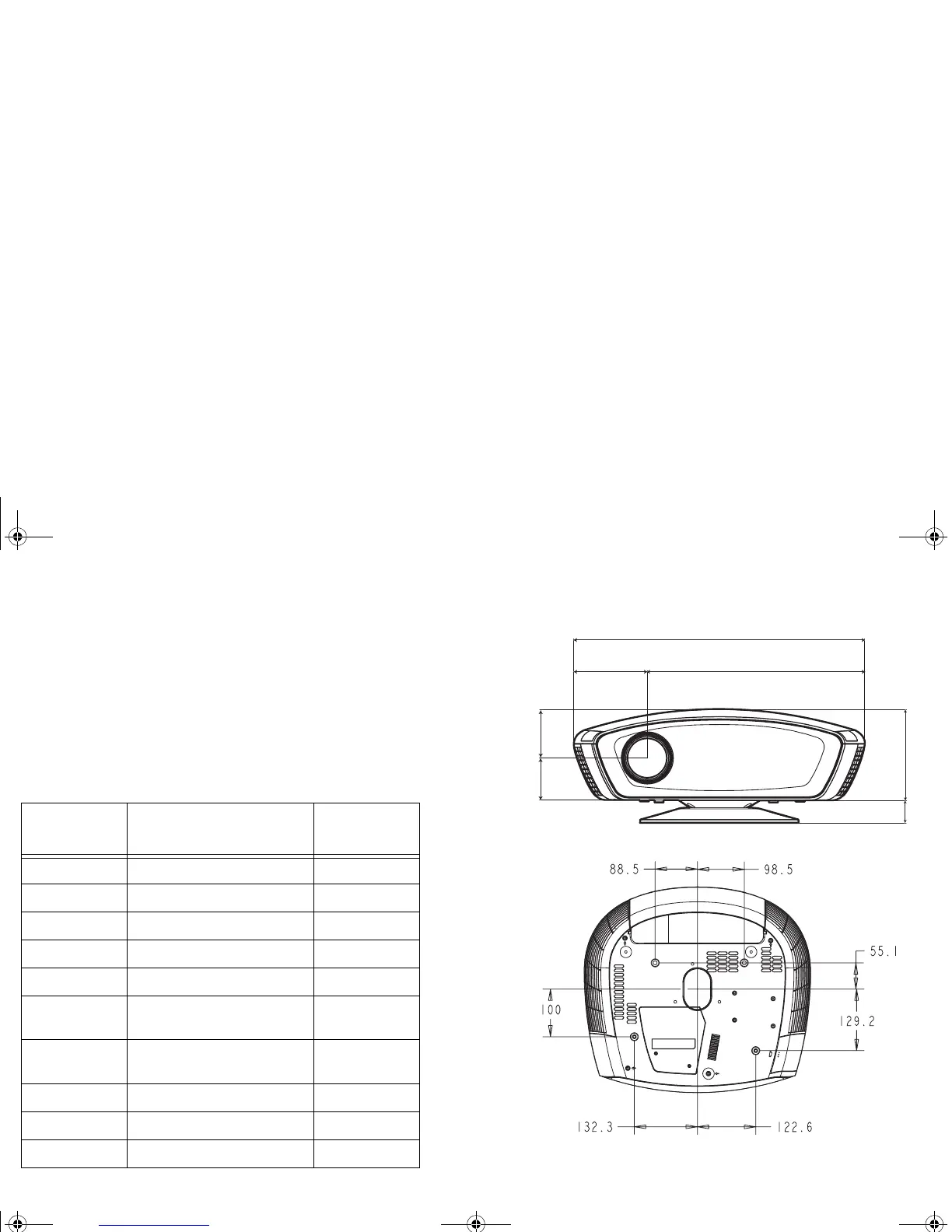
Projector dimensions for ceiling mount installations
All values in millimeters (mm).
Function Description
Remote
button
Power off turns power off Nav Up
Power on turns power on Nav Down
Native resize selects Native resize resize
16:9 resize selects 16:9 resize overscan
4:3 resize selects 4:3 resize source
Letterbox
resize
selects letterbox resize custom
Natural wide
resize
selects natural wide resize auto image
User preset 1 selects user preset 1 Source 1
User preset 2 selects user preset 2 Source 2
User preset 3 selects user preset 3 Source 3
68.95 79.2
119.91 355.91
475.82
36.54 148.63
K1 RG.fm Page 29 Thursday, September 27, 2007 10:24 AM


 To Next Page