INFOSEC UPS SYSTEM – 4 rue de la Rigotière – 44700 Orvault – France – www.infosec-ups.com
Hot Line Tel : +33 (0)2 40 76 15 82 – fax : +33(0)2 40 94 29 51 – hotline@infosec.fr – 05 14 AA 59 203 02
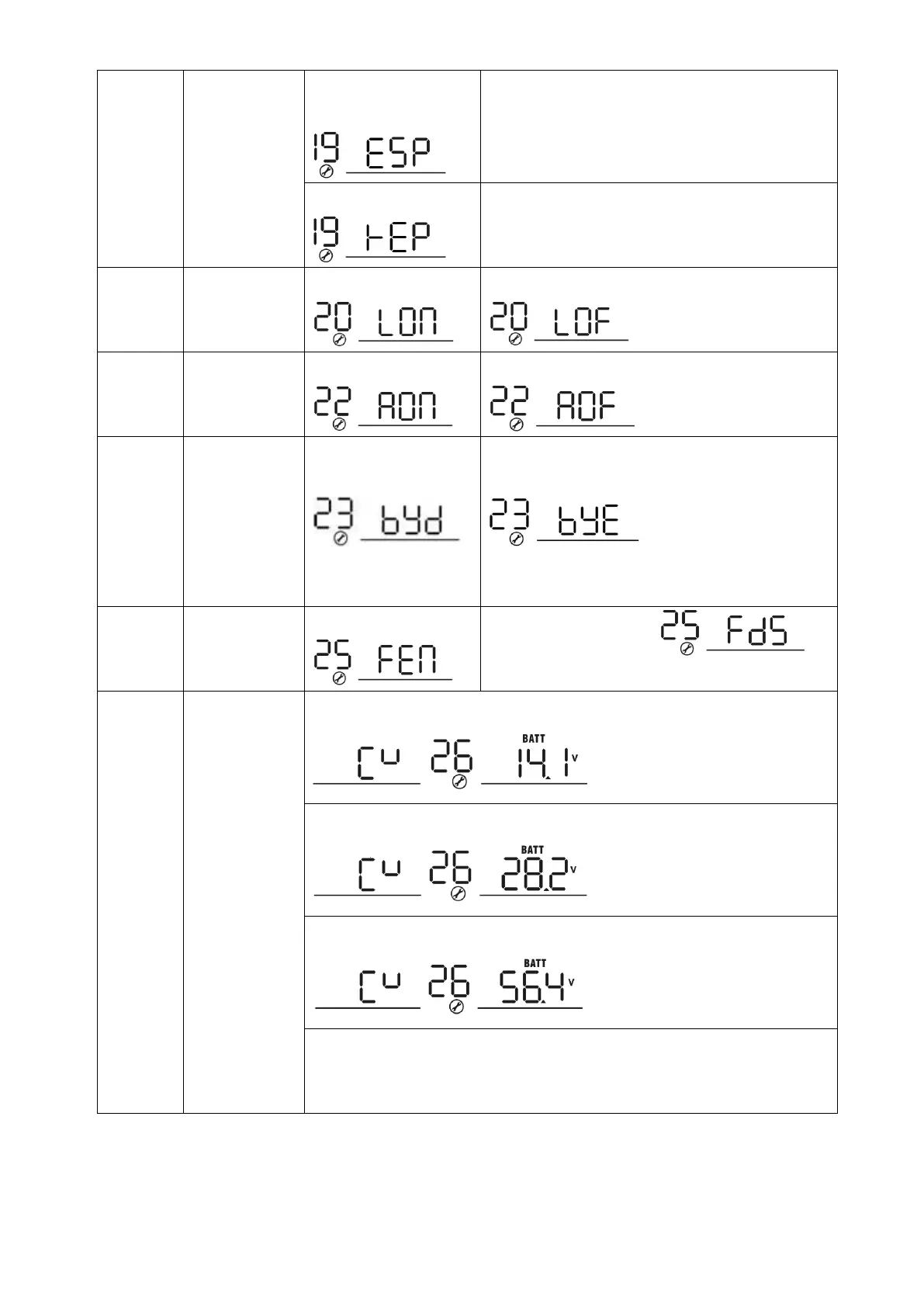
Auto return to
the default
display screen
Return to default
display screen (default)
If selected, no matter how users switch display
screen, it will automatically return to default
display screen (Input voltage /output voltage)
after no button is pressed for 1 minute.
If selected, the display screen will stay at latest
screen user finally switches.
Beeps while
the primary
source is
interrupted
Overload
bypass:
When enabled,
the unit will
transfer to line
mode if the
overload
occurs in
battery mode.
Bulk charging
voltage
(C.V voltage)
1KVA default setting: 14.1V
2K/3KVA default setting: 28.2V
4K/5KVA default setting: 56.4V
If self-defined is selected in program 5, this program can be set up. Setting
range is from 12.0V to 14.6V for 1K model, 24.0V to 29.2V for 2K/3K model
and 48.0V to 58.4V for 4K/5K model. Increment for each click is 0.1V.


 To Next Page