©2011, Attendance on Demand
®
, Inc. Information in this document is subject to change without notice.
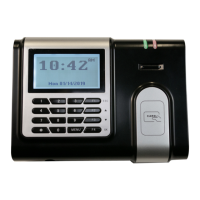
Using the IDpunch 7 Finger Reader
A few procedures are required for customers to begin using the IDpunch 7 Finger Reader. The QuickStart
Guide lists the overall procedure. The remaining sections describe the steps in detail. Become familiar
with these steps in order to guide customers in the installation and use of the IDpunch 7 Finger Reader.
QuickStart Guide for Using IDpunch 7 Finger Reader
To use IDpunch 7 Finger Readers in HTTP mode with the hosted system, a few steps are required. This
section gives an overview of the process.
1. Based on your reader type, you can:
Scan employee badges at the clock. See Registering Badges in the System on page 15.
Enroll employee fingers at the clock. See Enrolling Employees on page 13.
2. (Optional) Print the badge labels if necessary. See Printing Badge Labels on page 16.
3. (Optional) If the card reader is used, issue badges to employees. See Issuing Badges to Employees on
page 16.
4. Employees punch In and Out as usual. See Punching In or Out on page 15 to use badges to punch.
See Punching In or Out on page 14 to use fingers.
5. Supervisors and employees use their own function keys to perform transactions. For supervisor
function keys, see Appendix C: Supervisor Menu on page 28. For employee function keys, see
Appendix D: Employee Menu on page 32.
6. (Optional) If the card reader is used, learn what to do when badge events occur. See Changing Badge
Assignments on page 16.
7. (Optional) Administrators use menu commands for system management. See Appendix A: IDpunch 7
Finger Reader Menu Structure on page 18.
8. (Optional) See Recent Activity Tab on page 24 to check clock activities in Attendance on Demand
Professional Edition 1.0. See Station Activities on page 27 to check clock activities in Attendance on
Demand Professional Edition 1.1.
9. (Optional) Modify the IDpunch 7 Finger Reader station properties, such as modifying the
synchronization interval, or adding a user with the supervisor authority level in Attendance on
Demand Professional Edition 1.0 or Attendance on Demand Professional Edition 1.1. See Appendix
B: IDpunch 7 Finger Reader Station Properties in Attendance on Demand on page 23.


 To Next Page