User’s Manual
Viewing the system 19
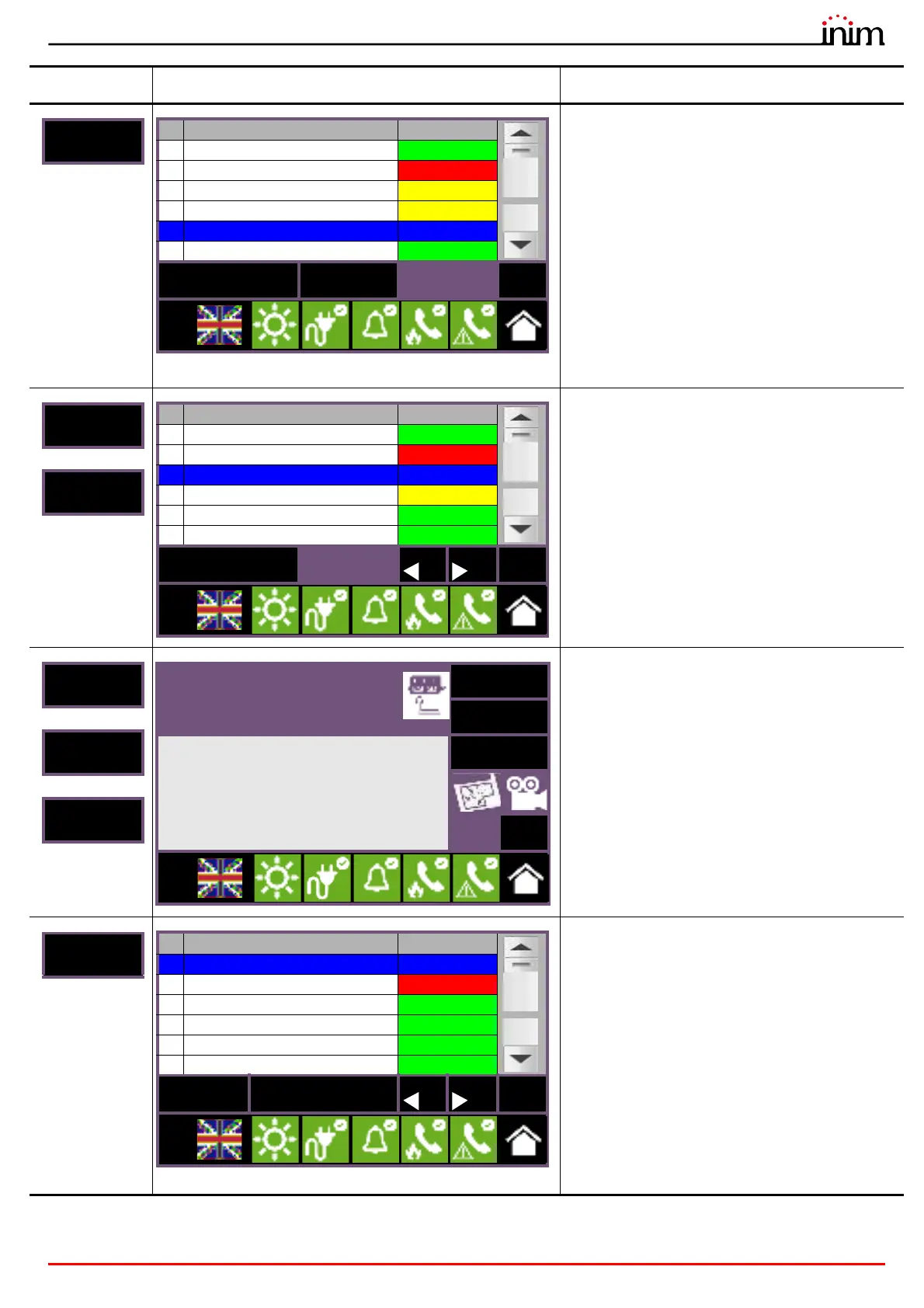
If an analogue control panel equipped with a loop is
selected, this section will activate as well as the two
following sections.
This section allows the selection of the loops of the
selected control panel.
The status of each loop is shown and made
distinctive by colour:
• Green, loop in standby
• Yellow, loop in fault status or bypassed
• Red, loop in alarm status
• Blue, selected loop
By selecting a loop and pressing the View button it
will be possible to access the loop devices. The
Disable button allows you to change the operating
mode.
>
Section for the selection of the devices on selected
loop.
The section is divided into pages that show a
maximum of 80 zones, navigable by means of the
arrow scroll buttons at the bottom. The status of
each device is shown and made distinctive by
colour:
• Green, device in standby
• Yellow, device in fault status or bypassed
• Red, device in alarm status
• Blue, selected device
By selecting a device and pressing the View button
it will be possible to access the device itself.
>
>
Section for the viewing of the selected device info
and data.
The section provides all the information regarding
the device and provides access to the relative
functions.
Section for the management of the output groups
of the selected control panel.
The section is divided into pages that show a
maximum of 80 groups, navigable by means of the
arrow scroll buttons at the bottom. The status of
each group is shown and made distinctive by
colour:
• Green, group deactivated
• Red, group activated
• Blue, selected group
• Gray, group not used
By selecting a group and pressing the
Activate/
Deactivate button, it will be possible to change its
activation status. The Disable button allows you to
change the operating mode.
Button Display Section
No. Loop Status
1 Loop 1 Standby
2
Loop 2 Alarm
3
Loop 3 Fault
4
Loop 4 Fault
5 Loop 5 Standby
6 Loop 6 Standby
Disable View Esc
L:3
No. Point Status
1 Call Point 1 Stand-by
2
Input/Output module 1 Alarm
5 Smoke det. 1 Stand-by
4 Smoke det. 2 Fault
2 Input/Output module 2 Stand-by
6
Smoke det. 3 Stand-by
View Esc
L:2
Input module x
Zone y
Loop: z - Point: x - SN:012345678
Info
Real-time
Info
Actions
Esc
L:2
No. Group Status
1 Generic alarm Stand-by
2 Generic fault Active
3
Extinguishing Stand-by
4
Pre-Extinguishing Stand-by
5 Automatic extinction Stand-by
6
Manual extinction Stand-by
Disable
Activate/Deactivate
Esc
L:2



 To Next Page