service@innocn.com
English
3
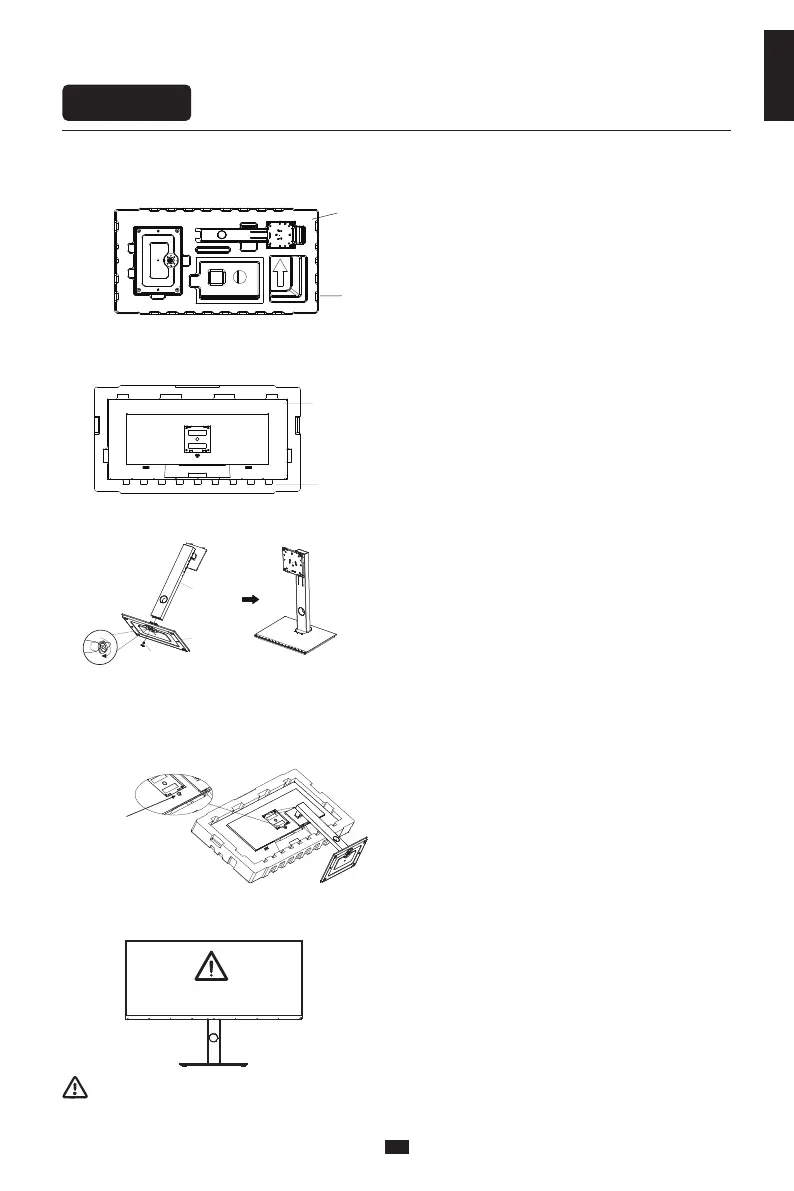
Installation of base
Installation
Note: During standing of the monitor, do not take out the monitor from foams, and do not
pinch the liquid crystal screen with hand to avoid damage to the screen.
2. Take off the top cover of Polylong, take out the body bag and put the body back into the
original bottom cover of Baolong.
Lower foam cover
Monitor
3. Take out the bracket and base, and tighten the manual screws on the base after assembly.
Stand
Base
hand screw
1. Open the carton package, take out the upper and lower foam covers and put them flat on the table top.
Lower foam cover
Upper foam cover
4. Insert the hook at the front end of the shaft of the lifting bracket into the bayonet of the rear shell
obliquely, and gently press the tail end perpendicular to the surface of the rear shell, so that the
lock of the lifting bracket can be buckled on the quick release button of the rear shell, and the quick
release button has a return. The snap action indicates that the tail end has also been snapped into
place.
Quick release
button
5. Simply hold the stand with hand to stand the monitor upright.
Do not press the LCD


 To Next Page