service@innocn.com
English
6
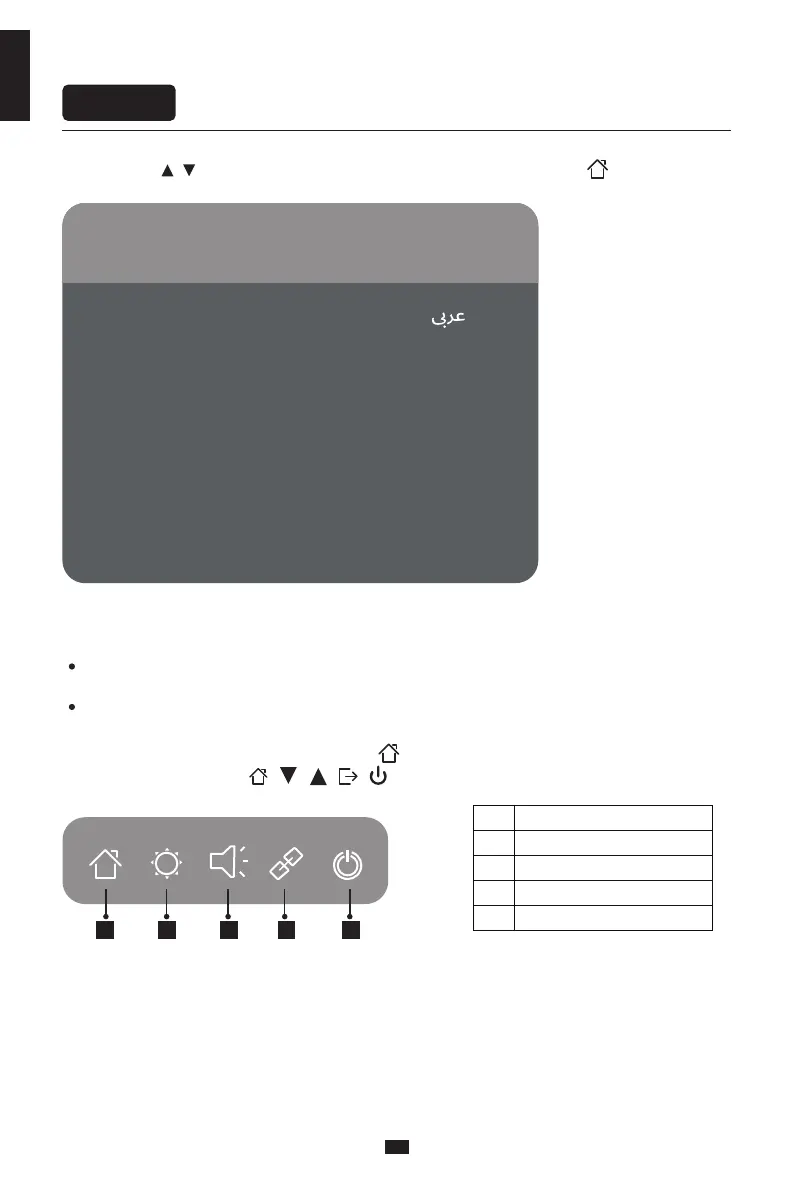
1 2 3 4 5
OSD menu
Enter the main menu
Adjust the brightness
Adjust the volume
Switch port input signal
Power ON/OFF
1
2
3
4
5
Menu description
The color and shape of the OSD menu of the actual computer may be slightly different from them
shown in the figure.
Specifications of the OSD menu may change with improvements of functions without prior notice.
The screen display (OSD) menu can be used to adjust settings of the monitor and is shown on the
screen after the monitor is powered on and the button is pressed.
1. Press one of the buttons ( ) to activate the browser screen.
When booting for the first time, you need to set the default language of the monitor menu.
Press buttons ( ) to select the language to be set, and press the OK button( ) to confirm.
Portugues do Brasilazil Deutsch Nederland
简体中文English 한국어
Suomi Français Ελληνικά Indonesia
Українська Tiếng Việt 繁体中文 Türkçe
Italiano 日本語 Malaysia Polskie
Português Pусский Español ไทย
Please select the default language
请选择默认语言


 To Next Page