Additional Functions
ADJUSTMENTS AND SETTINGS
74 3040c
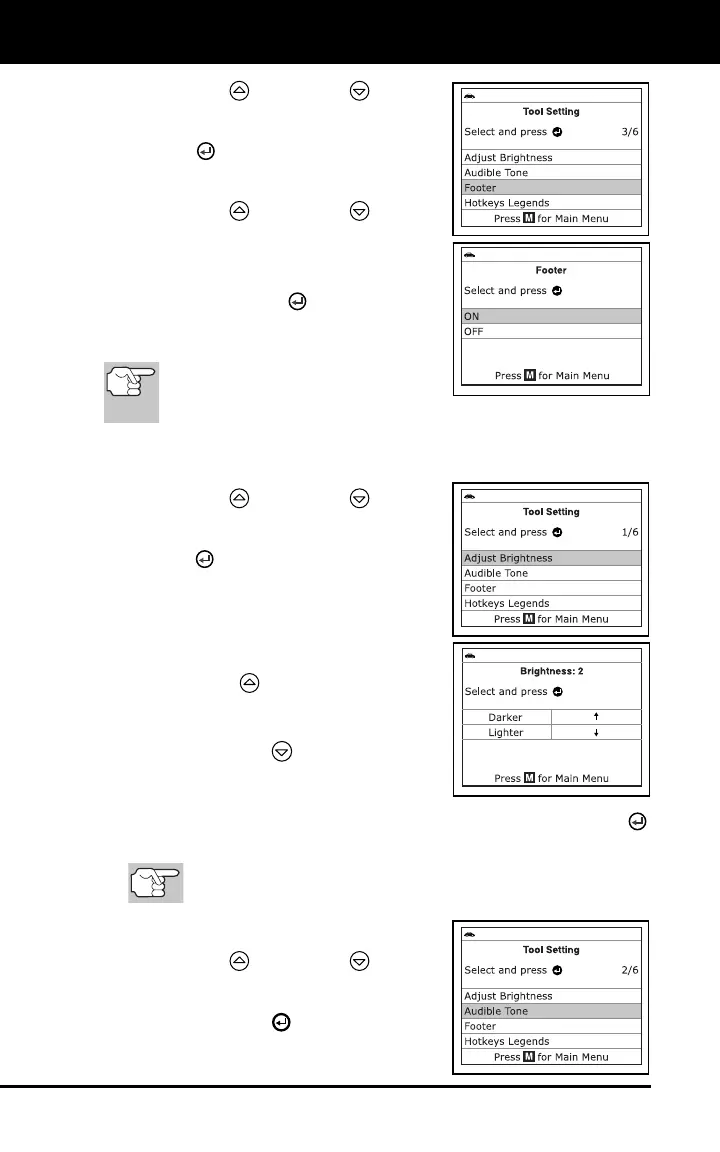
1. Use the UP and DOWN buttons,
as necessary, to highlight Footer in the
Tool Settings menu, then press the
ENTER
button.
The Footer screen displays.
2. Use the UP
and DOWN buttons,
as necessary, to highlight On of Off as
desired.
3. When the desired option is selected,
press the ENTER
button to save
your changes are return to the Tool
Settings menu.
To exit the Footer screen and
return to the Main Menu without
making changes, press the M button.
Adjusting Display Brightness
1. Use the UP
and DOWN buttons,
as necessary, to highlight Adjust
Brightness in the Menu, then press the
ENTER
button.
The Adjust Brightness screen displays.
The Adjust Brightness field shows
the current brightness setting, from
1 - 4.
2. Press the UP
button to decrease the
brightness of the display (make the
display darker).
3. Press the DOWN
button to increase
the brightness of the display (make the
display lighter).
4. When the desired brightness is obtained, press the ENTER
button to save your changes and return to the Tool Settings Menu.
To exit the Adjust Brightness screen and return to the Tool
Settings Menu without making changes, press the M button.
Enabling the Audible Tone
1. Use the UP
and DOWN buttons,
as necessary, to highlight Audible
Tone in the Tool Settings Menu, then
press the ENTER
button.



 To Next Page