ISTRUZIONI PER L’UTENTE
INSTRUCTIONS FOR THE USER
ANLEITUNGEN FÜR DEN BENUTZER
Combination ovens with direct and boiler system, gas and electric models. Programmable panel
11
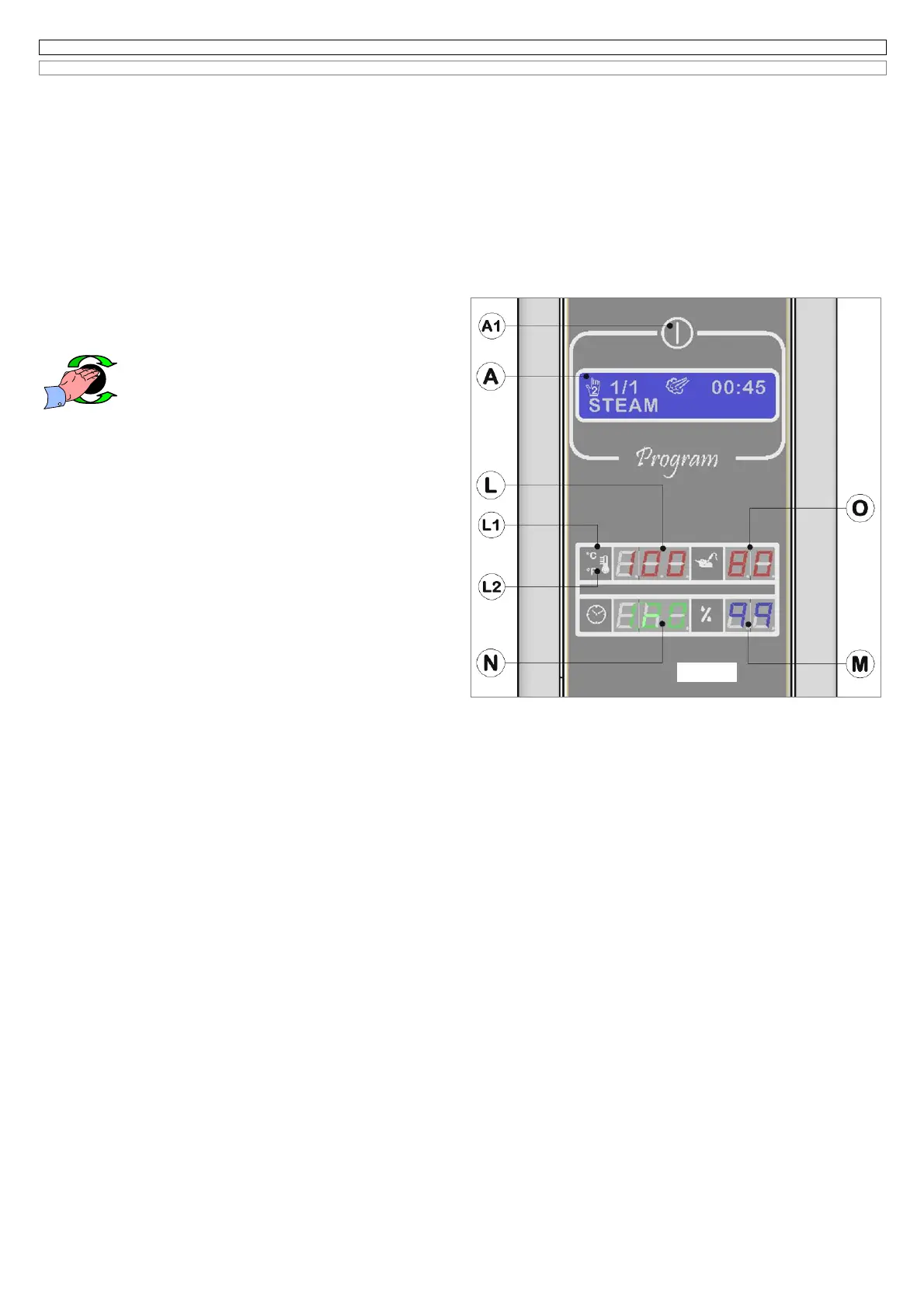
6.4 SETTING OF THE PHASE “STEAM” AND STARTING IN THE MANUAL COOKING PROGRAM N°2
(Fig. 6.4 it)
This program is manual and is made up of a single phase, having the name corresponding to the cooking mode only steam.
By turning the encoder-knob on the program 2, the electronic system will show:
1 on the LCD display (A)
the data relating to the last cooking
done using Program 2;
2 on the back lighted display (L)
the set temperature
for about 5 seconds, then the message
Go
before showing the real cooking chamber
temperature;
3 on the back lighted display (N)
the cooking time of the last steam cycle
done. If in the last cooking cycle the core probe has been used, the
display (N) will be switched off;
4 on the back lighted display (O)
the temperature selected for the core probe
if in the last cooking cycle the core probe was used , vice versa the
display (O) will be switched off.
5 On the back lighted display (M)
the percentage of humidification
of 99 %.
If the door of the oven is open on the display (N) you will see the message
oPn.
If you want to select a cooking program, maintaining the same values shown on the display, you just need to press the button START/STOP to start the
cycle.
6.4A Modification cooking chamber temperature
The value shown on the display (L) is that one of the cooking chamber
temperature and it can be selected between 30°C and 270°C; if you select
low speed of fan the maximum temperature will be instead
220°C.
To modify the value (L) please act as follows:
- press the encoder Knob (B);* the value will flash;
- select the new value, by turning the encoder knob (B),
clockwise to increase it and counter clockwise to decrease it.
Press the encoder knob to memorize the selected value and let the
electronic system move to the following programming of the temperature
core probe on the display (O).
6.4B Modification core probe temperature
As described on the paragraph 6.3B
6.4C Activation of
Δ
t function (Delta T)
As described on the paragraph 6.3C
6.4D Modification cooking time
As described on the paragraph 6.3D
6.4E Modification humidification percentage
For the phase “steam” the percentage of humidity inside the cooking
chamber is automatically set by the electronic system on a fixed and not
modifiable value of 99%.
ATTENTION:
It is well known that the steam temperature at atmospheric pressure cannot reach values over 100°C.
The electronic system of the oven shows on the display (A) the message “HIGH TEMP.” , when you select the steam phase with a cooking chamber
temperature over 100°C.
The message is only informative , this situation can happen after a “convention or combination” phase with temperature over 100°C , in case you haven’t
done a cooling cycle at the end of the phase to reduce the temperature.
The control system of the oven allows the functioning of steam also in this situation.
If the display (A) shows the message “NO WATER” it won’t be possible to activate the steam mode. (only for the models with boiler)
Fig.6.4 uk



 To Next Page