ISTRUZIONI PER L’UTENTE
INSTRUCTIONS FOR THE USER
ANLEITUNGEN FÜR DEN BENUTZER
Combination ovens with direct and boiler system, gas and electric models. Programmable panel
28
7.0 SETTING AND MODIFICATION OF AN AUTOMATIC COOKING PROGRAM WITH MORE
PHASES
(Fig. 6.1)
Select by using the encoder knob one of the programs among 06 and 96 and the LCD display will show
the data of the memorized program.
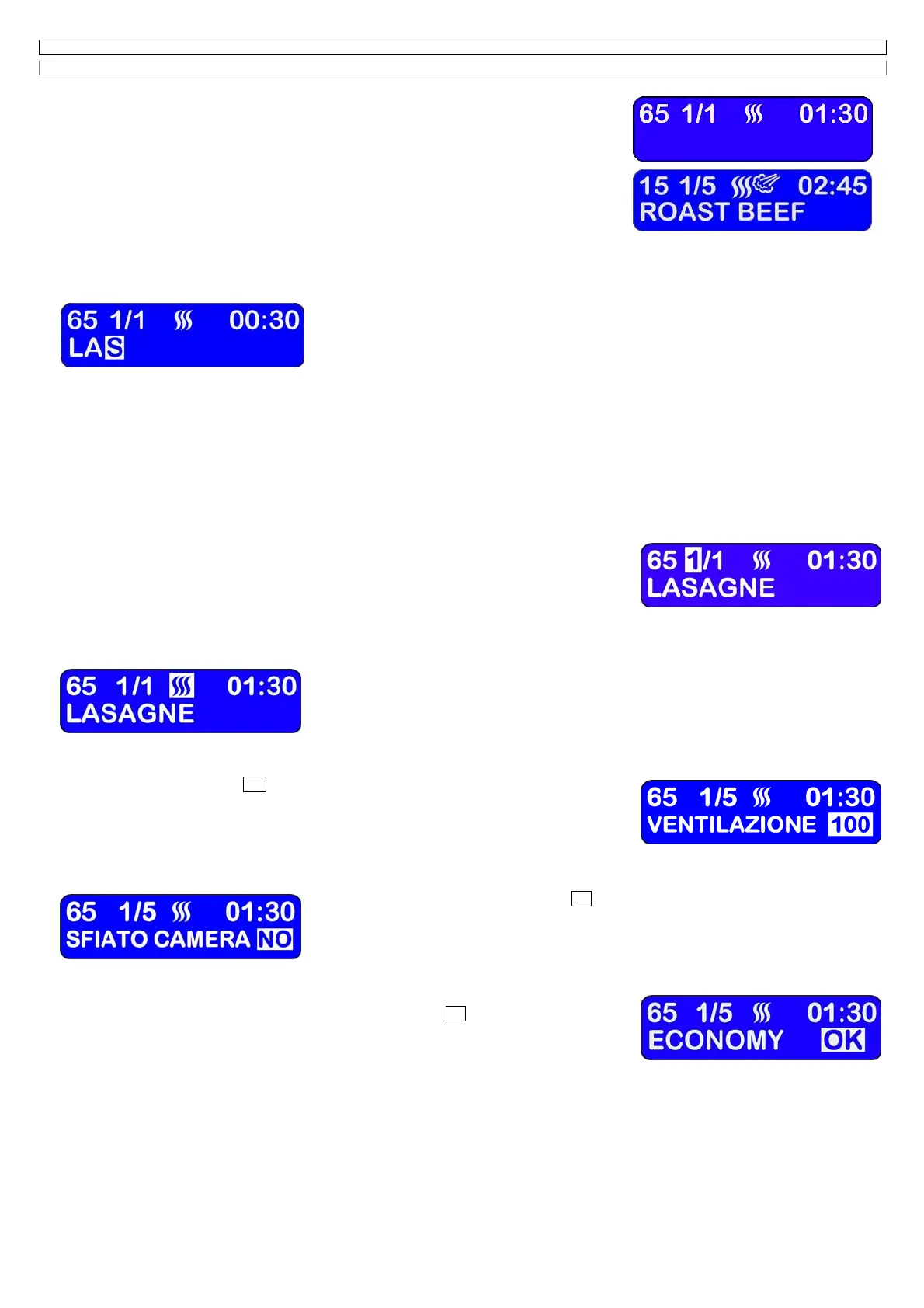
If no cooking program has been selected yet, the LCD display (A) shows the number of the selected
program (65), the number of the phase (1/1), the cooking mode (convention) and the cooking time
(01:30), the second line is empty, while the displays (L), (M), (N) and(O) show the default values.
Vice versa if any cooking program has been stored , the LCD display (A) and the displays (L), (M), (N)
and (O), will show the data of the first phase of the previous cooking cycle.
7.0A SETTING AND MODIFICATION OF THE DESCRIPTION IN AN AUTOMATIC COOKING PROGRAM
After you have selected the number of the program, of which you wish to select or modify the description, press the encoder to enter into the
programming. The programming of this parameter is highlighted by the character –blue on the white background -. In case there is no character,
you will see a white rectangle.
By using the encoder knob select the different letters of the alphabet; clockwise from A to Z,
counterclockwise from Z to A. To confirm and store the selected letter and go to the following letter,
press the encoder knob.
Attention:
the maximum accepted number of letters for each cooking program is 16.
If the cooking program name is shorter than 16 letters and you don’t want to insert the “blank” (space
between 2 words) for the remaining letters, press the encoder knob for more than 2 seconds and you will go to the following parameter (NUMBER OF
THE PHASE). To insert a single blank, you just need to click the encoder.
The button (C)START/STOP during the programming cannot be used to start a cooking cycle and it’s used to cancel; each time you press it, you
cancel the highlighted character, while if you keep it hold for more than 2 seconds, you will cancel all characters from the highlighted one till the end
of the line. If you don’t want to change the name of the program and go directly to the following parameter, press and keep it hold the encoder knob
for more than 2 seconds, when the first alphanumeric code is blinking.
After you go to the programming of the cooking phases.
7.0B SETTING AND MODIFICATION OF THE NUMBER OF COOKING PHASES IN AN AUTOMATIC COOKING PROGRAM
The modification of the cooking phases is highlighted by the character –blue on the white background –This number increases automatically after
you have inserted all parameters of the previous phase. The number after the slash corresponds to the total number of the phases.
It’s possible to program a maximum quantity of 6 phases.
To cancel a previously stored phase , act as follows:
- By using the encoder knob, activate the programming window on the second number after the slash
relative to the phase to cancel;
- press, some seconds long, the Δt button(H),
The electronic system will cancel the phase. The storage of the cooking phase will show the total
progressive number of the phases on the right of the space bar and the electronic system will go to next programming (COOKING MODE).
7.0C SETTING AND MODIFICATION OF THE COOKING MODE IN AN AUTOMATIC COOKING PROGRAM
the modification of the cooking mode is highlighted by the blue character on the white background,
that indicates CONVECTION, COMBINATION and STEAM.
Turn the encoder knob to select the mode, click the encoder to store it, and go to the next programming
(SPEED FAN).
7.0D SETTING AND MODIFICATION OF FAN SPEED IN AN AUTOMATIC COOKING PROGRAM
On the first line the cooking phase remains highlighted, while on the second line of the LCD display the name of the program is temporary replaced
by the message
VENTILATION 100.
The electronic system proposes a fan speed between a maximum value of 100 (Blue on a white
background) and a minimum of 50.
Turn the encoder knob to select the ventilation (50% or 100%). Click on the encoder knob to store the
new value and go to the next programming (RELEASE VALVE).
7.0E SETTING AND MODIFICATION OF THE STEAM RELEASING SYSTEM OF THE COOKING CHAMBER
On the first line the cooking phase remains highlighted, while on the second line of the LCD display the name of the recipe is temporary replaced by
the message
“STEAM RELEASING SYSTEM NO”.
Turn the encoder knob to select the releasing system open (SÌ) or closed (NO).
Press the encoder to store the new value and go to the next programming (ECONOMY).
Important note:
The electronic system doesn’t propose the function RELEASING SYSTEM, if you
have selected the STEAM cooking mode.
7.0F SETTING AND MODIFICATION OF THE REDUCED POWER IN AN AUTOMATIC COOKING PROGRAM
On the first line the cooking phase remains highlighted, while on the second line of the LCD display the
cooking program is temporary replaced by the message “
ECONOMY OK
”.
Turn the encoder knob to select the reduced power of 50%, select the message (ECONOMY OK).
Press the encoder knob to store the value and go to the next programming (cooking chamber
temperature).
Important note:
the electronic system doesn’t propose the function ECONOMY if you have selected the STEAM cooking cycle.



 To Next Page
 Loading...