ISTRUZIONI PER L’UTENTE
INSTRUCTIONS FOR THE USER
ANLEITUNGEN FÜR DEN BENUTZER
Combination ovens with direct and boiler system, gas and electric models. Programmable panel
22
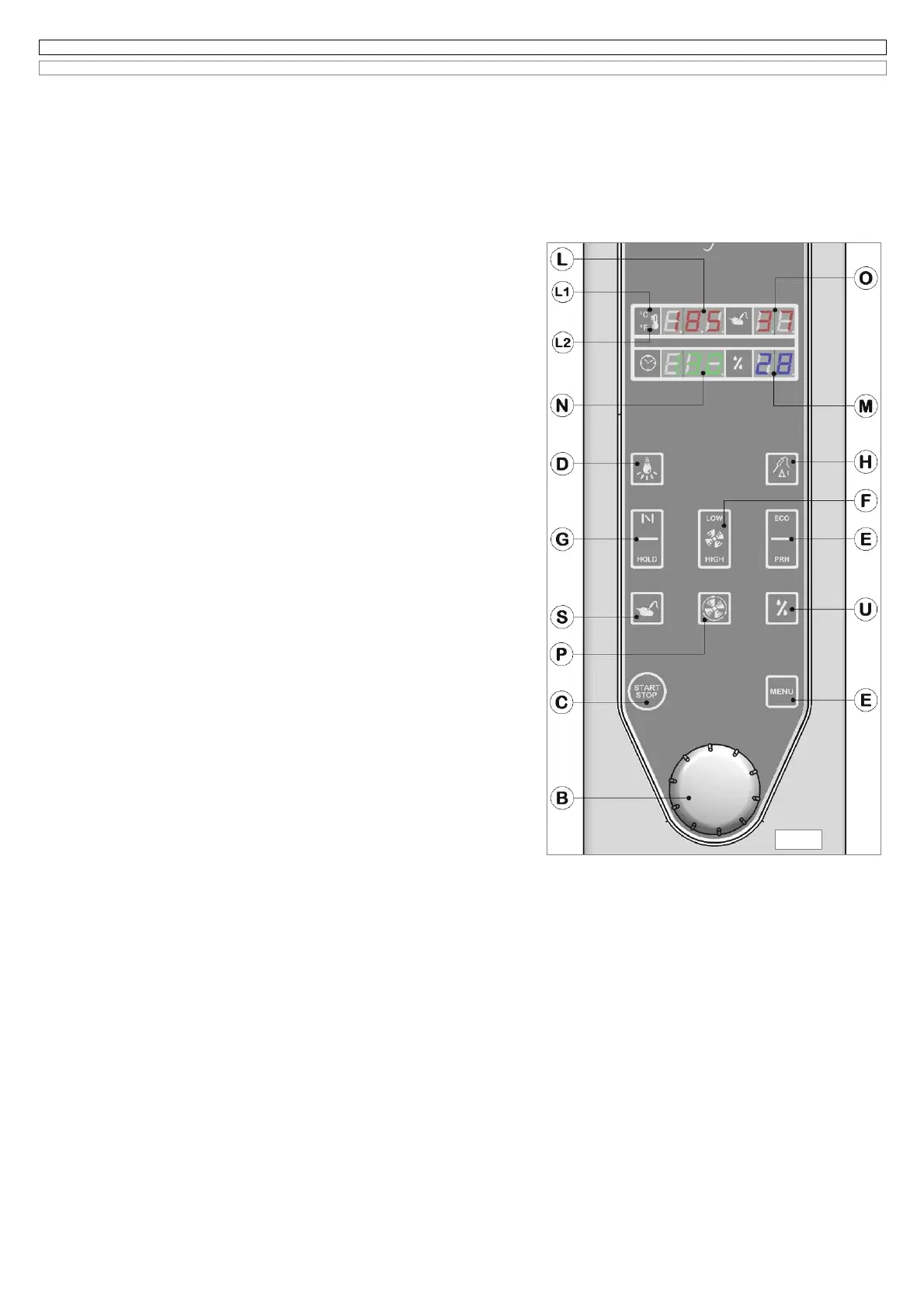
6.8 COOKING DEVICES AND AUTOMATISMS IN THE MANUAL COOKING PROGRAMS
(Fig. 6.8)
6.8A Release valve
All models are equipped with this device, to be activated with button (G), in all cooking modes except for steam mode.
This system lets the humidity going out of the cooking chamber.
Attention:
the release valve must be always open while grilling or browning food.
6.8B Cook & hold (C & H)
The function Cook & Hold allows at the end of the cooking cycle, a phase of “CONSTANT TEMPERATURE” at a steady temperature of 50°C for an
unlimited period of time.
The function can be activated in the following manual programs:
Program n°01 cycle with single phase CONVECTION;
Program n°03 cycle with single phase COMBINATION
Program n°04 cycle of REGENERATION
For the rest of manual cooking programs n°02 - 05 the function is not available.
The C & H mode can be activated only after starting the above mentioned programs;
press the button (G) and keep it hold down for about 4 seconds, until on the back
lighted display (N) you will see the message
HLd
, alternating with the timer decreasing
(timed cooking) and increasing (skewer probe cooking).
To cook using skewer probe and also Δt control on, the Cook & Hold phase is enabled
when the set temperature is reached, the letters
HLd
on display (N) will appear for the
entire Cook & Hold Phase.
The end of the cooking cycle or the reaching of the core probe temperature is signaled
by a buzzer.
To cancel the Cook & Hold function after it has been started, press the button (G) and
hold it down for about 4 seconds, until the letters
HLd
no longer appear on display (N).
6.8C Cooking chamber cooling cycle
The cooking chamber cooling cycle can be started only when the door of the oven is
open and when the cooking process is over; the electronic system makes the fans work
at a high speed, and the message HIGH appears on the display; by pressing the key
(F) it’s possible to modify this function and select the LOW speed.
The cooling down can be started by pressing the button (P), the cycle works as follows:
the relative symbol turns on, the fans work only with open door and the release valve
opens.
On the display (N) it will appear the fixed message Col, these letters will flash when the
door is not open; in this case the message OPEN DOOR will appear on the display.
The displays of the core probe (O) and humidity (M) stay switched off, while the display
of the cooking chamber temperature shows a set value of (30°C) for about 5 seconds
before showing the real temperature of the cooking chamber.
The action of the fans with open door allows a quick decreasing of the cooking chamber
temperature. When the set value is reached the fans switch off and the flashing letters
Col will reappear on the temperature display.
The cooling cycle stops definitely by pressing the button (P), and temporary by closing
the door.
6.8D Setting of reduced power and cooking chamber preheating
All programmable models are supplied with a device, able to reduce the heating power
into the cooking chamber, you can select this function by pressing the button (E)
signalled also by the message ECO, valid for all cooking modes except for STEAM and
HARD STEAM.
By pressing the button (E), and holding it down for about 5 seconds, you can start the
preheating of the cooking chamber, signalled by the letters PrH on the display (N),
these letters will flash until the set temperature is reached. To select the new value turn
the encoder knob (B), clockwise to increase it and counter clockwise to decrease it. When you reach the preheating temperature, you will hear the
buzzer, the value will flash on the display (N) until the door is open. To deactivate the preheating, press the button (E) again or press (C)to start the
cooking cycle previously selected.
Attention
: after setting the preheating temperature, you can select the cooking phase as already explained in the previous paragraphs.
Note
: in order to obtain good cooking results, we advise you to always do the preheating, before introducing the food into the cooking chamber.
6.8E Setting double speed fan
When you select convection or combination cycle, the oven always starts with double speed fan, otherwise when you select the steam cycle the oven
is started with low speed fan.
The button (F) allows you to choose between high or low speed fan for all cooking modes.
Note
: The speed of the fan is related to the food to cook, keep in mind that if you select low speed fan, the max. temperature reached in the cooking
chamber can be 220°C.
6.8F Internal cooking chamber lighting
All models are equipped with cooking chamber lighting, that can be activated by pressing the button (D).
While closing the door, the lamps can light with a little delay; this is to be considered normal.
Attention
: the electronic system turns the lamps off after 1 minute ( with a temperature in the cooking chamber over 150°C) in order to guarantee a
longer life of the lamps.
Fig.6.8


 To Next Page
 Loading...