ISTRUZIONI PER L’UTENTE
INSTRUCTIONS FOR THE USER
ANLEITUNGEN FÜR DEN BENUTZER
Combination ovens with direct and boiler system, gas and electric models. Programmable panel
5
6.1 COMMISSIONING
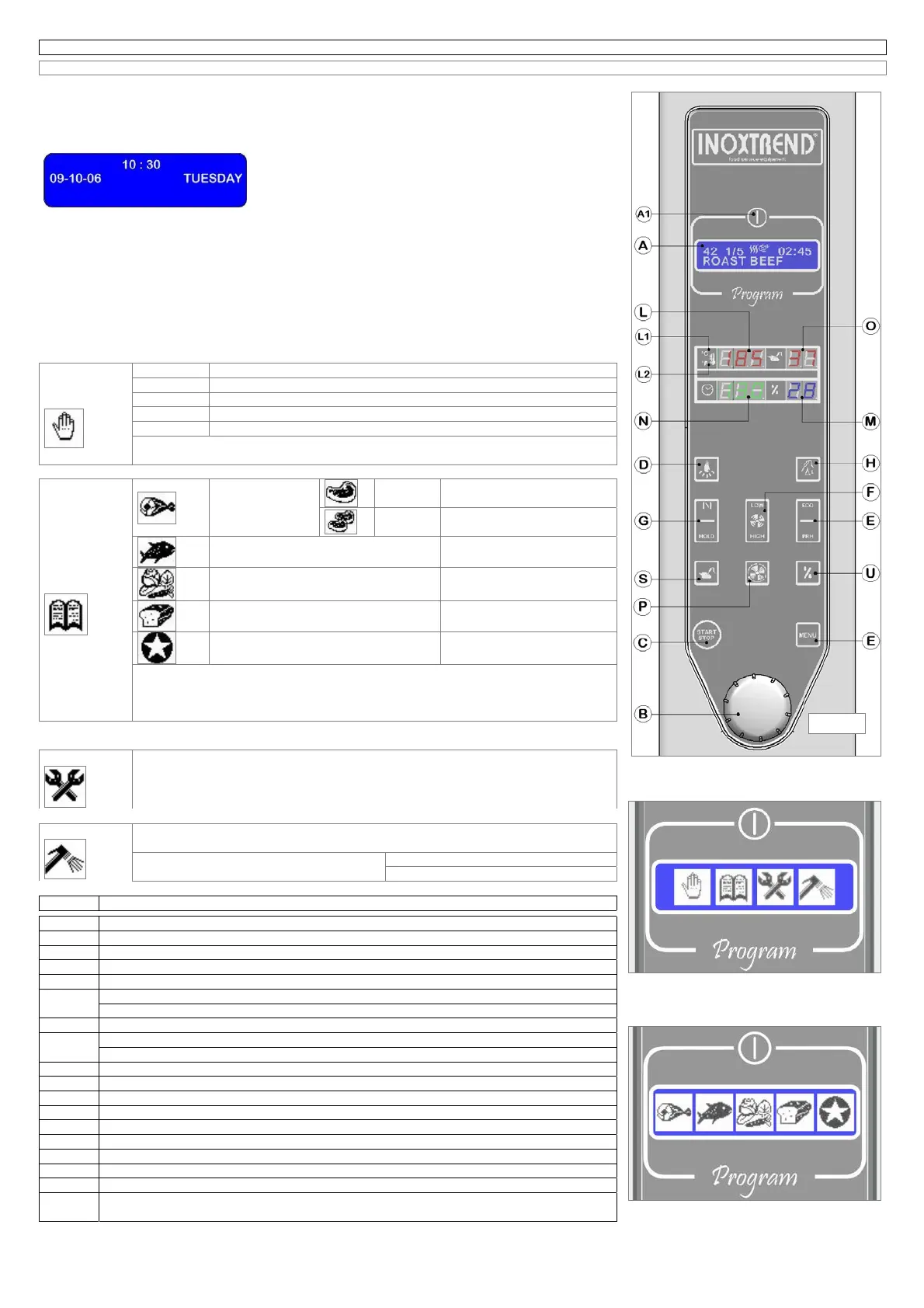
(Fig. 6.1)
Ensure that water and gas supply valves installed upstream are turned on and that the protection
electricity switch is switched on.
On the display (A) it will appear firstly the version of the installed software, then the sign welcome, and
later the left message that for our simplicity we will call of “ stand
by” while the back lighted displays (L) (M) (N) (O) are switched
off.
Press the key ON/OFF (A1), the graphic display (A) will show the
last used cooking cycle, and the displays (L) (M) (N) (O) will switch on in accordance with the program
selected before.
To select a program turn the encoder knob (B) also called ENTER, clockwise to increase and counter
clockwise to decrease; it’s not necessary to confirm the choice of the new program with any control key
on the control panel.
By pressing the key (E) MENU the electronic system will show on the display (A) the symbols of the
operative menus inside which you can find submenus with relative programs.
To select the desired menu turn the encoder-knob until the display will show the corresponding symbol
in blue colour on a white background, push the encoder to confirm.
In the following chart all operative menus are well illustrated.
Manual
cooking
Prog. 01 Manual cooking program with single phase, convention mode
Prog. 02 Manual cooking program with single phase, steam mode
Prog. 03 Manual cooking program with single phase, steam-convection mode
Prog. 04 Regeneration program
Prog. 05 Hard-steam program (only for models with boiler)
The manual cooking programs with single phase are shown on the display (A) with
their respective number inside the symbol representing a hand.
Automatic
cooking
Meat
Big
pieces
Automatic programs
from n°06 to n°16
Small
pieces
Automatic programs
from n°17 to n°26
Fish
Automatic programs
from n°27 to n°47
vegetables
Automatic programs
from n°48 to n°68
Pastry and bakery products
Automatic programs
from n°69 to n°89
Favourite cooking
Automatic programs
from n°90 to n°95
The meat menu provides for two under menus to simplify the programming and
research of all automatic cooking programs.
The numbers of such programs are shown on the display (A) alternately to the
symbol, inside which they have been stored.
Maintenance
Program manual discharge of the boiler
Attention (only for models with boiler)
Program end of the work
Attention (only for models with boiler)
Washing
Program descailing and washing of the boiler
Attention (only for models with boiler)
Program cooking chamber washing
Short cooking chamber washing
Long cooking chamber washing
Fig. 6.1 COMPONENTS DESCRIPTION OF PROGRAMMABLE PANEL
A LCD Display
A1 Electronic control on/off push button
B Encoder (knob used to select and modify the values of the program)
C Cooking cycle stop/start push button
D Cooking chamber light on/off push button
E
Operating with reduced power push button
Start oven pre-heating button (pressed for 3”)
F Fan motor speed selector button
G
Cooking chamber release valve control button
Cook & hold cycle start button. (pressed for 3”)
H Delta T start button
L Cooking chamber temperature display
L1 white LED indicating temperature in °C
L2 white LED indicating temperature in °F
M Humidity value display
N Cooking time display
O Core probe temperature display
P Oven cooling mode on/off push button
S Push button for the quick programming and display of the core probe
U
Push button for the quick programming and display of humidity percentage into the cooking
chamber
Fig. 6.1



 To Next Page