ISTRUZIONI PER L’UTENTE
INSTRUCTIONS FOR THE USER
ANLEITUNGEN FÜR DEN BENUTZER
Combination ovens with direct and boiler system, gas and electric models. Programmable panel
8
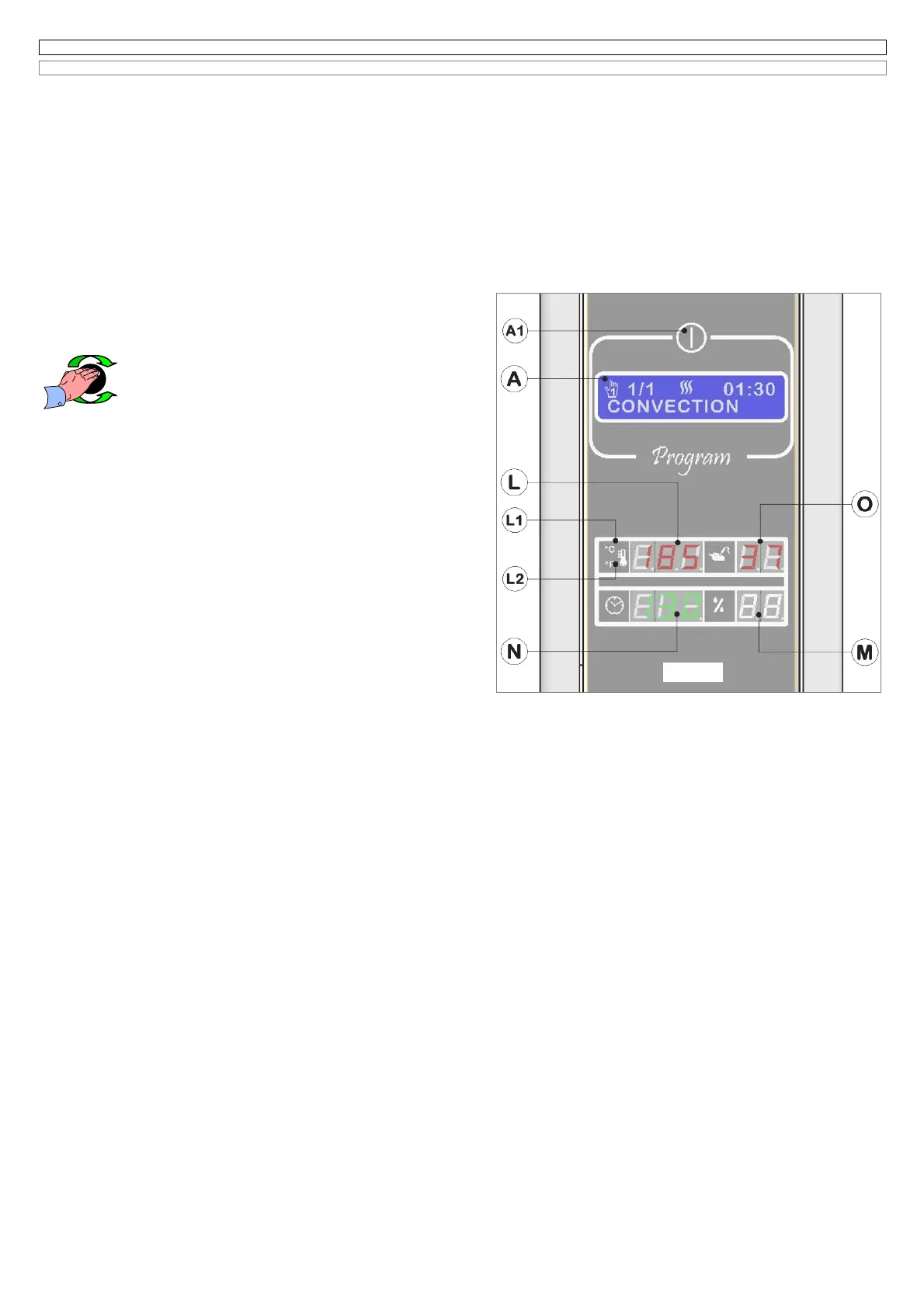
6.3 SETTING OF THE PHASE “CONVECTION” AND STARTING, IN THE MANUAL COOKING PROGRAM N°1
(Fig. 6.3 )
This program is manual and it is made up of 1 single phase, having the name corresponding to the convection mode with hot forced air.
By turning the encoder knob on the program 1, the electronic system will show:
1 on the LCD display (A)
the data relating to the last cooking
done using Program 1;
2 on the back lighted display (L)
the set temperature
for about 5 seconds, then the message
Go
before showing the real cooking chamber
temperature;
3 on the back lighted display (N)
the cooking time of the last convection cycle
done. If in the last cooking cycle the core probe has been used, the
display (N) will be switched off;
4 on the back lighted display (O)
the temperature selected for the core probe
, if in the last cooking cycle the core probe was used , vice versa the
display (O) will be switched off.
On the back lighted display (M) no value is shown, because during the convention cycle the humidification control cannot be used.
If the door of the oven is open on the display (N) you will see the message
oPn.
In case you want to choose a cooking program, maintaining the same values shown on the display, you just need to press the START/STOP button to
start the cycle.
6.3A Modification of the cooking chamber temperature
The value shown on the display (L) is that one of the cooking chamber
temperature and it can be selected between 20°C and 270°C; if you select low
speed of fan the maximum temperature will be instead 220°C.
To modify the value (L) please act as follows:
- press the encoder Knob (B);
*
the value will flash;
- select the new value, by turning the encoder knob (B), clockwise
to increase it and counter clockwise to decrease it.
Press the encoder knob to memorize the selected value and let the electronic
system move to the following programming of the temperature core probe on the
display (O).
6.3B Modification core probe temperature
This oven lets you check the core probe temperature, as an alternative to the
established cooking time. The value on the display (O) is the core probe
temperature, measured by the skewer and can be selected between 20°C and
99°C.
The electronic system shows always on the same display (O) the last selected
value of temperature: to increase it turn the encoder-knob clockwise and to
decrease it turn the encoder knob counter clockwise.
Press the encoder knob (B) to memorize the selected value (B), and wait until
the message
Go
will appear on the display (L); now you can press START to
start the cooking cycle.
After pressing the key START, that causes the beginning of the cycle, the
electronic system will show on the display (N) the time passed from the
beginning of the cooking cycle.
Select the symbol
- -
(2 Lines) on the display (O) if you don’t want to use the
core probe temperature, situated before the minimum value to select for this
date. Doing this, the core probe temperature is deactivated and the electronic system is ready for the next programming of the cooking time on the
display (N).
The key (S) of fig.6.1 allows an easy access to display and modify the value of the setted core temperature, with the same modalities as above
described, and also during the cooking cycle.
ATTENTION:
if the temperature is shown in °F degrees , you will see the value of the core probe on the display (N), the display (O) will be switched off;
to select a cooking cycle using time select and confirm the symbol - - - (3 lines) on the display (N), cooking time will be selected on the same display.
6.3C Activation of the function
Δ
t (Delta T)
So that while cooking large pieces of meat the loss of salts and vitamins is reduced, it’s very important to maintain a steady difference between the
cooking chamber temperature and that one in the core of the product.
This difference is called “
Delta T
”, shortly Δ
t.
The smaller this value is, the better the cooking results will be. This function allows a more delicate cooking process: the food is more tasty and the
weight loss is reduced.
If you have selected a cooking cycle with skewer, the electronic system proposes automatically on the display (A) the eventual choice of the function Δ
t
,
to confirm such function select the message SI with the encoder (B), the Δ
t
value will appear on the display (L) and can be modified and confirmed by
turning and pressing the encoder knob.
The electronic system allows the activation of the function Δ
t
also during a cooking cycle by using the button (H) of Fig.6.1, the relative back lighted led
turns on to show that the function
CORE PROBE +
Δ
t
is activated.
In case you have to execute a new programming of Δ
t
, the electronic system proposes and shows on the display (L) the last memorised value.
Δ
t
value can be modified only after you have activated a cooking cycle (see following paragraphs).
If you have selected the function Δ
t
, to cancel it press a second time the key (H) of Fig.6.1, for about 4”, the green led will turn off.
6.3D Modification of the cooking time
The electronic system of this oven lets you select a cooking time within the following parameters: from 1 minute up to 9 hours and 59 minutes, or without
any time limit. To select a new value turn the encoder knob (B) clockwise to increase it and counter clockwise to decrease it. Cooking without any time
limit is marked by the symbol (-:--) that appears on the display (N).
Then press the encoder to store the value and the electronic system waits for the START to begin the cooking cycle. The message
Go
will appear on
the display (L).
Attention:
After the cooking cycle has begun, it is always possible to modify at any time the values of the functions above mentioned.
ATTENTION:
During convection mode the function percentage of humidity is not available, the display (m) is always switched off.
* (Attention: for our simplicity this sentence will be used also in other paragraphs of this notice, “ click on the encoder (B)”)
Fig.6.3 uk


 To Next Page
 Loading...