Patient Warming System Instructions for Use 13
Inspiration Healthcare Limited © 2021 Inspiration Healthcare Limited
W inspiration-healthcare.com
700-307 Revision: 10
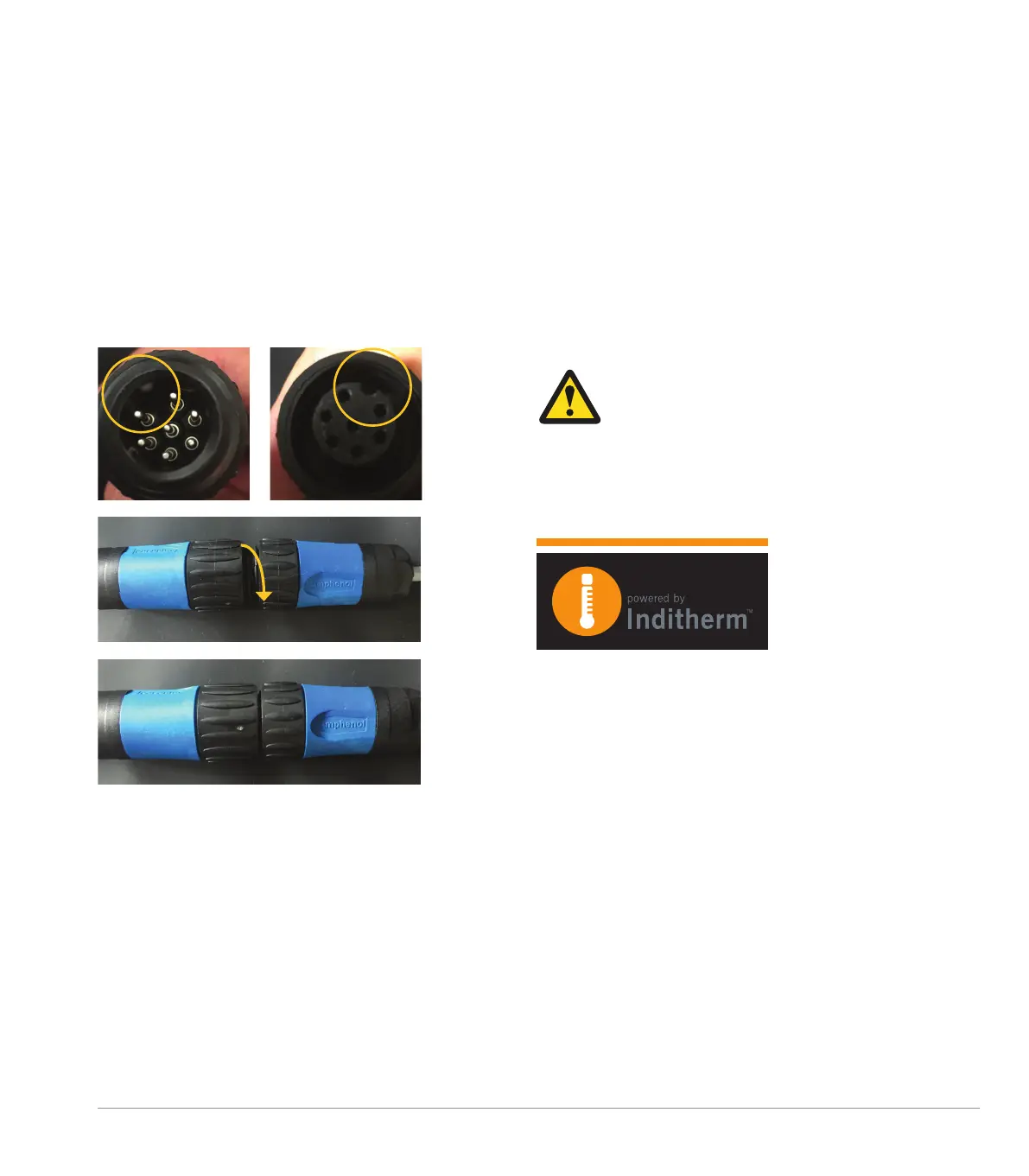
Amphenol Connector
The Amphenol connector at the opposite end of the
connection cable plugs into the connector fitted to the
mattress/blanket. Align the plug and socket then push
together and rotate the black collars clockwise to lock
the connection as shown below.
To disconnect, hold the connector locking rings, rotate
counter-clockwise and then pull them apart.
Patient Probe
The patient probe is connected with an ODU-style
connector to the blue connection on the right-
hand side of the AlphaCore
5
Controller This can
be connected and disconnected to the AlphaCore
5
Controller as described in ODU Connector
section above.
Warning: Clinical decisions should not be
made based on the patient temperature
probe reading of the AlphaCore
5
Controller
– it is for indication only.
Do not attempt to force the connectors and pay
attention to the orientation of the plugs for proper
connection.
The ODU-style connectors are all keyed (and colour
coded) so that only a mattress cable can be plugged
in to the mattress output; only the patient probe can
be connected to the patient probe input.


 To Next Page