IF1200A Pilot Operating Handbook Appendix
Compass Calibration: Mission Planner
In the next steps, you must lift the vehicle and turn it in various
orientations. The IF1200A, with batteries installed, weighs 35.9
lbs. If lifting the vehicle is not possible, perform the Large Vehicle
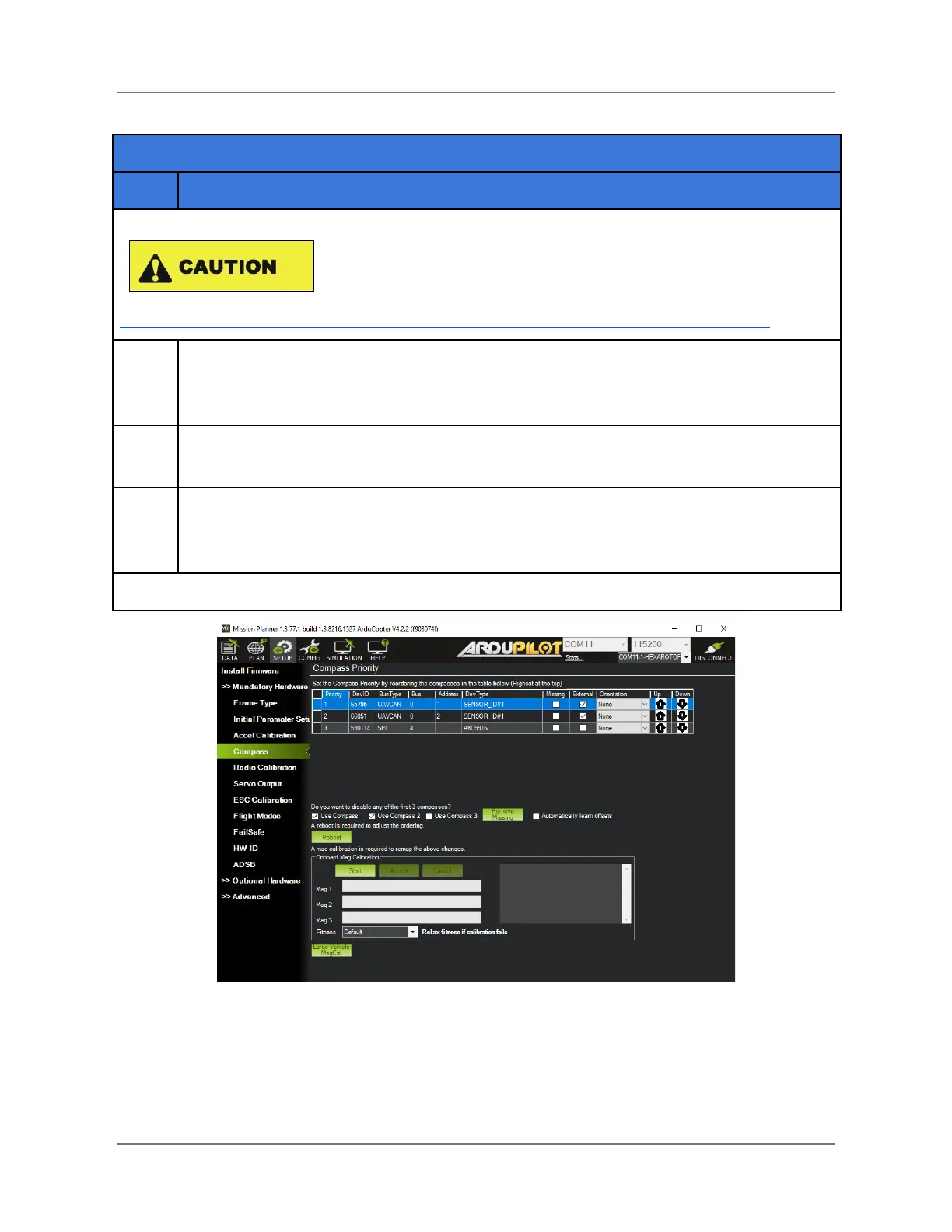
MagCal (see Figure 34 below) instead. Go to:
https://ardupilot.org/copter/docs/common-compass-calibration-in-mission-planner.html
In the Compass pane (see Figure 34), locate Onboard Mag Calibration near the
bottom. Select Start. The aircraft will emit a single tone followed by a short beep once
per second. This begins the calibration procedure.
While holding the vehicle in the air, orient the front down towards the earth. Rotate
yourself 360°, keeping the front of the vehicle pointed towards the ground.
Repeat the previous step for the remaining five sides: back, left, right, top and
bottom. While doing this, the progress bars below the Start button should fill in, left to
right.
Figure 34. Mission Planner: Start Compass Calibration
IFT Doc Num 102094, Rev 1.02 Page 73



 To Next Page