E
FUNCTION SETUP
Setting items Options
Sti
M
e
Adjusts picture resolution and
qua
it
in sti
mo
e.
A
*
Automatica
se
ects t
e
est reso
ution setting (“Frame” or “Fie
”)
ase
on the data characteristics of the pictures.
Fi
l
Stabilizes the pictures, although the picture qualit
ma
become coarse due
to the limited amount of data. Select “Field” when the
ictures are still
n
l
v
n if “A
” i
l
rame:
Displa
s relativel
motionless pictures in higher resolution. “Frame”
improves the picture qualit
, although it ma
unstabilize the pictures due to
alternate output of 2-field data.
V Act
ve Area
Sets the horizontal displa
area
or
interlace (480i) out
ut
Norma
Select this if the image is not stable with connecting to professional-use display.
Fu
*:
Select this for connecting to commonly-marketed display.
*) Settin
s with (*) are the default.
) Even if “HDMI Video Resolution” is set to “Source Direct”, HDMI video resolution will be changed when your TV is
ot compatible with the video resolution o
a disc material.
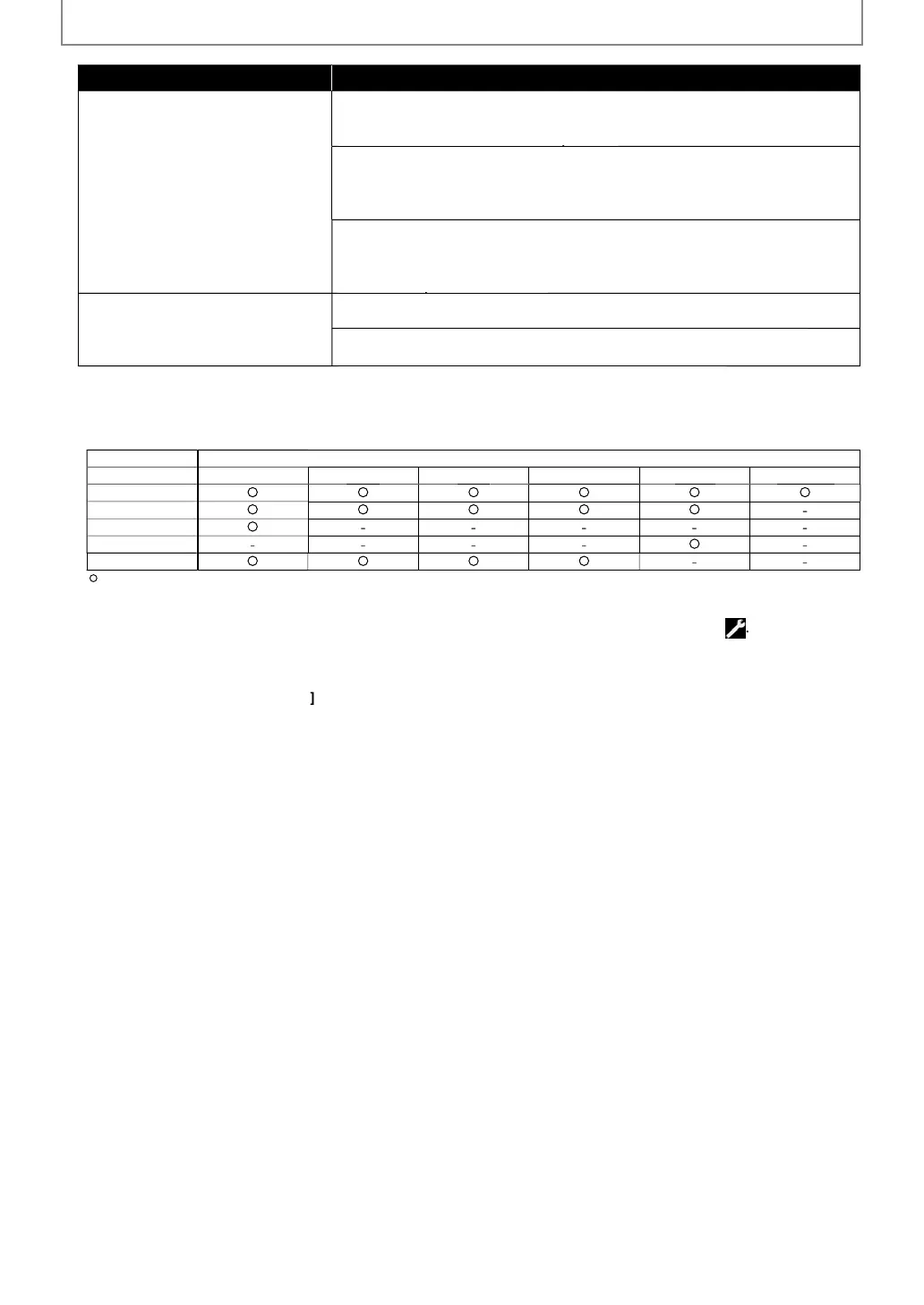
he table below describes the available output resolution when "HDMI Video Resolution" is set to "Source Direct".
i
4
1
i
BD-vi
e
AV
HD
DVD-vi
JPE
DLNA Vi
v
il
l
-
n
xi
) An individual picture on the TV screen is called “Frame”, which consists of two separate ima
es called “Field”.
Some pictures may be blurred at the auto setting in “Still Mode” setting due to their data characteristics.
“Quick” menu consists of the setting menus frequentl
used, and the
are accompanied with
Even if “HDMI Video Resolution” is set to “1080p24”, for the BD that is not recorded b
1080p24 frame or for DVD,
a video resolution supported b
the disc and the displa
device will be output instead of 1080p24 frame.
I
the picture is not output properly to the TV because o
“HDMI Video Resolution” or “Component Output”
setting, press an
o
P
ay
on the
ront panel
or more than 5 seconds. Both settings will be reset to the
e
ault automatically.
For “HDMI RGB Setting”, select “Enhanced” i
the black-white contrast is not clear. The setting is e
ective only
or
HDMI R
B output.
I
“Component Output” is set to “480i”, “16:9 Squeeze” in “TV Aspect” is not available.
I
HDMI is connected,
or video resolution
or the component output, you can only select video resolution that
urrently output
rom HDMI OUT jack or “480i”.
I
the video resolution
or the component output and HDMI video resolution do not match, the video resolution
or the component output will be switched to “480i”. VIDEO OUTPUT (COMPONENT) jacks ma
not output an
signa
s
epen
ing on t
e
isc materia
.
If you play back copy-protected DVD-video, 480p signal will be output from VIDEO OUTPUT (COMPONENT) jacks,
en “Component Output” setting is set to “720p” or “1080i”
The setting items which are not available with current situation o
this unit will be displa
ed in gra
and
ou
nn
l
h
i
m
Even i
“HDMI Select” is set to “YCbCr”, i
the displa
device does not support YCbCr, RGB will be output.
If “HDMI Video Resolution” is set to “Source Direct”, “1080p” or “1080p24”,
ou cannot set “Component Output”.
Th
l
d caption of the BD which is recorded b
1080p24 frame is not output from VIDEO OUTPUT (COMPONENT)
acks and VIDEO OUTPUT (VIDEO)
ack when "HDMI Video Resolution" is set to "Auto", "Source Direct" or "1080p24"
Ev
if the setting is set to "1080p24", the output will be 60Hz when
ou turn the unit on.
E5SF0UDDBS50.2ENv2.indd44E5SF0UDDBS50.2ENv2.indd44 2010/08/0515:17:232010/08/0515:17:23



 To Next Page