17
Front Panel
1
z
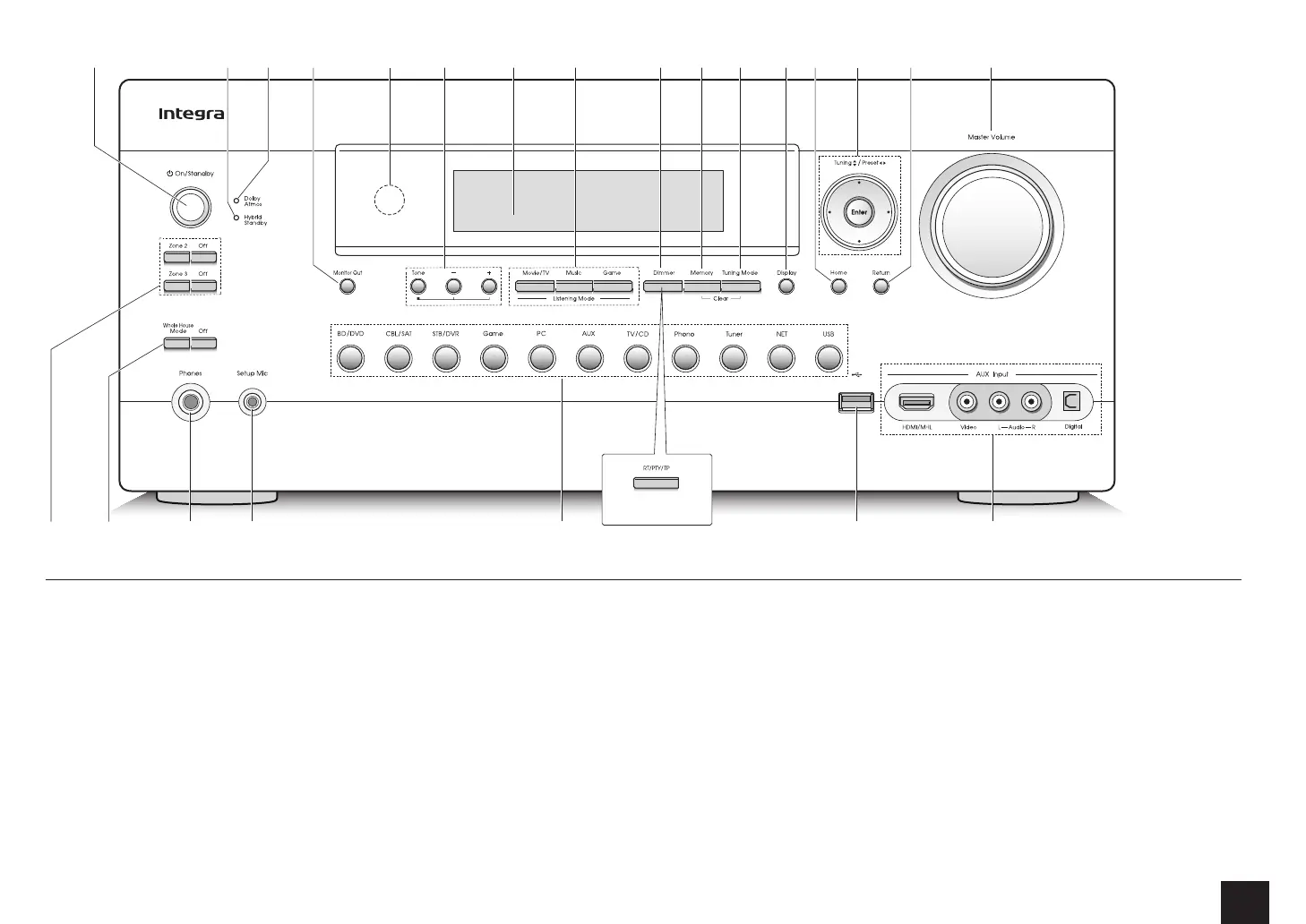
On/Standby button: Turns the unit on or into standby
mode.
2
Hybrid Standby indicator: Stays lit if the unit enters
standby when the HDMI Through and network standby
are enabled.
3
Dolby Atmos indicator: Stays lit when the Dolby Atmos
listening mode is selected with Height speakers or
surround back speakers enabled.
4
Monitor Out button: Allows you to select the HDMI jack
to output the video input signals that are input to the
unit.
5
Remote control sensor: Receives signals from the
remote controller.
6
Tone and Tone Level buttons: Adjusts the high tone
and low tone.
7
Display
8
Listening Mode buttons: Allows you to select the
listening mode.
9
Dimmer button (North American model): Switches the
brightness of the display.
RT/PTY/TP button (Australian and Asian models):
Can be used when receiving the station transmitting text
information.
F
Memory button: Registers or deletes a station.
G
Tuning Mode button: Switches the tuning mode.
H
Display button: Switches the information on the display.
I
Home button: Displays the Home menu.
J
Cursor buttons, Tuning
jl
button, Preset
dc
button and Enter button: Moves the cursor and
confirms the selection. When listening to AM/FM
broadcasting, tune into the station with Tuning
jl
or
select the registered station with Preset
dc
.
K
Return button: Returns the display to the previous
state.
L
Master Volume: Allows you to adjust the volume.
M
Zone 2 button, Zone 3 button and Off button:
Controls the multi-zone function.
N
Whole House Mode button and Off button: Controls
the WHOLE HOUSE MODE function to play the same
source in all the multi-zone connected rooms.
O
Phones jack: Stereo headphones with a standard plug
are connected.
P
Setup Mic jack: The supplied speaker setup
microphone is connected.
Q
Input selector buttons: Switches the input to be
played.
1 4 8 9 F H J2 5 7
M
K
L
Q SRON
3 G I6
P
(Australian and Asian
models)



 To Next Page