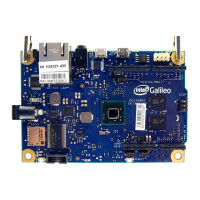
The Intel Galileo Board is a customer reference board (CRB) designed for makers and developers, based on the Intel Quark SoC X1000 application processor. This board is compatible with the Arduino Revision 1.0 pinout, allowing for easy integration with existing Arduino shields and sketches. The Galileo board is intended to provide a flexible and powerful platform for various projects, including those requiring WiFi connectivity, which necessitates booting from an SD card.
Function Description:
The Intel Galileo Board serves as a development platform for creating and prototyping electronic projects. It allows users to connect to a computer, install software, and upload "sketches" (programs) to control the board's functionalities. The board features a USB Client Port for programming and communication with a host computer, a USB Host Port for connecting peripherals, an Ethernet port for network connectivity, and I/O headers that are electrically and mechanically compatible with Arduino shields.
A key feature of the Galileo board is its ability to be programmed using a special version of the Arduino Integrated Development Environment (IDE). This IDE facilitates writing, compiling, and uploading code to the board. The board's firmware can be updated either automatically through the IDE or manually using specific image files. For advanced functionalities, particularly WiFi, the board is designed to boot from an SD card, which allows for a larger Linux image that includes drivers and additional software packages like ALSA, V4L2, Python, SSH, Node.js, and OpenCV. This SD card boot capability also enables persistent rootfs and a persistent /sketch folder, which are crucial for more complex applications.
The board includes a reset button for sketches and shields, and a separate reboot button specifically for the Intel Quark SoC, offering distinct control over the board's operation.
Important Technical Specifications:
- Processor: Intel Quark SoC X1000 application processor.
- Compatibility: Arduino Revision 1.0 pinout.
- Power Supply: Requires a 5V power supply with a cable. It is critical to use the provided power supply to avoid damaging the board. The green power LED (labelled PWR) indicates when the board is powered on.
- Connectivity:
- USB Client Port (Programming Port): Used for connecting to a PC for programming and serial communication.
- USB Host Port: Allows connection of USB peripherals.
- Ethernet Port: 10/100 LAN for network connectivity.
- SD Card Slot: For booting from an SD card, which is mandatory for WiFi functionality and enables a larger Linux image with additional software.
- I/O Headers: Digital (PWM) and Analog In pins, compatible with Arduino shields.
- ICSP Header: In-Circuit Serial Programming header.
- Firmware: The board's firmware can be updated, with specific versions tied to the Arduino IDE. SPI flash image capsule files are used for firmware updates.
- Operating Systems Supported for IDE: Windows, Linux, and Mac OS.
- Serial Communication: Uses a serial port (e.g., COMx on Windows, /dev/ttyACM0 on Linux, /dev/cu.usbmodemnnnnn on Mac OS) for communication with the host computer. Baud rate for serial console sessions is 115200.
Usage Features:
- Getting Started Guide: Provides a step-by-step process for connecting the board, installing software, and uploading a first sketch (e.g., the "Blink" example).
- Arduino IDE Integration: Utilizes a customized Arduino IDE for ease of programming. The IDE automatically installs Galileo software and drivers upon first compilation/installation of a sketch.
- Driver Installation: Detailed instructions are provided for installing necessary drivers on Windows, Linux, and Mac OS, including troubleshooting steps for common issues like missing
usbser.sys on Windows or ttyACM0 not being present on Linux.
- Firmware Update: The IDE includes a feature for automatically updating the board's firmware. Manual update procedures are also available for specific scenarios, involving copying capsule files to an SD card and using a serial console.
- SD Card Boot (Mandatory for WiFi): Users can boot the board from an SD card by copying specific
meta-clanton zip files to the card. This is essential for enabling WiFi and accessing a richer Linux environment with pre-installed software.
- Serial Console Access: For manual firmware updates and advanced debugging, a serial console session (e.g., PuTTY) can be established, requiring specific configuration for special characters.
- Community and Support: Intel provides links to support pages and online communities (e.g.,
communities.intel.com/community/makers, maker.intel.com) for additional resources and assistance.
- Sketch Upload: A simple "Upload" button in the IDE allows users to transfer their compiled programs to the board, with status messages indicating success or failure.
- Power-on Sequence: It is crucial to always connect the 5V power supply before any other connections (e.g., USB) to prevent damage.
Maintenance Features:
- Firmware Updates: Regular firmware updates are available through the IDE to ensure the board is running the latest software, addressing potential bugs and improving functionality. Users are advised to update firmware before downloading any sketches.
- Driver Management: Instructions for updating or reinstalling drivers are provided, particularly for Windows users encountering issues with "Gadget Serial V2.4" in Device Manager.
- SD Card Management: For SD card booting, users need to ensure the correct files are copied to the top level of the SD card, maintaining the specified directory structure.
- Troubleshooting: The guide includes notes and cautions for common issues, such as unzipping packages with long file paths, disabling modem manager on Linux, and handling Java errors on Ubuntu. It also advises consulting Release Notes for known issues and workarounds during firmware upgrades.
- Power Supply Caution: A strong warning is given regarding the use of the correct 5V power supply to prevent damage to the board, emphasizing a critical maintenance aspect.
- Clean IDE Installation: When updating the IDE, users are advised to uninstall previous versions first to avoid conflicts.
- File Permissions: For Linux users, appropriate file and directory access permissions are required for the Galileo software installation, sometimes necessitating running the IDE as root or using
sudo arduino.

 Need help?
 General




 To Next Page