Setting Region
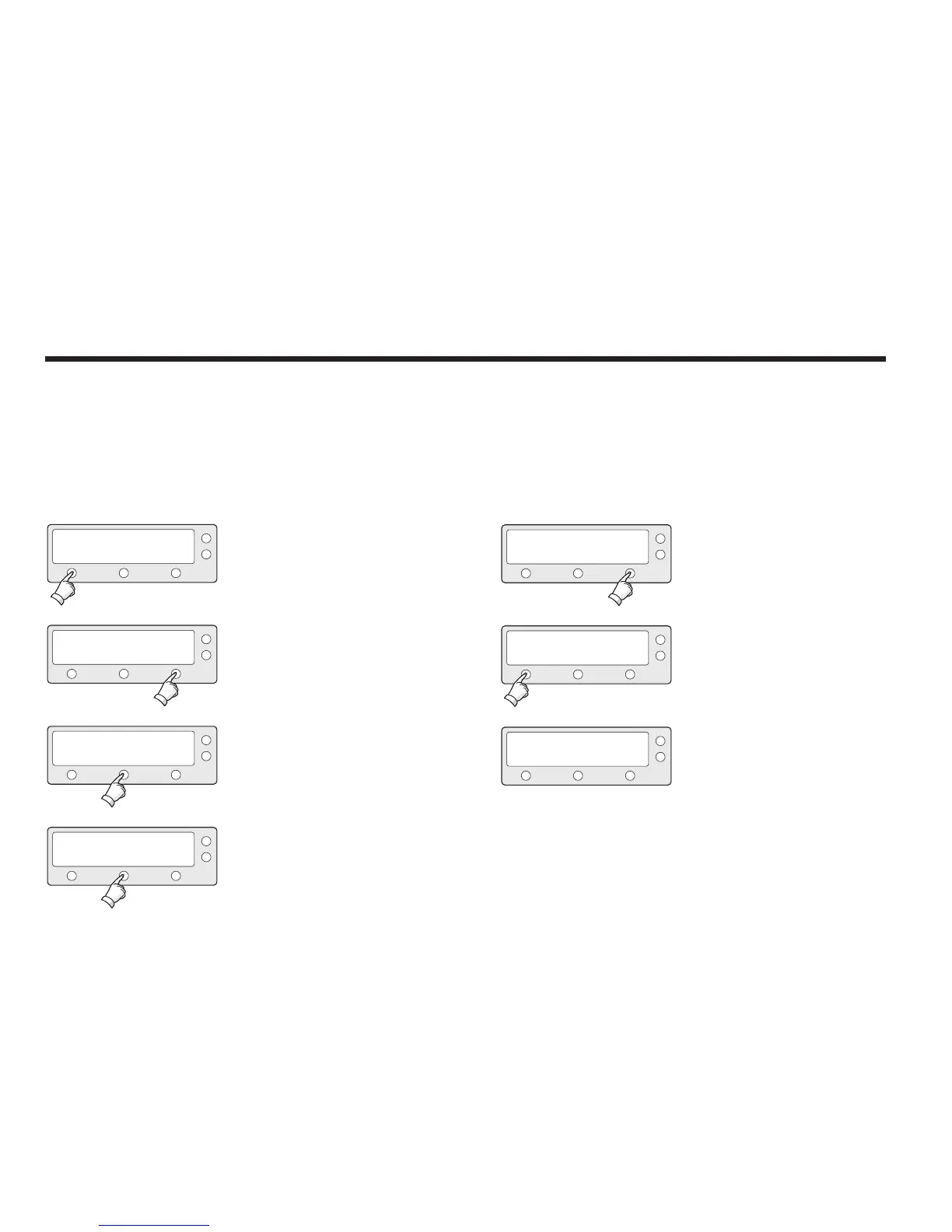
1. Press YES to enter setup mode.
2. Press NEXT thirteen times to enter load region
information mode.
3. Press YES to load region information.
4. Select the Continent*.
PREV - Shows previous continent.
SELECT - Set the displayed continent.
NEXT - Shows next continent.
SETUP MODE ?
SET SAT PAIR ?
LOAD REGION INFO ?
CONTINENT : N_AMERICA
YES
PREV
PREV
PREV
NO
NEXT
NEXT
NEXT
YES
YES
SELECT
X13
5. Select the Region*.
PREV - Shows previous region.
SELECT - Set the displayed region.
NEXT - Shows next region.
6. Press YES to load region information.
Press NO to cancel and return to main setup
mode.
7. After loading, auto restart.
REGION : LOS_ANGELES
LOAD ?
LOADING :
■ ■ ■ ■
PREV
YES
DO NOT TURN OFF!
NEXT
NO
SELECT
Continent*
N.AMERICA, S.AMERICA, EUROPE, ASIA.
Region*
NEW YORK, MIAMI, UK, JAPAN, and etc.



 To Next Page