Intergas Heating Ltd
33
10.1.4 Changing the settings of the various functions:
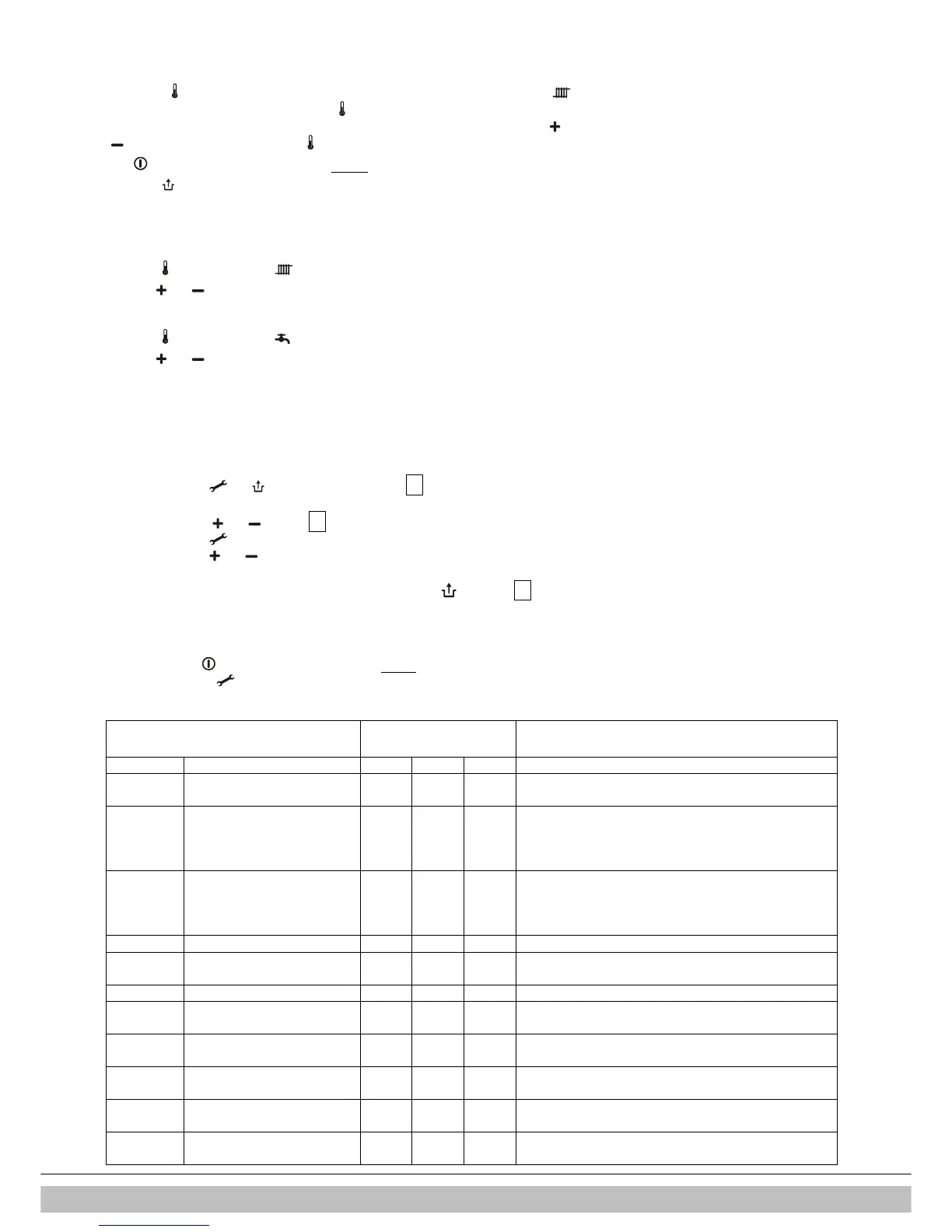
Holding the key pressed in for 2 seconds takes you to the user settings menu(LED at and
the figure display start to flash). Pressing the key repeatedly results in a different function LED
flashing each time. When the LED is flashing the indicated function can be set with the and
key . The value set is shown on the display.
The on/off key closes the settings menu without storing the changes.
The reset key closes the settings menu and the changes are stored.
If no key is pressed during a period of 30 seconds, the settings menu is closed automatically
and the changes are stored.
10.1.5 Maximum CH supply temperature
Press the key until the LED at starts to flash.
With the and key s set the temperature between 30°C and 90°C (default value 80°C).
10.1.6 DHW temperature
Press the key until the LED at starts to flash.
With the and keys set the temperature between 40°C and 65°C (default value 55°C).
10.2 Setting via the service code
The boiler controller in the appliance is factory set in accordance with the parameters.
These parameters can only be changed using the service code. Proceed as follows to activate
the program memory:
1. Press the and keys simultaneously until a 0 appears on the service- and main
display.
2. Using the and keys set 15
(service code) on the main display.
3. Using the key set the parameter to be set on the service display.
4. Using the and keys set the parameter to the desired value (visible) on the main
display.
5. Once all desired changes have been entered, press the key until a P appears on
the service display.
The boiler controller has now been reprogrammed.
•
Pressing the key in takes you out of the menu without storing the parameter changes.
•
By pressing the button over 5 seconds the default setting for the parameters will be restored. In the display “F-set” appears.
10.3 Parameters
Combi Compact ECO RF
Factory settings
Parameter 24 30 36
0 Service code [15] - - - Access to installer settings
The service code must be entered (= 15)
1 Installation type 0 0 0 0= Combi
1= Heating only + external DHW tank
2= DHW only (no heating system required)
3= Heating only
2 CH pump continuous 0 0 0 0= post purge period only
1= pump continuously active
2= pump continuously active with MIT switch
3= pump on with external switch
3 Maximum CH power set 60 60 60 Adjustment range of set value parameter c up to 85%
3. Max. power modulating pump
80 80 80 Adjustment range of set value parameter c. up to 99%
4 Maximum DHW power set 99 99 99 Adjustment range of set value parameter d up to 99%
5 Min. supply temperature of the
heat curve
25 25 25 Adjustment range 10°C to 25°C
5. Max. value flow temperature in
display (end user setting)
90 90 90 Adjustment range 30°C to 90°C
6 Min. outside temperature of the
heat curve
-7 -7 -7 Adjustment range -9°C to 10°C
7 Max. outside temperature of
the heat curve
25 25 25 Adjustment range 15°C to 30°C
8 CH pump post purge period
1 1 1 Adjustment range 0 to 15 minutes



 To Next Page