TruVision 11/31 Series IP Camera Configuration Manual 51
Admin: This is the system administrator. The administrator can configure all
settings. Only the administrator can create and delete user accounts. Admin
cannot be deleted.
Operator: This user can only change the configuration of his/her own
account. An operator cannot create or delete other users.
Viewer: This user has the permission to live view, play back and search logs.
However, Viewers cannot change any configuration settings.
Add and delete users
The administrator can create up to 15 users. Only the system administrator can
create or delete users.
To add a user:
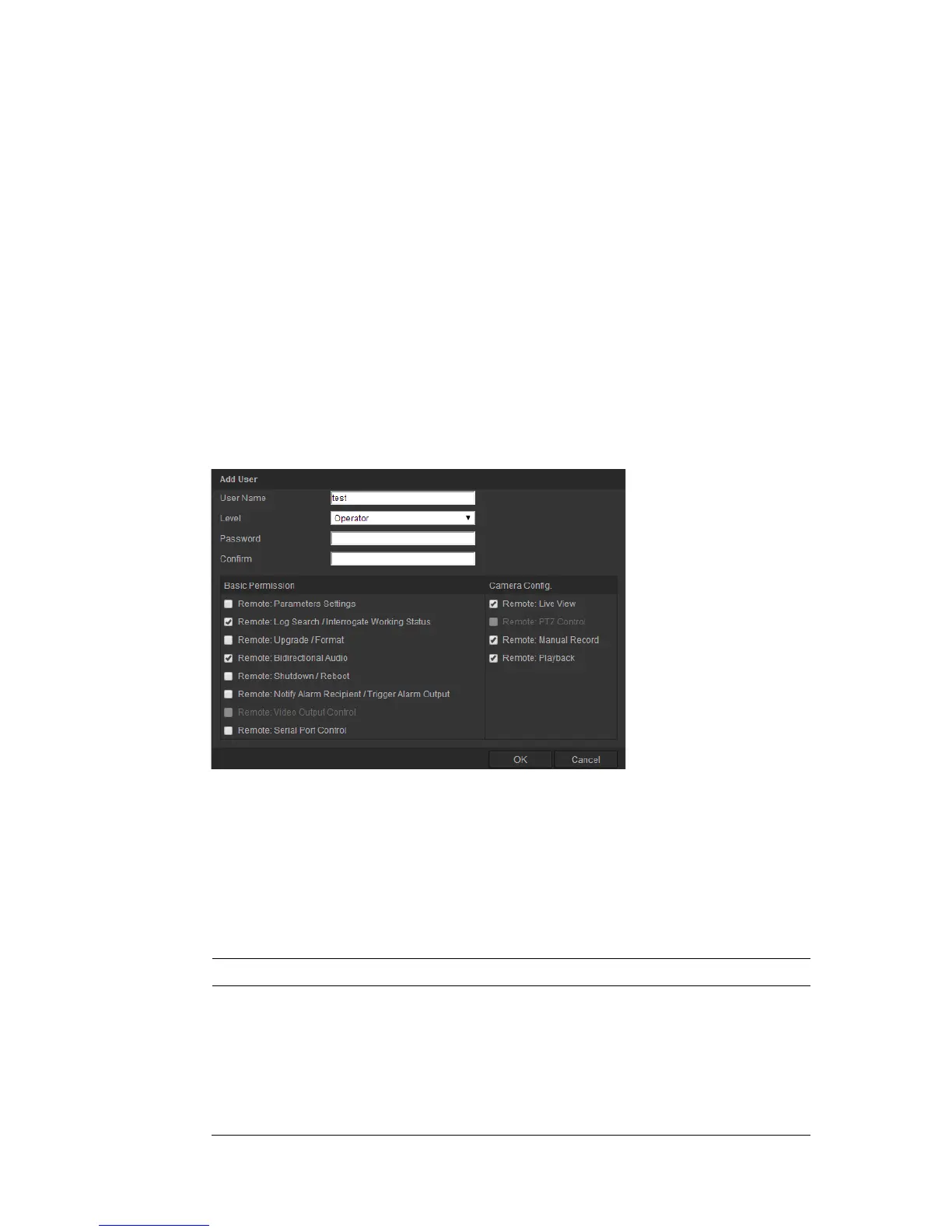
1. Click the User folder to open its window.
2. Select the Add button. The user management window appears.
3. Enter a user name. The name can have up to 16 alphanumeric characters.
4. Assign the user a password. Passwords can have up to 16 alphanumeric
characters.
5. Select the type of user from the drop-down list. The options are Viewer and
Operator.
6. Assign permissions to users. The options are:
Basic Permission Camera Configuration
Remote: Parameters Settings
Remote: Log Search/Interrogate Working
Status
Remote: Upgrade/Format
Remote: Bidirectional Audio
Remote: Shutdown / Reboot




 To Next Page