54 TruVision 11/31 Series IP Camera Configuration Manual
To define IP Address Filter:
1. Click Configuration > Security.
2. Select the IP Address Filter tab.
3. Check the checkbox of Enable IP Address Filter.
4. Select the type of IP Address Filter in the drop-down list, Forbidden and
Allowed are selectable.
5. Click Add to add an IP address.
6. Click Modify or Delete to modify or delete the selected IP address.
7. Click Clear to delete all the IP addrsses.
8. Click Save to save the changes.
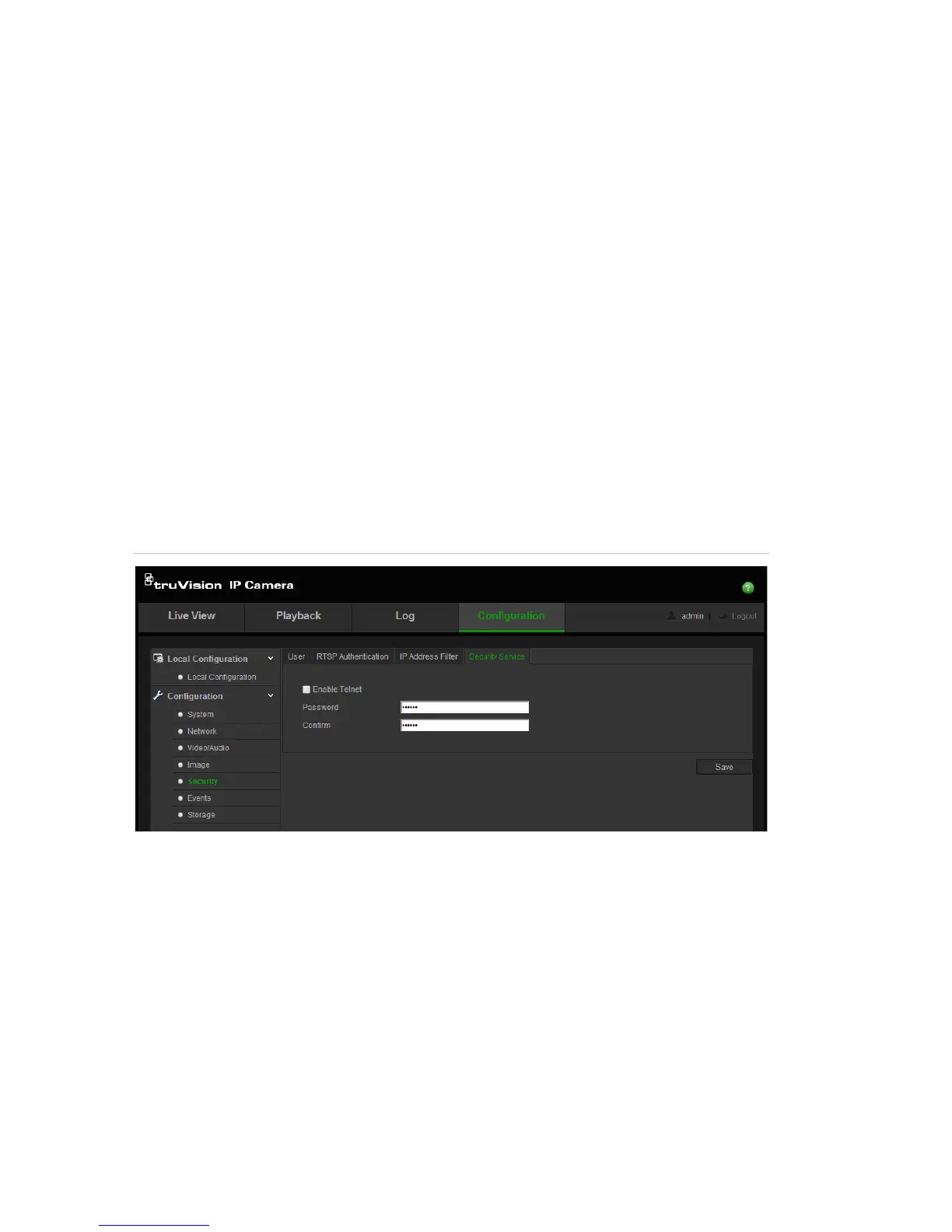
Defining the security service
This function enables Telnet and lets you define its password. It is only used by
Technical Support.
Figure 17: Enable Telnet window
To define Telnet:
1. Click Configuration > Security > Security Service.
2. Check the Enable Telnet checkbox.
3. Click Save to save the changes.
Note:
1. The Telnet user name is root as default and cannot be changed.
2. The default Telnet password is “ab12!”
3. The password should have least four characters with at least one letter and
one number.




 To Next Page