PLAYBACK MODE and CONNECTING TO AN HDTV
15
DUB
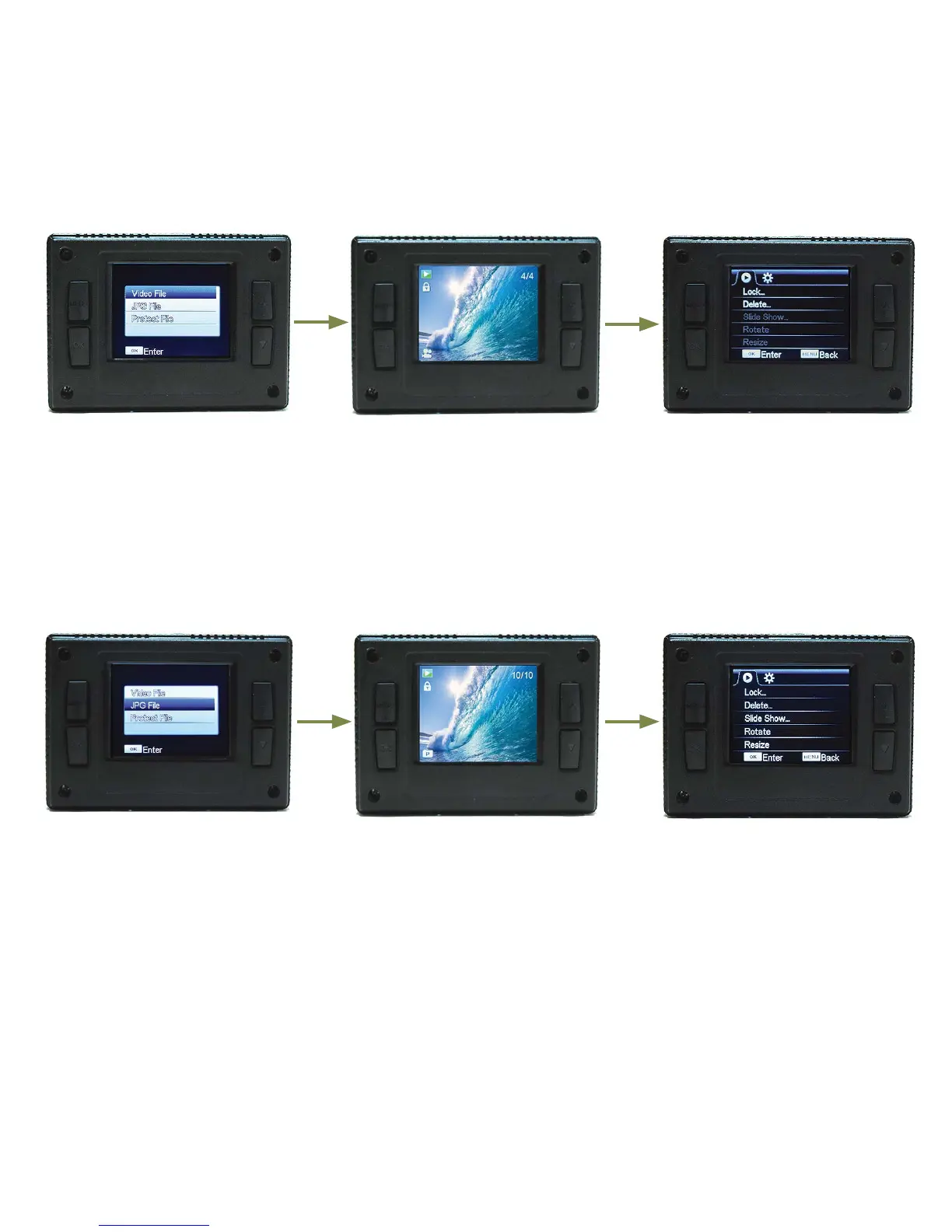
PLAYBACK MODE SCREEN
The DUB camera LCD displays the following information about functions and settings when in playback mode
and menu. Press MODE button while in Photo mode to go to Playback mode.
1. Playback mode choice screen.
With “Video File” highlighted in
blue, press OK button to access
video les. Press MODE button
to exit playback mode and go to
video recording mode.
2. Press UP or DOWN button to
scroll through les and press OK
button to begin video playback.
Press UP button to PAUSE video
and press UP button again to
resume. When done viewing,
press MODE button to go back
to playback choice screen.
3. While in le viewing screen,
press MENU button to access
video playback menu to either
lock le(s) or delete le(s). Any
le that is locked must rst be
unlocked in order to delete it.
To go back to le view screen
press MENU button.
4. Playback mode choice screen.
With “Photo File” highlighted in
blue, press OK button to access
photo les. Press MODE button
to exit playback mode and go to
video recording mode.
5. Press UP or DOWN button to
scroll through and view photo
les. Press OK button to begin
photo slide show. Press MENU
button to stop slideshow. When
done viewing, press the MODE
button to go back to playback
choice screen.
6. While in le viewing screen,
press MENU button to access
photo playback menu to lock
le(s), delete le(s), adjust the
slideshow, rotate photo, resize
photo. Any le that is locked
must rst be unlocked in order
to delete it. To go back to le
view screen press MENU button.
CONNECTING TO AN HDTVTO VIEW FILES
Connect the DUB camera to an HDTV with a mini HDMI cable (not included). Insert the mini HDMI plug into the
camera’s HDMI out port and the other end with the standard HDMI plug into the HDTV’s HDMI input port and go
to playback mode to view les. While the camera is plugged into the HDTV, the LCD screen on the back of the
camera will go blank. The HDTV can also be used for live view while in either video or photo mode. Videos can
be recorded and also photos can be taken using the HDTV for live view instead of the camera’s LCD.


 To Next Page