SECTION 4—FRONT RIGGINGS
Insignia
™
22 Part No. 1163197
Replacing Heel Loop
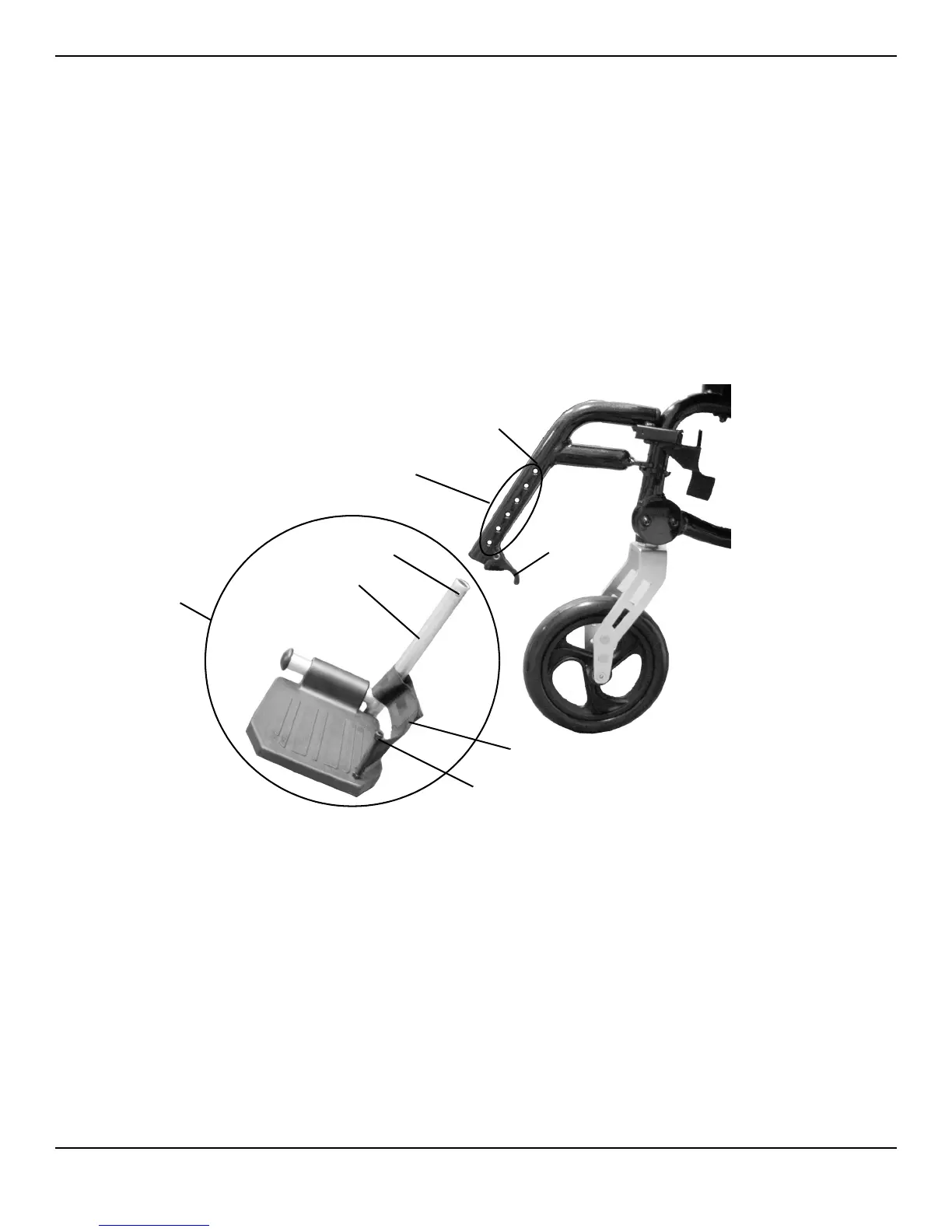
NOTE:Forthisprocedure,refertoFIGURE 4.4.
1. Pullthecamlockleverdowntothe unlockedposition.
2. Pushinthereleasebuttonsandremovethefootplateassemblyfromthefrontriggingsupport.
3. Removethemountingscrew,spacerandlocknutthatsecuretheheellooptothefootplate.
4. Removeexistingheelloopfromslide
tube.
5. Installnewheelloopontoslidetube.
6. Installthemountingscrew,spacerandlocknuttosecuretheheellooptothefootplate.Tightensecurely.
7. Inserttheslidetubeintothefrontriggingsupportandadjusttodesiredheight.
8. Ensurethatthereleasebuttonsfullyprotrudefromholesonbothsidesof
thefrontriggingsupport.
9. Rotatecamlockleveruptothelockedposition.
FIGURE 4.4 Replacing Heel Loop
Adjustment
Holes
Cam Lock
Lever
Footplate
Assembly
Release Button
Front Rigging
Support
Heel Loop
Slide Tube
Mounting Screw,
Spacer and Locknut







 To Next Page