SECTION 6—SEAT AND BACK
Insignia
™
28 Part No. 1163197
7. Removeseatcushion.
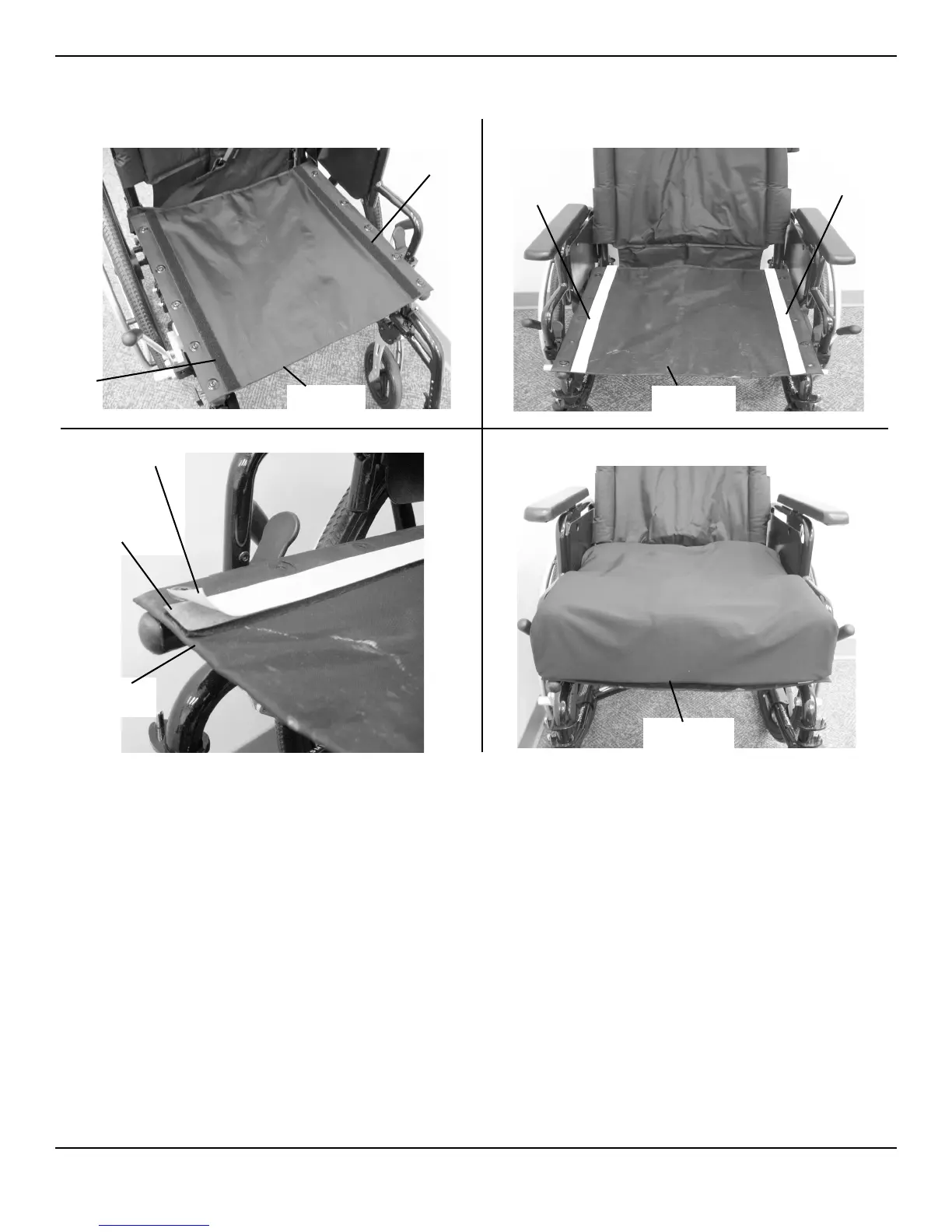
FIGURE 6.2 Removing/Installing the Seat Cushion
Removing/Installing the Back Upholstery
Removing
NOTE:Forthisprocedure,refertoFIGURE 6.3onpage29.
1. Removethetwomountingscrewsandwasherstha tsecurethe backupholsterytothebackcanes.
2. Removethetwoheightadjustmentknobsthatsecurebackcanetothewheelchairframe.
3. Pullthebackcanesoutofthewheelchairframe.
4. Pullthebackupholstery
downandoffthebackcanes.
Installing
1. Installbackupholsteryontothebackcanes.
2. Installbackcanesintowheelchairframe.
3. Securethebackcanestothewheelchairframewiththetwoadjustmentknobs.Tightensecurely.
4. Securethebackupholstery tothebackcaneswiththetwomountingscrewsandwashers.Tightensecurely.
DETAIL “A”
DETAIL “B”
Loop
Strip
Loop
Strip
Seat
Upholstery
HooK
Strip
HooK
Strip
Seat
Upholstery
DETAIL “C”
Backing
Adhesive
Seat
Upholstery
DETAIL “D”
Seat Cushion







 To Next Page