troubleshooting
7
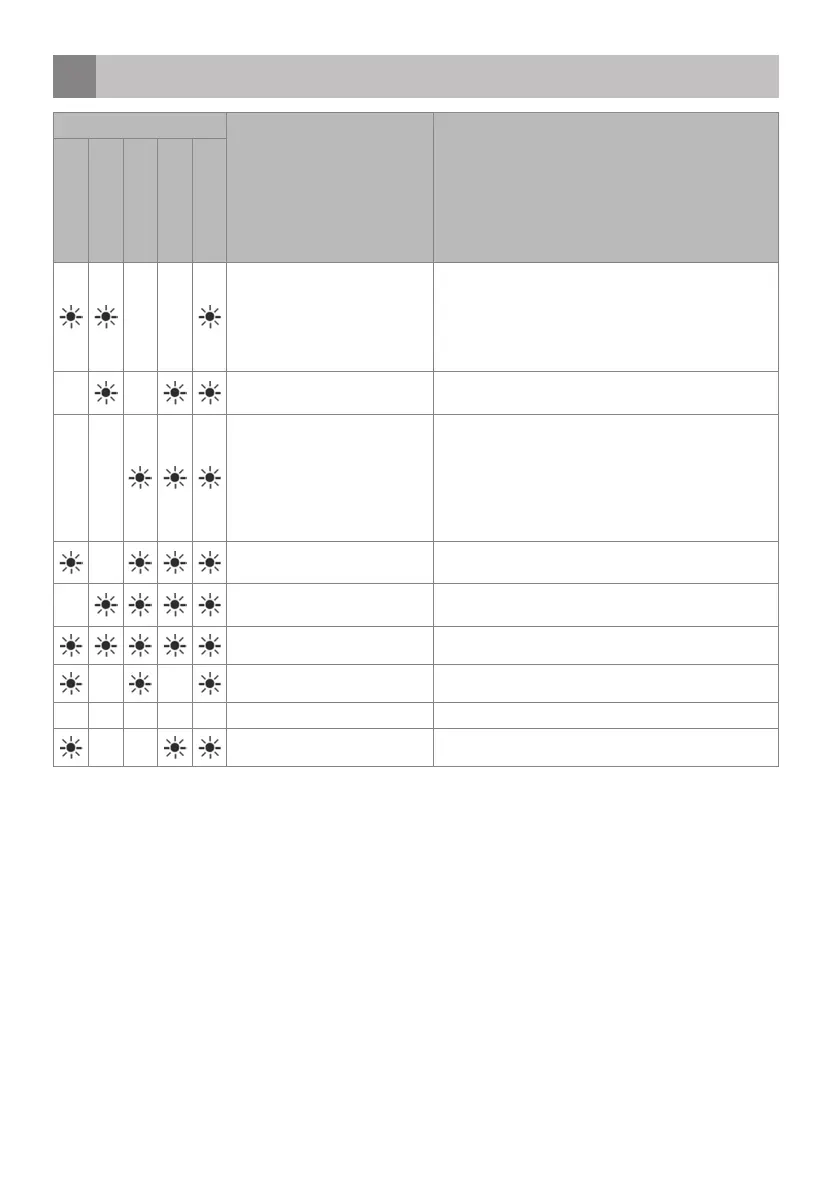
FAULTCODE DESCRIPTION CHECK
P1 - Intensive
P2 - Fast 50 min
P3 - Eco
P4 - Rinse
P5 - Pre-wash
Inadequate water supply • Check whether the tap is fully open and there is
nothing blocking the water mains.
• Close the tap, remove the input hose and check
whether it is clogged.
• Start the dishwasher again. Contact the service
department of Inventum when the error remains.
Water supply is not stopping. • Close the tap.
• Contact the service department of Inventum.
The waste water can not be
discharged.
• The water discharge hose is clogged.
• The filters might be clogged.
• Turn the dishwasher off. Reset the dishwasher’s
program and check the filters and the discharge hose.
Restart the dishwasher.
• Contact the service department of Inventum when the
error remains.
The water temperature is not
correct. Heating defect.
• Contact the service department of Inventum.
Safety is activated against water
overflow.
• Turn off the dishwasher and close the tap.
• Contact the service department of Inventum.
Faulty electronics. • Contact the service department of Inventum.
Overheating error. • Contact the service department of Inventum.
Position of the distributor error. • Contact the service department of Inventum.
Faulty heat sensor. • Contact the service department of Inventum.
English • 41
IVW6008A-instructions-1019.indd 41 25-10-2019 10:14:16


 To Next Page