26 | Optidrive CoolVert User Guide | Version 1.00 www.invertekdrives.com
4
Set-up and Operation
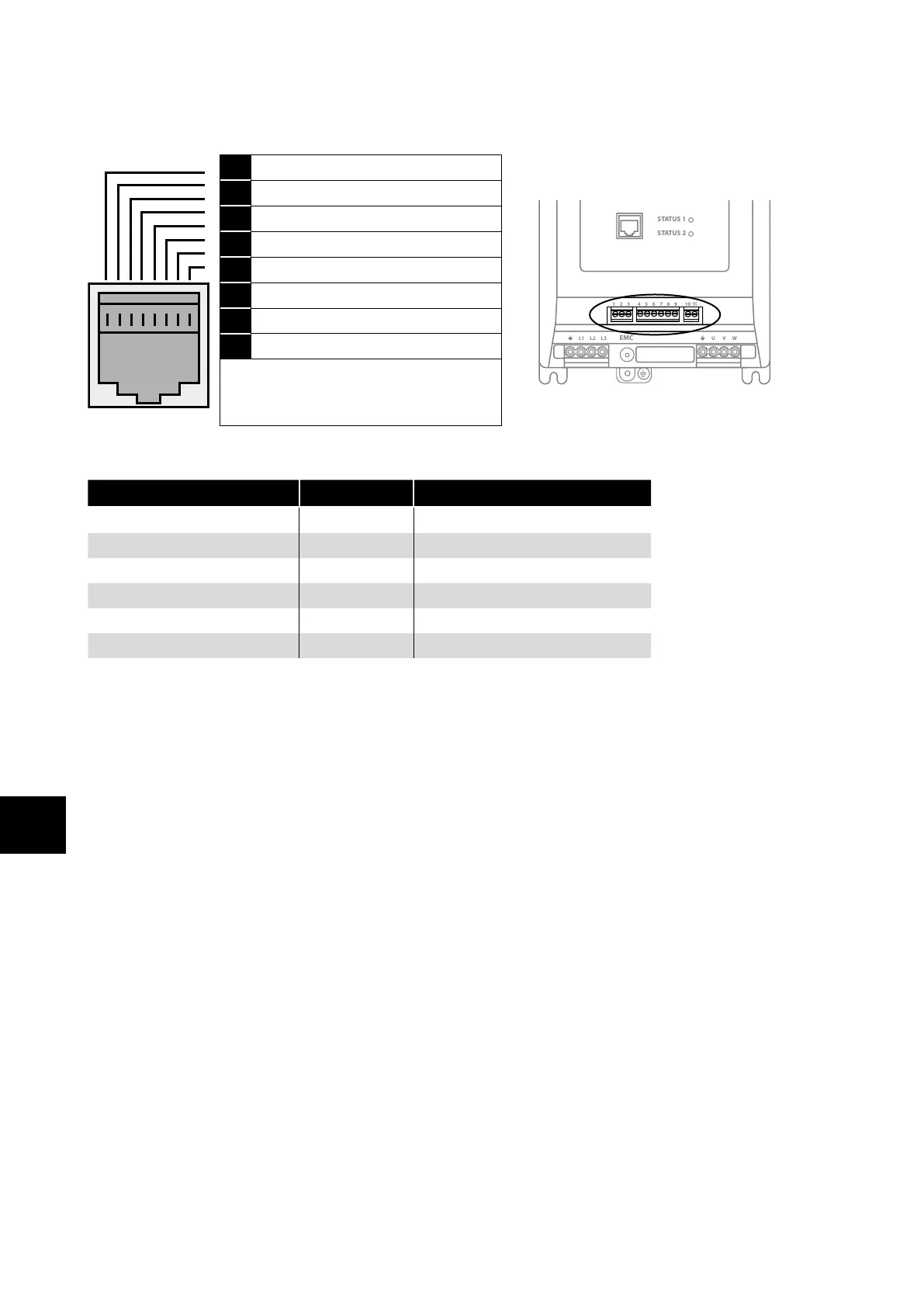
4.2.4. RS-485 Communications Electrical Connections via RJ45 Port
This port is intended for use with the Optistick Smart for parameter cloning or for connection to the mobile App or to PC Tools or for
Master Follower configuration of drives.
1 Not used
1 2 3 4 5 6 7 8 9
10
11
STATUS 1
STATUS 2
L1 L2 L3 U V WEMC
1 2 3 4 5 6 7 8 9
10
11
STATUS 1
STATUS 2
L1 L2 L3 U V WEMC
2 Not used
3 0 Volts
4 -RS485 (PC)
5 +RS485 (PC)
6 +24 Volt
7 RS 485- Modbus RTU / BACnet MSTP
8 RS 485+ Modbus RTU / BACnet MSTP
Warning:
This is not an Ethernet connection. Do not
connect directly to an Ethernet port.
The RJ45 port has some terminals that are internally connected in parallel with the pluggable control terminals as shown below:
Pluggable Control Terminal RJ45 Terminal Description
1 3 0 Volt Common
2 8 Modbus RTU TX/RX + (RS485)
3 7 Modbus RTU TX/RX - (RS485)
4 6 User +24 Volt (100mA Max)
- 5 PC-Tools TX/RX + (RS485 Optibus)
- 4 PC-Tools TX/RX - (RS485 Optibus)
4.2.5. Modbus Telegram Structure
The Optidrive Coolvert supports Master / Slave Modbus RTU communications, using the 03 Read Multiple Holding Registers and 06
Write Single Holding Register commands and 16 Write Multiple Holding Registers (Supported for registers 1 – 4 only). Many Master
devices treat the first Register address as Register 0; therefore it may be necessary to convert the Register Numbers detail in section
4.3. Read-only Parameter List and Modbus Registers on page 28 and section 4.4. Full Parameter List and Modbus Registers on
page 31 by subtracting 1 to obtain the correct Register address.


 To Next Page