ELECTRICAL CONNECTION
13
Pulsar extractor fan | Installation and operation instructions
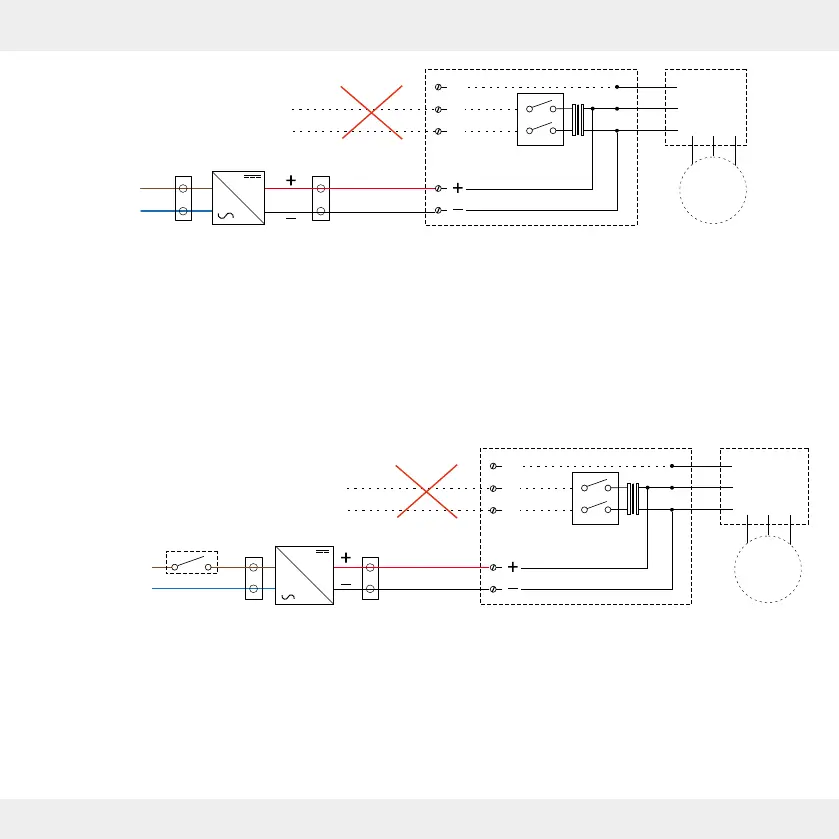
Figure 10: Wiring diagram for NT16 ush-mounted power supply unit and Pulsar extractor fan 12 V DC (sensor-cont-
rolled and use as overow fan)
Switch-controlled, without run-on function:
• Setting must be selected via the inVENTer Mobile
App.
• The Pulsar is switched on and o via a manual
external switch S.
• The sensors are deactivated.
Usage as overow fan:
• Setting must be selected via the inVENTer Mobile
App.
• Suitable for ventilating adjacent rooms.
Switch controlled functions
• The extractor fan is switched on and o based on tempe-
rature; the light and humidity sensors are inactive.
AC 230 V
DC 12 V
S1
M
T
L
N
AC 230 V
L
N
DC
AC
Figure 11: Wiring diagram for NT16 ush-mounted power supply unit and Pulsar extractor fan DC 12 V (switch-controlled)
AC 230 V
DC 12 V
S1
M
T
L
N
S
AC 230 V
L
N
DC
AC


 To Next Page