INSTALLATION
16
Pulsar extractor fan | Installation and operation instructions
5.3 Insert and connect the Pulsar
Screwdriver, drill, dowels, screws, spirit level, stripping tool
Requirements:
• The wall sleeve is mounted. styrofoam discs have been removed.
• The connection cable (AC 230 V, 50 Hz/ DC 12 V) has been laid.
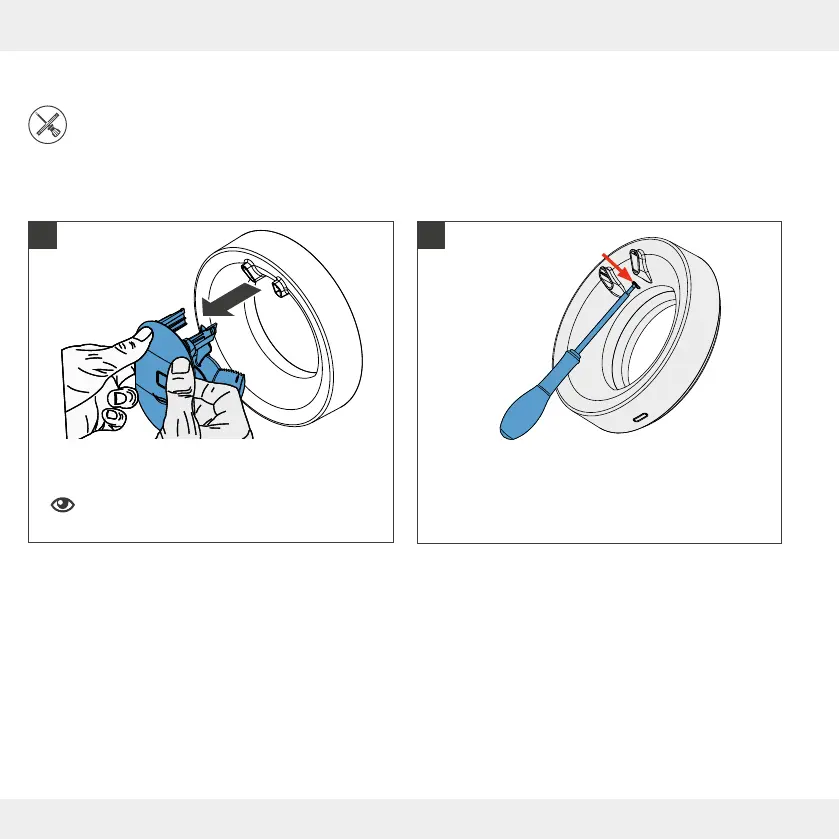
► Reach behind the fan unit with both hands.
► Pull the fan unit forward off the fan housing.
Hold the fan unit rmly so that it does not fall to
the oor when it is removed.
► Use a screwdriver to press in the lock button (red
arrow) on the fan casing.
► Loosen the cover of the fan housing.
!
1 2


 To Next Page