INSTALLATION
20
Pulsar extractor fan | Installation and operation instructions
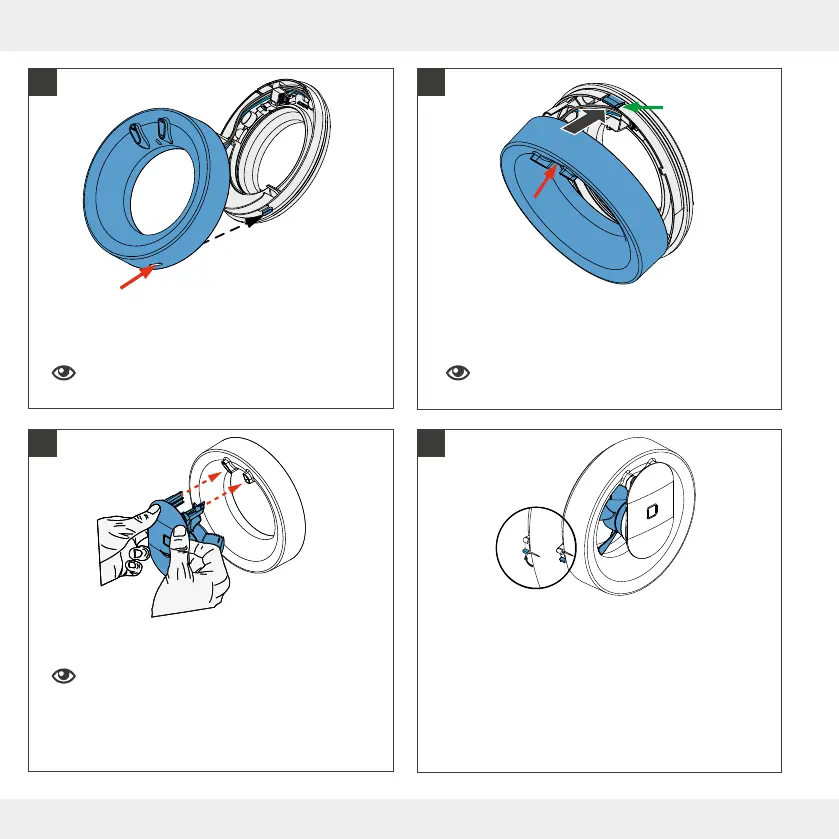
► Carefully insert the fan unit into the guides (red
arrows) on the fan housing.
Do not tilt the fan unit when inserting it so as
not to damage the contacts.
An audible click conrms that the fan unit is correctly
inserted.
► Press the cover of the fan housing in the upper area
onto the holder (green arrow) on the base plate of the
fan housing.
The locking button (red arrow) audibly engages
between the guides.
► Engage the hook on the lower side of the base plate
in the hole (red arrow) on the lower side of the fan
housing cover.
The guides for the fan unit are located in the
upper area.
► Make sure that the fan can rotate freely before you
switch it on.
► Switch on the power supply.
• DC 12 V: When the power supply is switched on, the
fan runs (with switch control, the external switch is
used to switch on and o).
• AC 230 V: Switch on the Pulsar. The switch is loca-
ted on the left side of the housing. Push it upwards
to position 1.
0
1
0
1
AC 230 V
! !
!
12 13
14 15


 To Next Page