INSTALLATION
19
Pulsar extractor fan | Installation and operation instructions
The Pulsar extractor fan is inserted and connected.
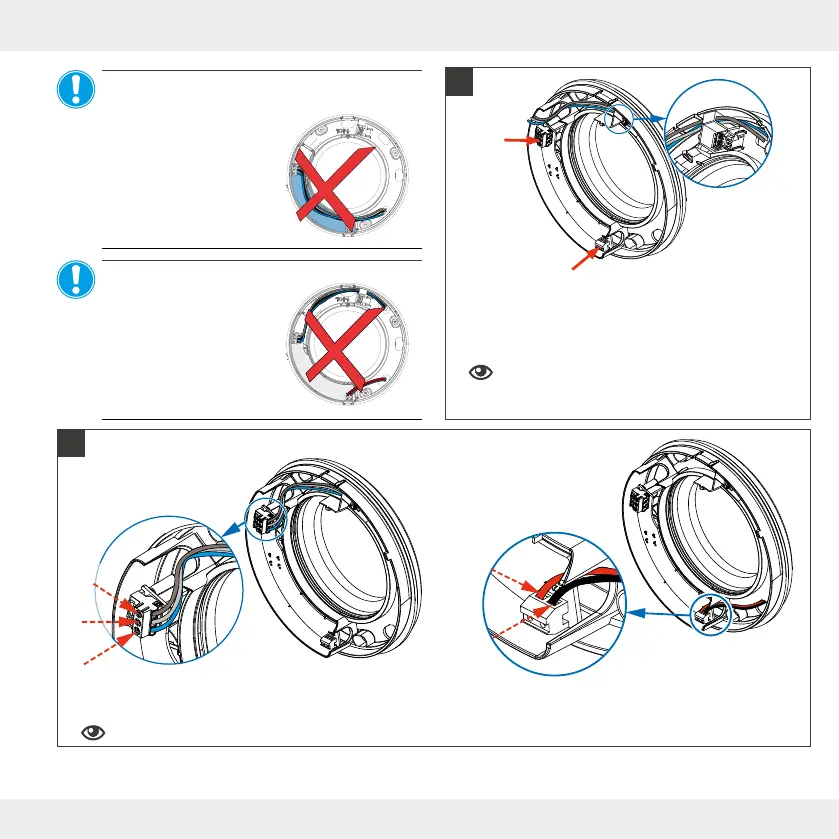
► Attach the shortened connection cable, according to the connection diagram, in the connection terminal of the base plate.
4: Terminal assignment, connection diagrams.
► Shorten the connection cable so that you can reach
the connection terminal (red arrows).
AC 230 V: 3-pole Connection Terminal
DC 12 V: 2-pole Connection Terminal
Route the connection cable through the cable
gland in the upper area to ensure correct instal-
lation of the fan unit.
NOTICE: Laying the mains connection cable
over the cover of the circuit board
will damage the circuit
board and impair the func-
tion of the Pulsar!
• Do not lay mains cable
AC 230V over the circuit
board.
AC 230 V
DC 12 V
NOTICE: If 230 V AC and 12 V DC are
connected at the same
time the Pulsar extractor
fan will be damaged!
• Never connect the
Pulsar to 230V AC and
DC 12V simultane-
ously.
AC 230 V
T (Ls)
N
L
DC 12 V
+
−
10
!
11
!


 To Next Page