6 7
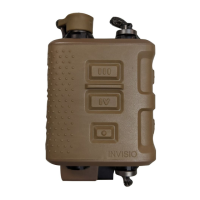
INVISIO V60
Communication and Hearing Protection system enabling
hearing protection with ambient hear-thru and the ability to
control three communication devices simultaneously. Hear-thru
volume can be adjusted. The system is designed to meet or
exceed military specifications.
Getting Started
1. Connect headset & radio(s)
2. Turn on radio(s) - hear-thru starts automatically
3. Key PTT to transmit on radio
Start-up takes less than 2 seconds and there is an audio tone.
When using an INVISIO headset with hear-thru capabilities,
hear-thru starts automatically. To turn the hear-thru o, see
section on hear-thru control.
Turn Off
To turn o the V60 disconnect the radio cable(s) or turn the
radio o.
Overview Getting Started
PTT 3
Mode Button
PTT 4
PTT 1
PTT 2
COM 1
COM 3
COM 2
Headset
Caution
• Avoid acoustic feedback by turning the V60 o during
headset fitting.
• High sound pressure levels may damage hearing.
Ensure radio volume is low at start-up.


 To Next Page