10 11
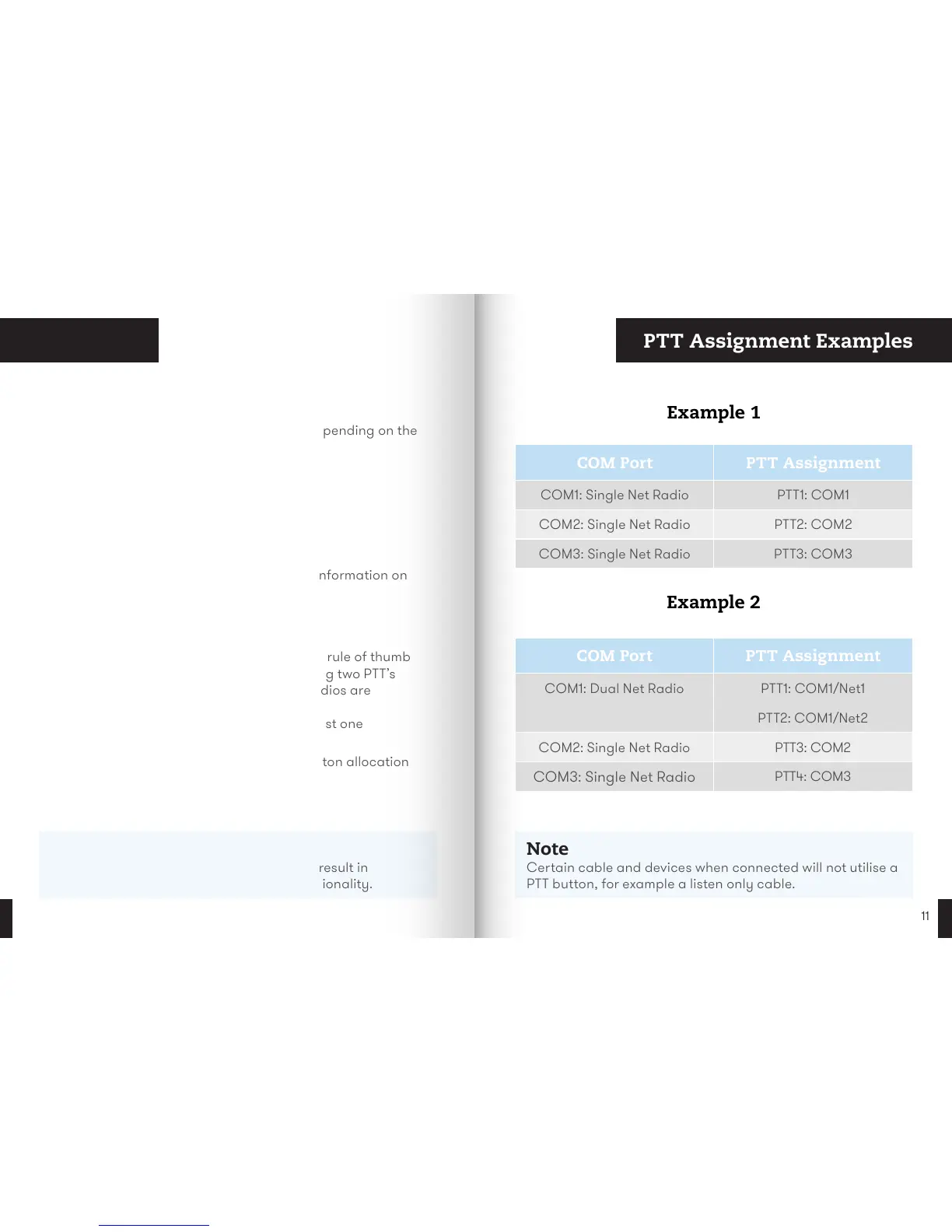
Transmit PTT Assignment Examples
Note
Dierent configurations of V60 cables can result in
unassigned PTT buttons and dierent functionality.
Transmit Modes
The V60 has dierent ways of transmitting depending on the
device and cables used. Examples include:
• Push-To-Talk (PTT) (e.g. 2-Way Radio)
• Latching (Mute) (e.g. Intercom System)
• Open Mic (e.g. Intercom System)
• Call Answering (e.g. Mobile Phone)
• Listen Only (e.g. Minesweeper)
Please consult your representative for more information on
your system setup.
PTT Assignment
PTT buttons are dynamically assigned, with a rule of thumb
being PTT1 to COM1 and PTT2 to COM2. Keying two PTT’s
simultaneously is possible. When multi-net radios are
connected the following rules apply:
• Every connected device is allocated at least one
PTT button.
• Priority is COM1 through to COM3 for button allocation
when multi-net radios are connected.
Note
Certain cable and devices when connected will not utilise a
PTT button, for example a listen only cable.
COM Port PTT Assignment
COM1: Single Net Radio PTT1: COM1
COM2: Single Net Radio PTT2: COM2
COM3: Single Net Radio PTT3: COM3
COM Port PTT Assignment
COM1: Dual Net Radio PTT1: COM1/Net1
PTT2: COM1/Net2
COM2: Single Net Radio PTT3: COM2
COM3: Single Net Radio
PTT4: COM3
Example 1
Example 2


 To Next Page