ION Audio Block Rocker
®
User Guide 14
U
sing the Radio
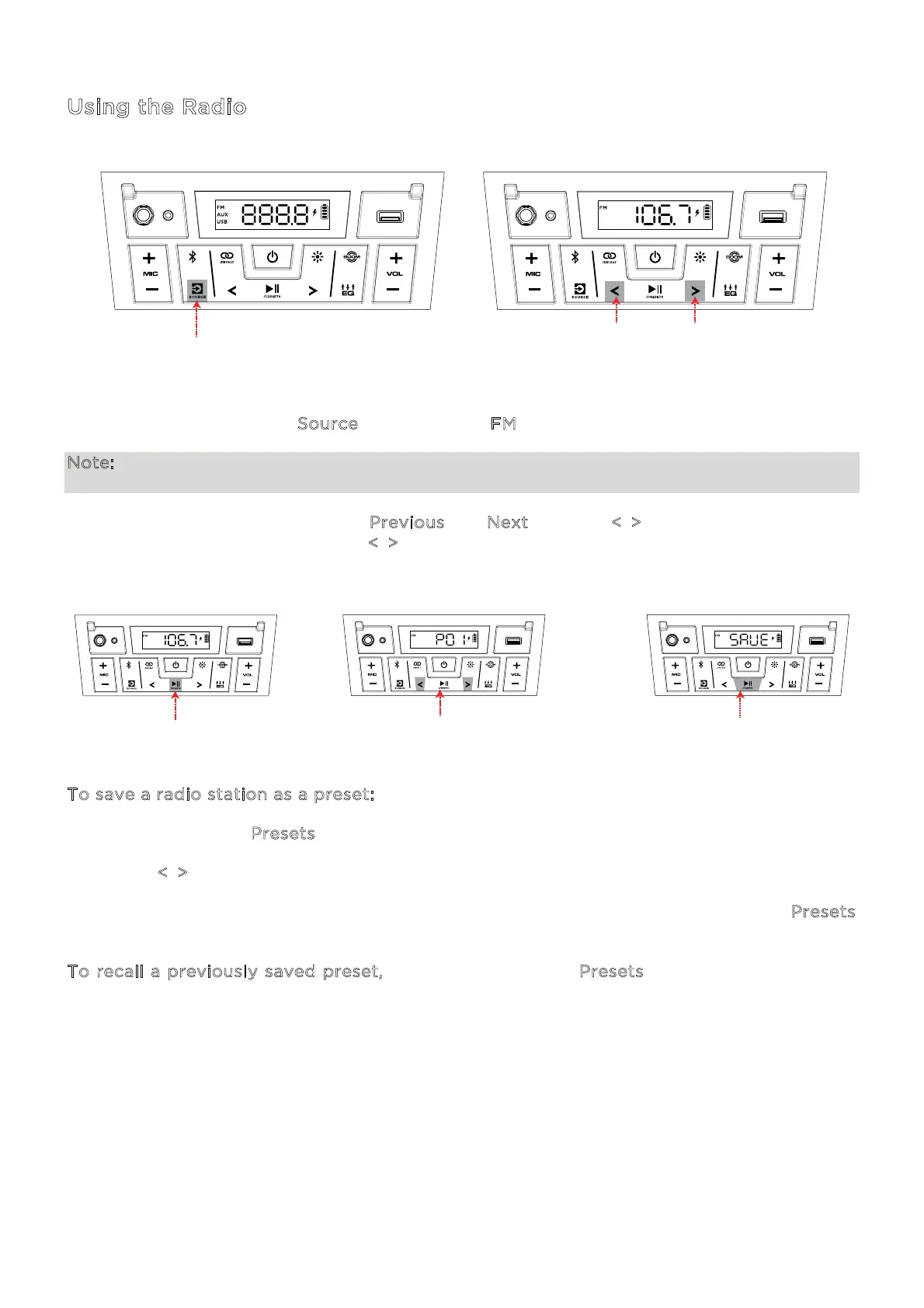
To use the radio, press the S
ource button so that FM is selected and shown on the display.
Note: Pause playback from or disable Bluetooth entirely before using the radio to prevent
both audio signals from being active at the same time.
While in FM mode, briefly press the P
revious and Next buttons (</>) to move to the previous
or next station. Press and hold the <
/> buttons to seek for the next strongest station in that
direction.
T
o save a radio station as a preset:
1. Press and hold the P
resets button.
2. Use the <
/> buttons to select a preset number, 1–12, shown on the display.
3. When you have selected the desired preset number, quickly press and release the P
resets
button again to save it.
T
o recall a previously saved preset, press and release the Presets button to cycle through
the saved presets.
PRESS
(FM, O)
PRESS - Previous / Next Station
HOLD - Seek
1 - HOLD
2 - PRESS - Select Preset Number
3 - PRESS - Save Preset




 To Next Page