ION Audio Uber™
Boom User Guide 10
Stereo-Link
TM
: Syncing Between Two Speakers
T
o sync audio between two Uber
TM
Boom speakers:
Note: When you begin the Stereo-Link
TM
process, any connected Bluetooth devices will be
automatically disconnected. You can also disconnect your device prior to beginning by
double-pressing the Bluetooth button.
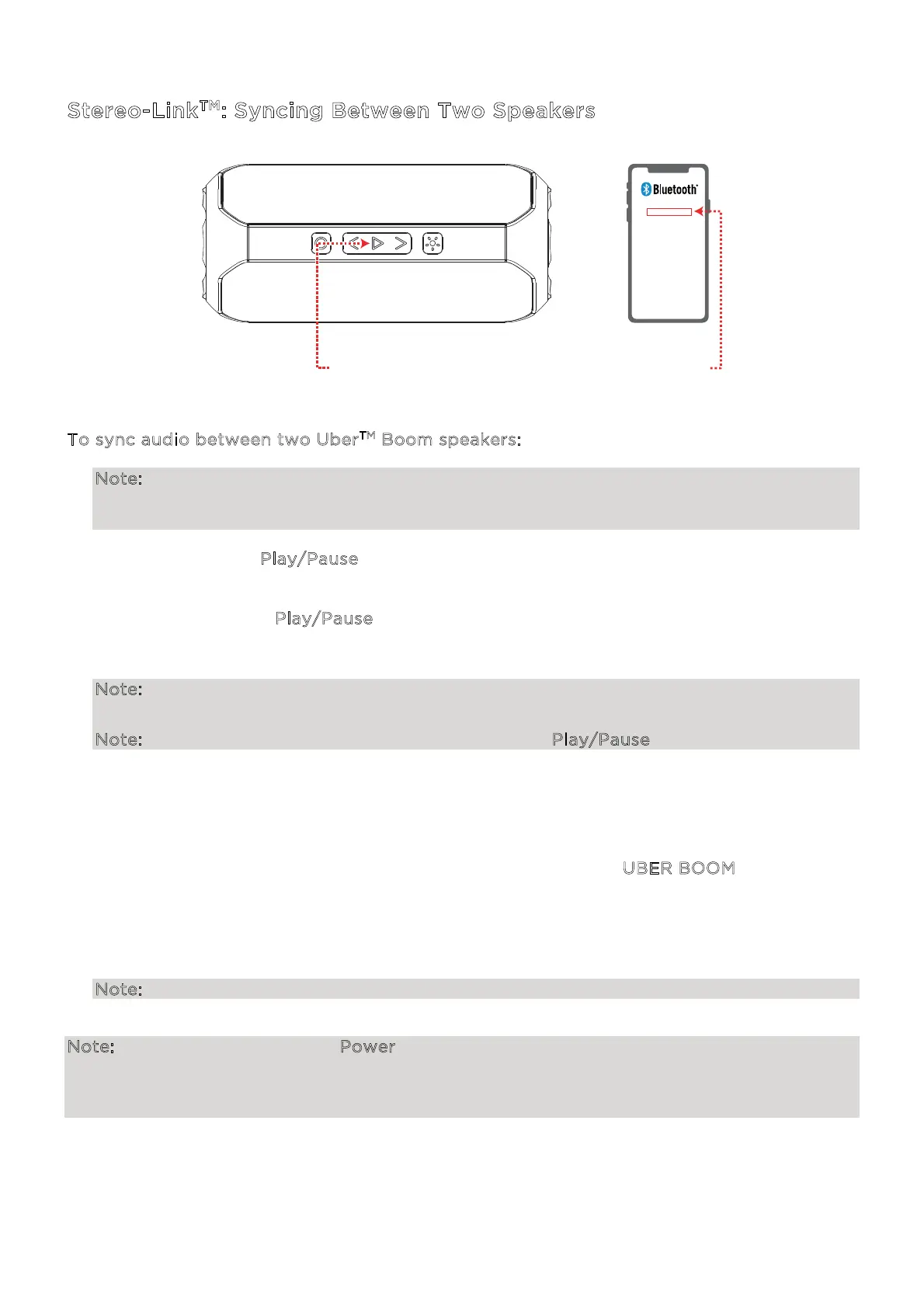
1. Press and hold the P
lay/Pause button for two seconds on the first Uber
TM
Boom speaker.
If voice prompts are enabled, you will hear “Stereo-Link Mode.”
2. Press and hold the P
lay/Pause button for two seconds on the second Uber
TM
Boom
speaker. The blue lights on the speakers will begin rotating while attempting to link. Please
allow 10 to 30 seconds for the speakers to link.
Note: Speakers should be within 50’ (15 m) of each other to properly link. The closer the
speakers are, the faster they will link.
Note: To exit Stereo-Link
TM
mode, press and hold the Play/Pause button again.
Once the speakers are linked, you will hear “Speaker Paired” if voice prompts are enabled.
3. The lights on the primary speaker will rotate clockwise to indicate it is ready to pair to a
Bluetooth device. The lights on the secondary speaker will be lit solid.
4. Navigate to your device's Bluetooth settings menu and select U
BER BOOM to connect.
When the connection is successful, you will hear "Bluetooth Connected" from the primary
speaker (if voice prompts are enabled). When Bluetooth audio playback begins, you should
hear it through both speakers. The primary speaker will play the left channel while the
secondary speaker plays the right channel. Playback controls are active on both speakers.
Note: Aux and SD modes will be disabled when Stereo-Link
TM
is active.
Note: Pressing and holding the Power button on the primary speaker while in Stereo-Link
TM
mode will power o all connected speakers. Uber
TM
Boom speakers powered o in Stereo-
Link
TM
mode will automatically enter Stereo-Link
TM
mode the next time they are powered on
and begin searching for secondary speakers to connect to.
UBER
TM
BOOM
2 - CONNECT
1 - PRESS & HOLD
(Speakers 1 & 2)


 To Next Page