18
STEP 5. Balance the Payload
After attaching the scope and accessories, the mount head assembly must be balanced in both
R.A. and DEC axes to ensure minimum stresses on the mount driving mechanism.
CAUTION: The telescope may swing freely when the R.A. or DEC during the balancing process.
Always hold on to the mount and/or telescope assembly before releasing the Axle Locking
Knob and/or Gear Switches to prevent it from swinging, which can cause personal injury and/or
equipment damage.
With the corresponding Gear Switch disengaged, balance in DEC axis by moving the scope with
accessories back and forth in the mount saddle. Balance the assembly in R.A. axis by moving CW
along its shaft.
Only balance one axis at a time and start with the DEC axis first. Double check the mount to
make sure both the RA and DEC axes are balanced.
Return the mount to the Zero Position after balancing; i.e., the CW shaft points to ground, and
the telescope tip is at its highest position.
STEP 6. Connect Cables
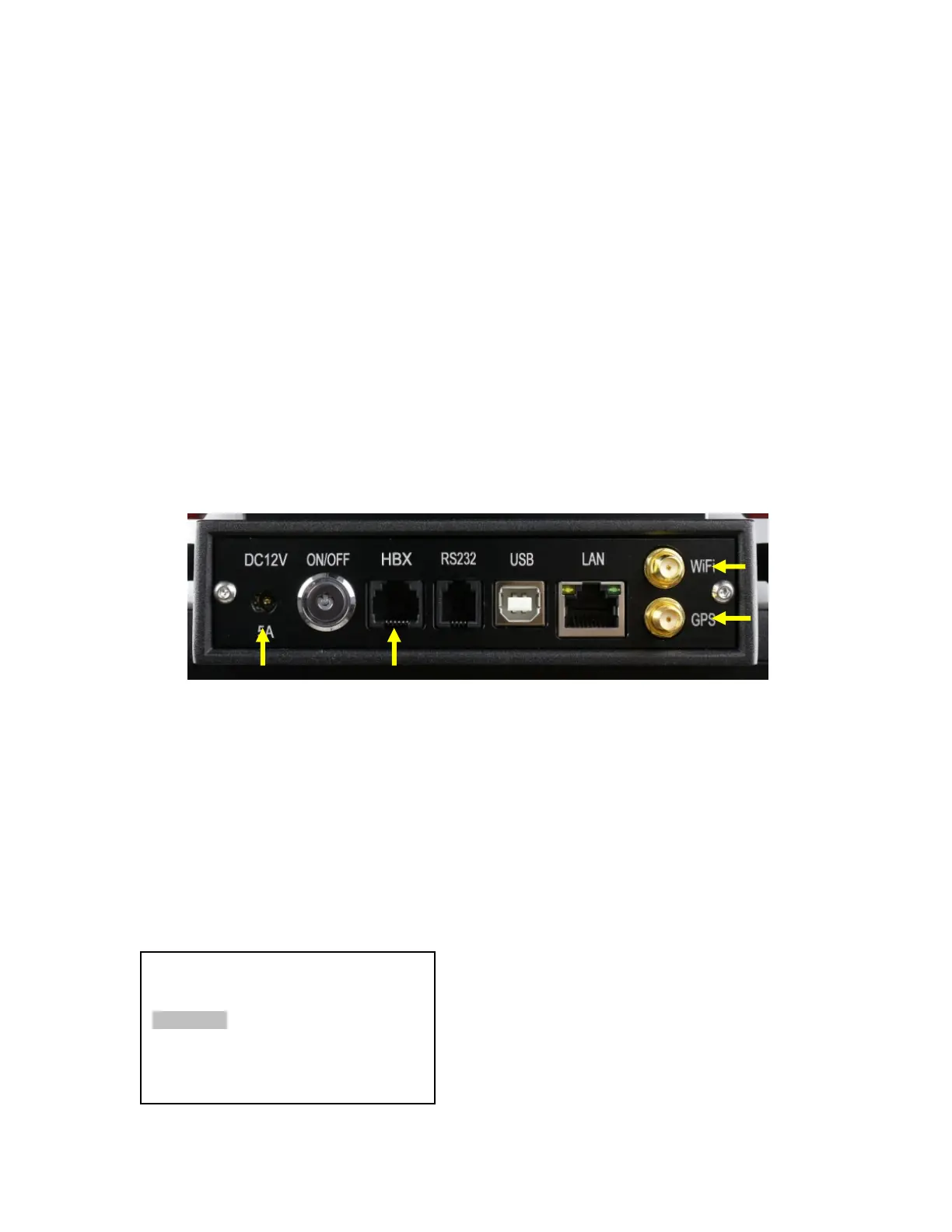
Plug in a 12V DC power supply to the DC12V POWER socket; connect the Go2Nova
®
8407
Hand Controller to the HBX port on the mount side panel; and install Wi-Fi antenna (right angle one)
and GPS antenna, as shown in .
STEP 7. Setup Hand Controller
The CEM120 mount is equipped with a GPS receiver which will receive the UTC time, longitude
and latitude information for your current location from satellites after a link is established. However,
there are still some parameters which need to be entered to reflect your location, such as time zone
information and whether daylight saving time is currently in effect. This information will be stored in the
mount until they need be updated.
The GPS with an external antenna should make the mount to connect the satellites in a few
minutes. If the GPS module has difficulty receiving the satellite signal, you may manually enter the
information.
To set up the controller, press MENU =>“Settings”:
Press ENTER and select “Set Time & Site”
Select and Slew
Sync. to Target
Alignment
Settings
Electric Focuser
PEC Options
Park Telescope
Edit User Ob
ects



 To Next Page