Basic operation
Playing music
33
Basic operation
Playing music
32
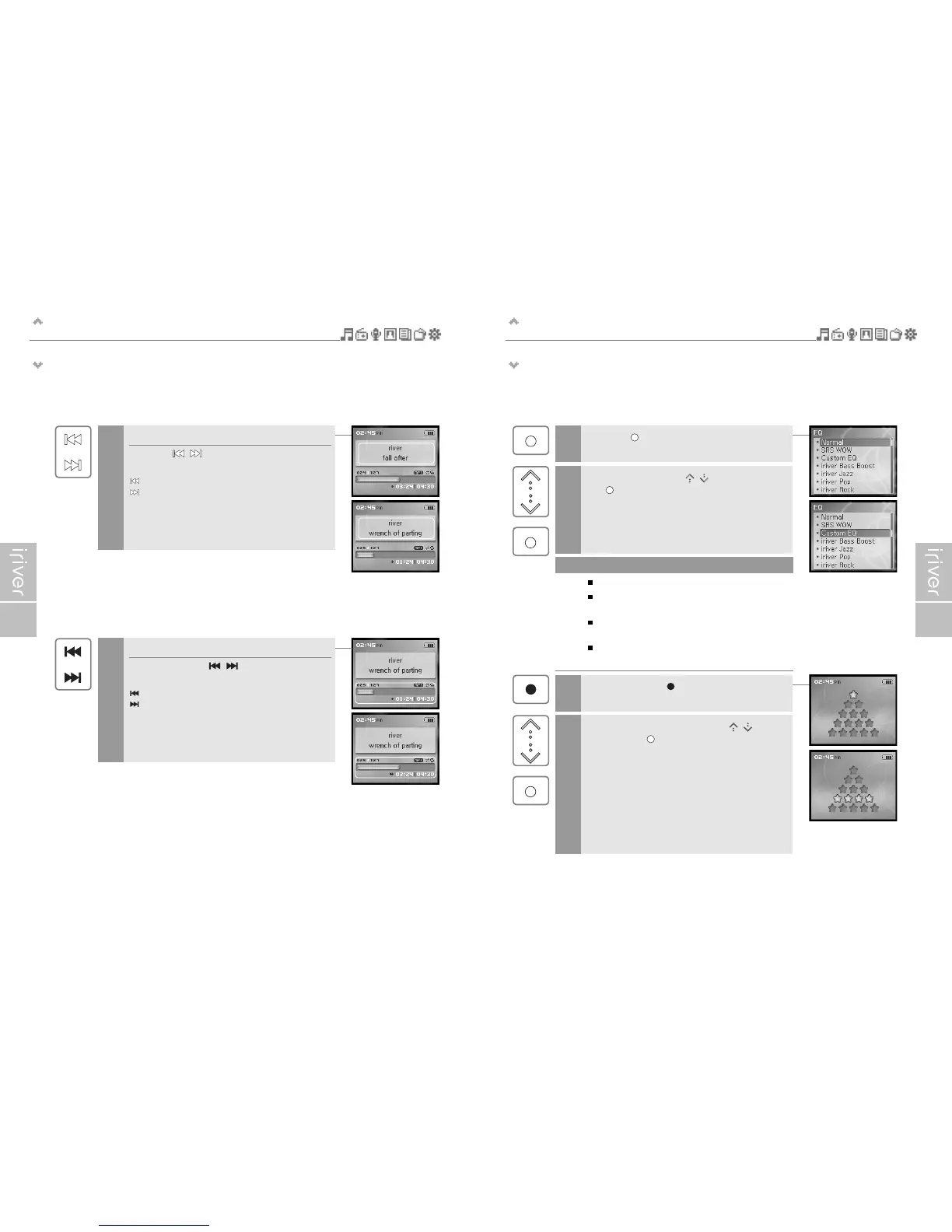
Playing previous/next title
Press the [
/
] button during playback to
play previous / next title.
: Plays previous file
: Plays next file
7
Fast-forward / Fast-reverse
Press and hold the [
/
] button during
playback for fast-forward or fast-reverse playback.
: Fast-reverse
: Fast-forward
8
Press the [ ] button during playback to display
the EQ selection screen.
9
Select the EQ using the [ / ] scroll and press
the [ ] button.
10
11
Select the desired Rating using the [ / ] scroll
and press the [ ] button.
12
EQ consists of SRS and 30 Preset EQ.
To customize SRS and Custom EQ, use the
<Sound> menu. (Refer to page 59.)
SRS uses a combination of Field Width, TruBase,
FOCUS and Freq. Boost to enhance sound.
Custom EQ will be automatically selected after adjusting
Custom EQ settings in the <Sound> menu.
Note
Press and hold the [ ] button during playback to
display the MY Rating screen.



 To Next Page