Basic operation
Playing music
35
Basic operation
Playing music
34
Setting up the Play mode
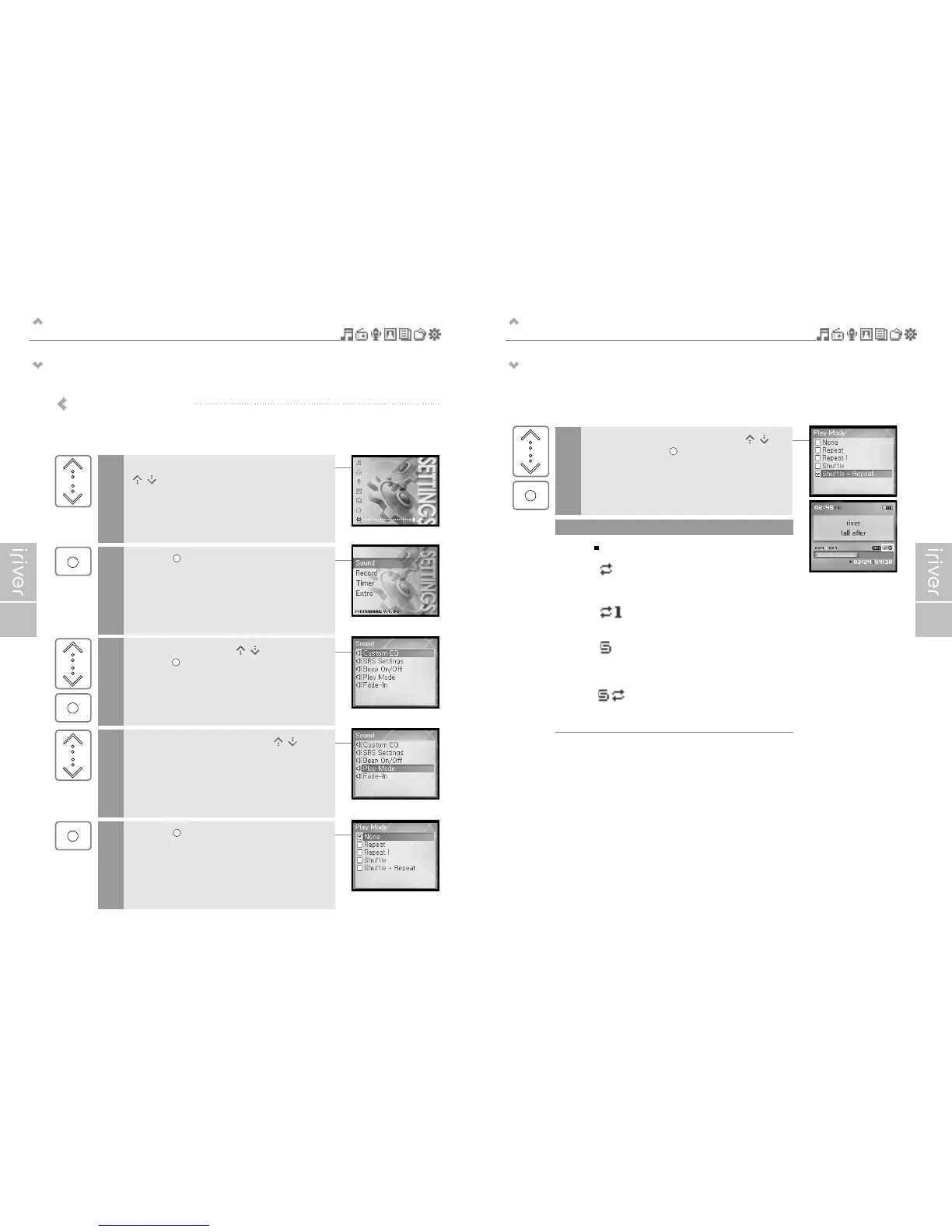
Various Play modes can be used during playback.
Select the <SETTINGS> mode using the
[ / ] scroll when the main screen appears.
1
2
Press the [ ] button to display the SETTINGS list
screen.
3
Select <Sound> using the [ / ] scroll and
press the [ ] button to display the <Sound> list
screen.
4
Move to the <Play Mode> using the [ / ] scroll.
5
Press the [ ] button to display the <Play Mode>
list screen.
Note
The Play mode consists of following options.
6
Select the desired Play mode using the [ / ]
scroll and press the [ ] button to setup
the Play mode.
: Repeat
Plays all titles in the selected category
repeatedly.
: Repeat 1
Plays a selected title repeatedly.
: Shuffle
Randomly plays all titles in the selected
category and stop.
: Shuffle + Repeat
Randomly plays all titles in the selected
category repeatedly.



 To Next Page