Basic operation
Listening to FM radio
41
Basic operation
Listening to FM radio
40
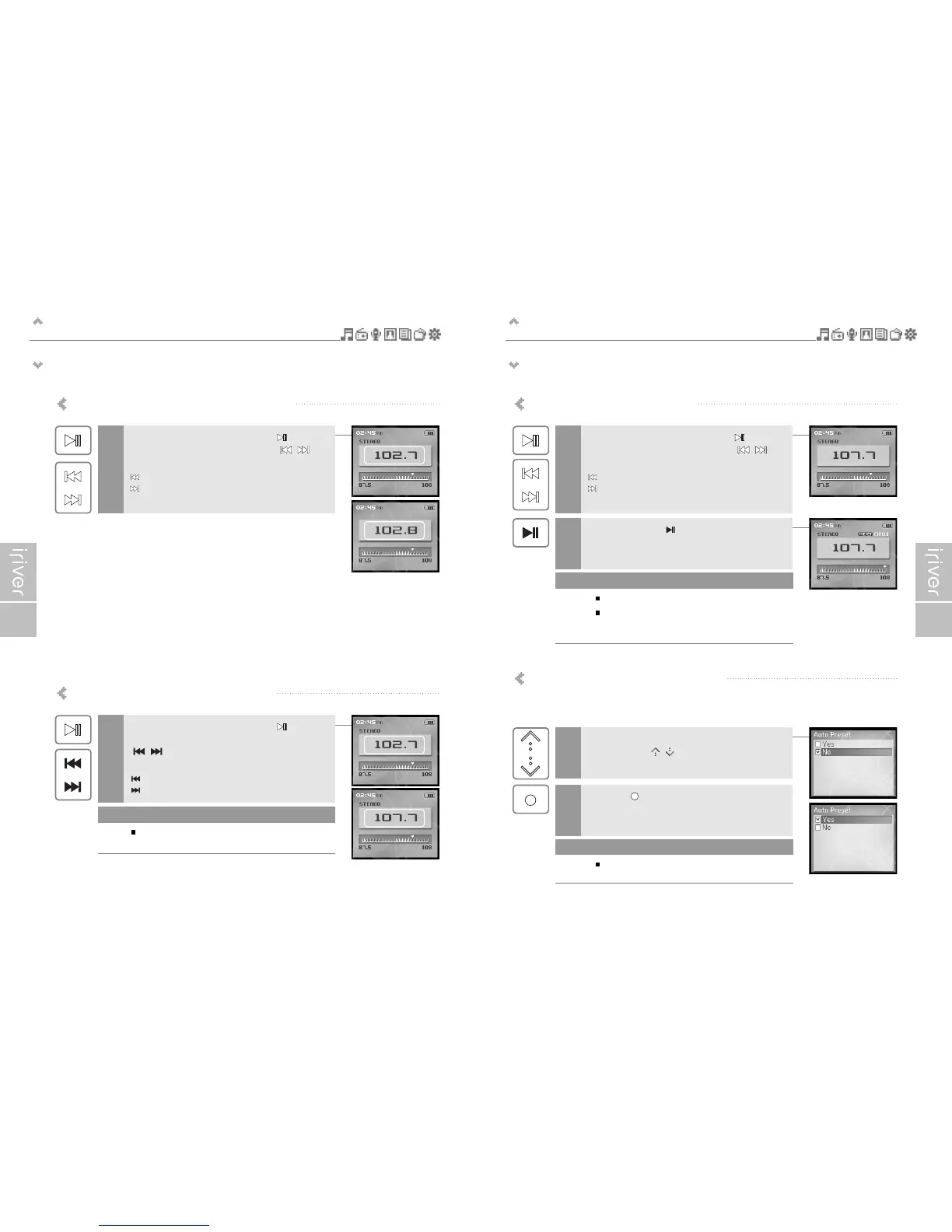
Storing FM radio station - Manually
If <PRESET> is displayed, press the [ ] button to
disable "Preset" mode, and press the [ / ]
button to increase/decrease the frequency.
: Decreases frequency
: Increases frequency
1
Press and hold the [ ] button.
If all 20 available channels are filled, the station will not be
stored.
2
Up to 20 channels can be stored.
Once all 20 channels are filled, new stations can not
be stored. Please refer to page 43 to delete a station
before storing another.
Note
Storing FM radio stations - Automatically
<Auto Preset>will program up to 20 stations automatically in the 20 channels.
The <Auto Preset> function can be set in <SETTINGS> - <Extra> - <Auto Preset>.
If the <Auto Preset> screen appears, move to
[Yes] using the [ / ] scroll.
1
Press the [ ] button.
The tuned stations will be stored one by one.
2
In areas where the signal is weak, some channels
may not be stored.
Note
Scanning FM radio frequency – Manual search
If <PRESET> is displayed, press the [ ] button to
disable "Preset" mode, and press the [ / ]
button to increase/decrease the frequency.
: Decreases by 0.1 MHz
: Increases by 0.1 MHz
1
Scanning FM radio frequency – Auto Scan
If <PRESET> is displayed, press the [ ] button
to disable "Preset" mode and press and hold
[ / ] button to Scan for the previous/next
available station.
: Moves to the previous available station
: Moves to the next available station
1
If the Preset it set to ON, the AUTO SCAN
function cannot be used.
Note


 To Next Page
 Loading...