Scooba 400 Series Owner’s Manual 13
EN
Scooba
®
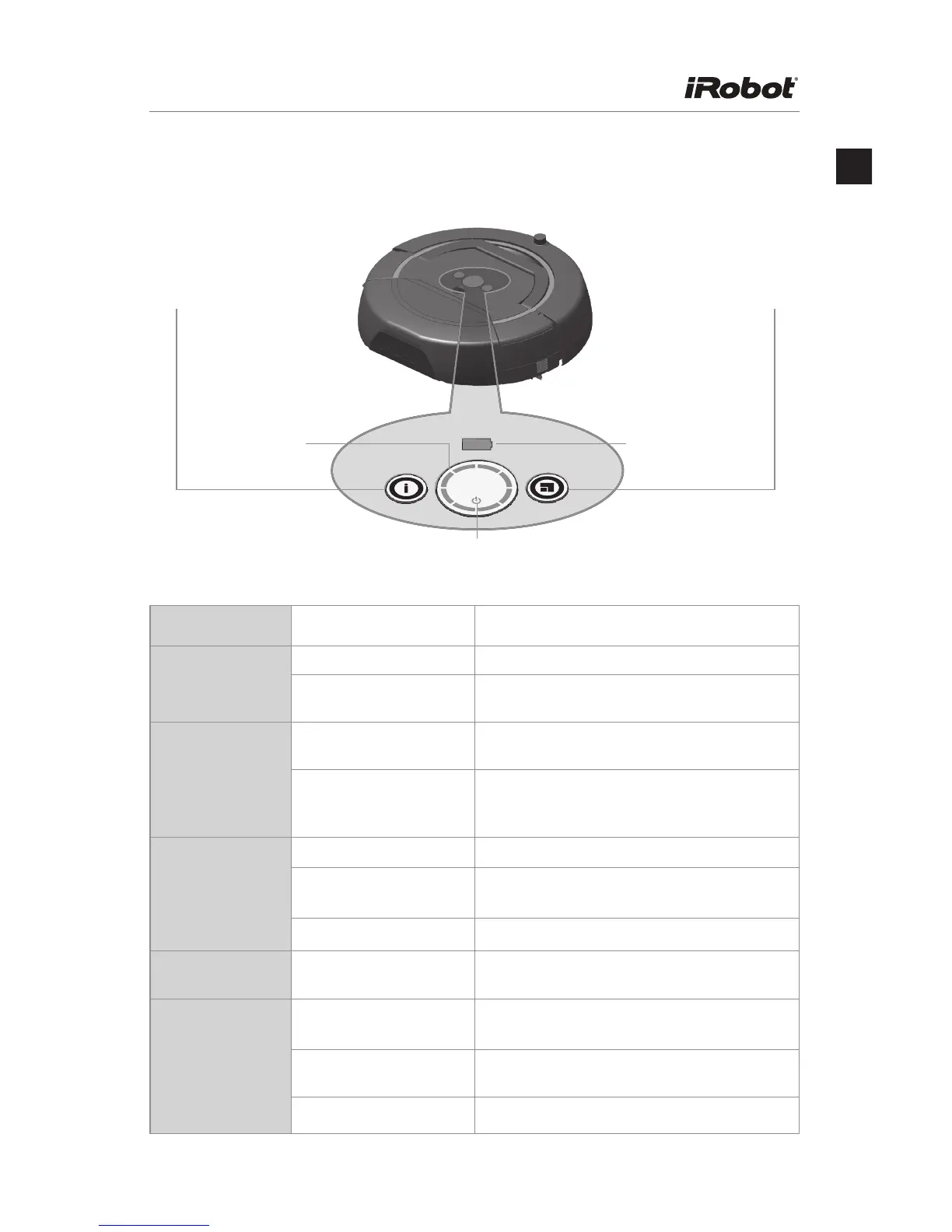
Lights & Buttons
Light or Button Behavior and Color What it Means and What to Do
Clean Button Unlit When Scooba is off, press to turn it on.
Steady blue When Scooba is on, press to start
cleaning cycle.
LED Status Ring Spinning blue The lights spin rapidly as Scooba prepares
to begin cleaning cycle.
Steady blue During the cleaning cycle, the lights go on in
succession to show how much progress has
been made.
Battery Indicator
Light
Steady red The battery is discharged.
Pulsing yellow or green When Scooba is plugged in, this means the
battery is charging.
Steady green The battery is fully charged.
Room Size Button Steady blue Press to choose between short and long
cleaning cycles.
Information Button Blinking or
steady green
Press to hear about Scooba’s current state
and how to use Scooba.
Blinking or
steady yellow
Press to troubleshoot errors.
Blinking or steady red Contact iRobot support for further assistance.
CLEAN
Information
Button
Room Size
Button
Battery
Indicator
Light
LED
Status
Ring
Clean Button








 To Next Page