1:
Connect the charger to the power supply and wait for the system to complete the self testing.
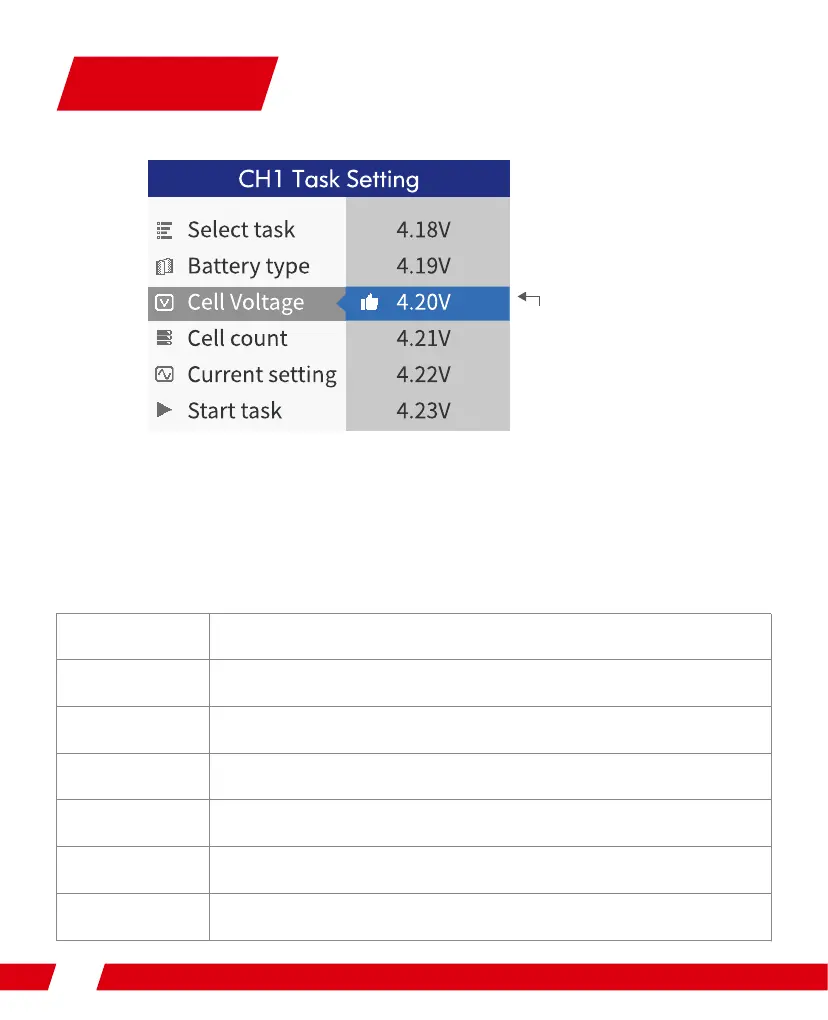
Connect the battery to the charger under standby interface, and short press the shuttle key to
make the task setting menu to pop up. The items in the menu are as follows:
Ubtl
Cbuufsz!uzqf
Dfmmt!wpmubhf
Dfmmt!dpvou
Dvssfou!tfuujoh
Tubsu!ubtl
Cbdl
Tfmfdu!ubtl!dpoufout;!Dibshf-!Ejtdibshf-!Tupsbhf
Tfmfdu!cbuufsz!uzqft
Foe.wpmubhf!tmjhiu!bekvtunfou-!sbohf!¨1/16W
Tfmfdu!cbuufsjft"tusjoht-!boe!uif!jufn!qspdfttft!bvupnbujd!uftu!boe!offet!
op!tfuujoh!jg!jotfsufe!jo!cbmbodfe!joufsgbdf
Tfmfdu!dvssfou-!dibshf!1/2!.!23!B-!ejtdibshf0tupsbhf!1/2!.!4/1!B
Tubsu!up!fyfdvuf!ubtlt
cbdl
Sfdpnnfoefe!Wpmubhf!
Foe.wpmubhf!tfuujoh
Task Setting


 To Next Page