ICP 3020 / ICP 4030 iMC-P Operating instruction
page 23
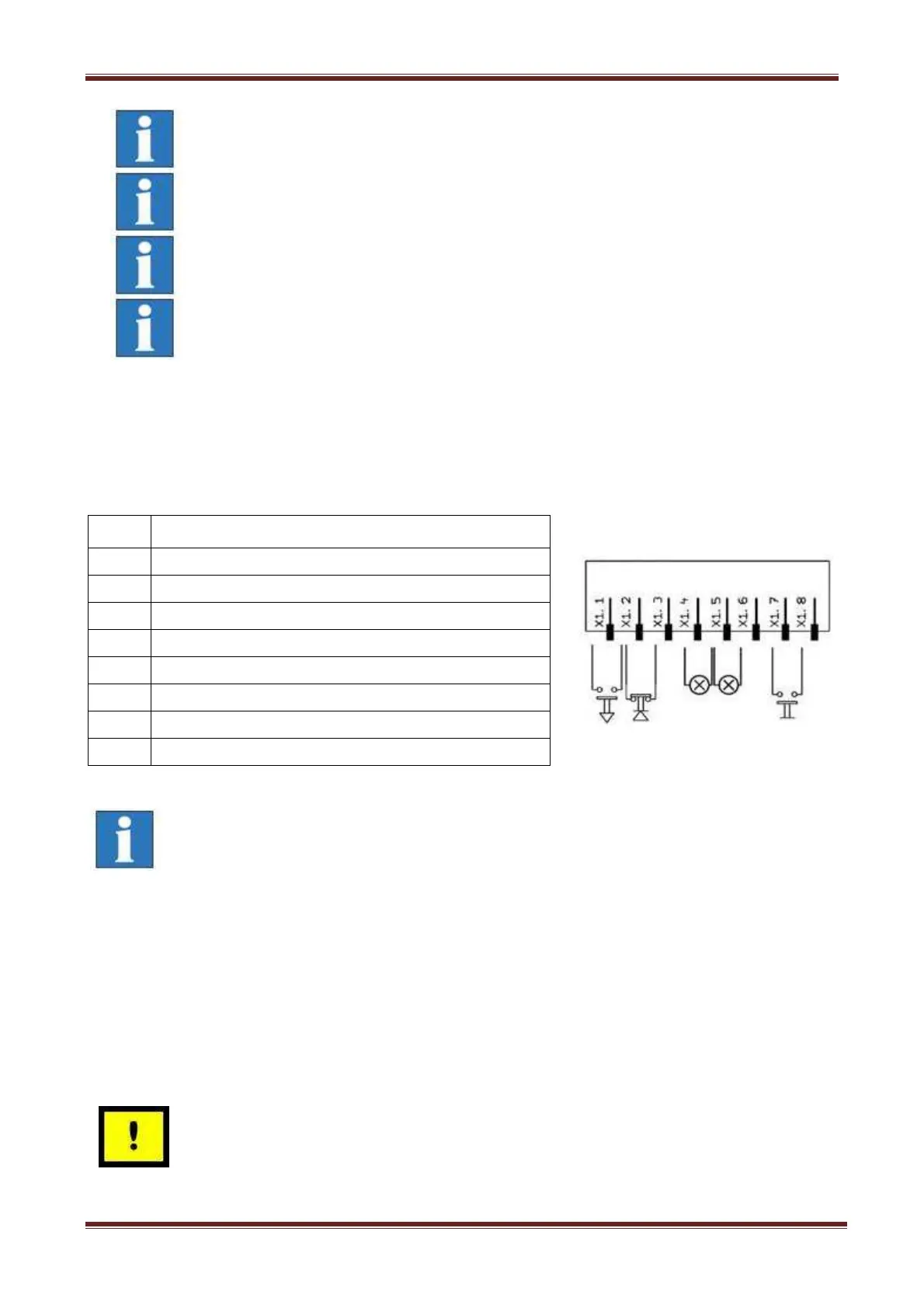
Impulse - interface impulse control, 8-pin connector
Use this connector to integrate the function keys start button, stop button and reset from the
controller front side as external signal inputs.
input external START button (make contact)
input external STOP button (brake contact)
input length measure switch
If the external STOP button is not used pins 2 and 3 must be bridged.
Input - digital inputs, 8-pin connector
The controller has 8 digital user inputs. Use these inputs to connect external devices like
sensors, switches or outputs from other devices. All inputs are opto-decoupled. If +24VDC
lies on the input a logical HIGH is signalized. Not connected (e.g. switch open) a logical
LOW is signalized.
Do not short 24VDC potential of the controller with GND or case
ground.
Use external emergency stop:
pin 5 and 6 bridged
pin 7 and 8 bridged
The length of the connection cable for the external emergency
stop button must not more than 5m.
Use external power button:
pin 1 and 2 bridged
connect external power button (make contact) on pin 3 and 4
In case of an emergency stop the +24VDC voltage on pin 4 is no
longer available.


 To Next Page