Manual No. 085-3435-07 20/45 IGB/IGX Series (Overseas Specifications) Service Manual
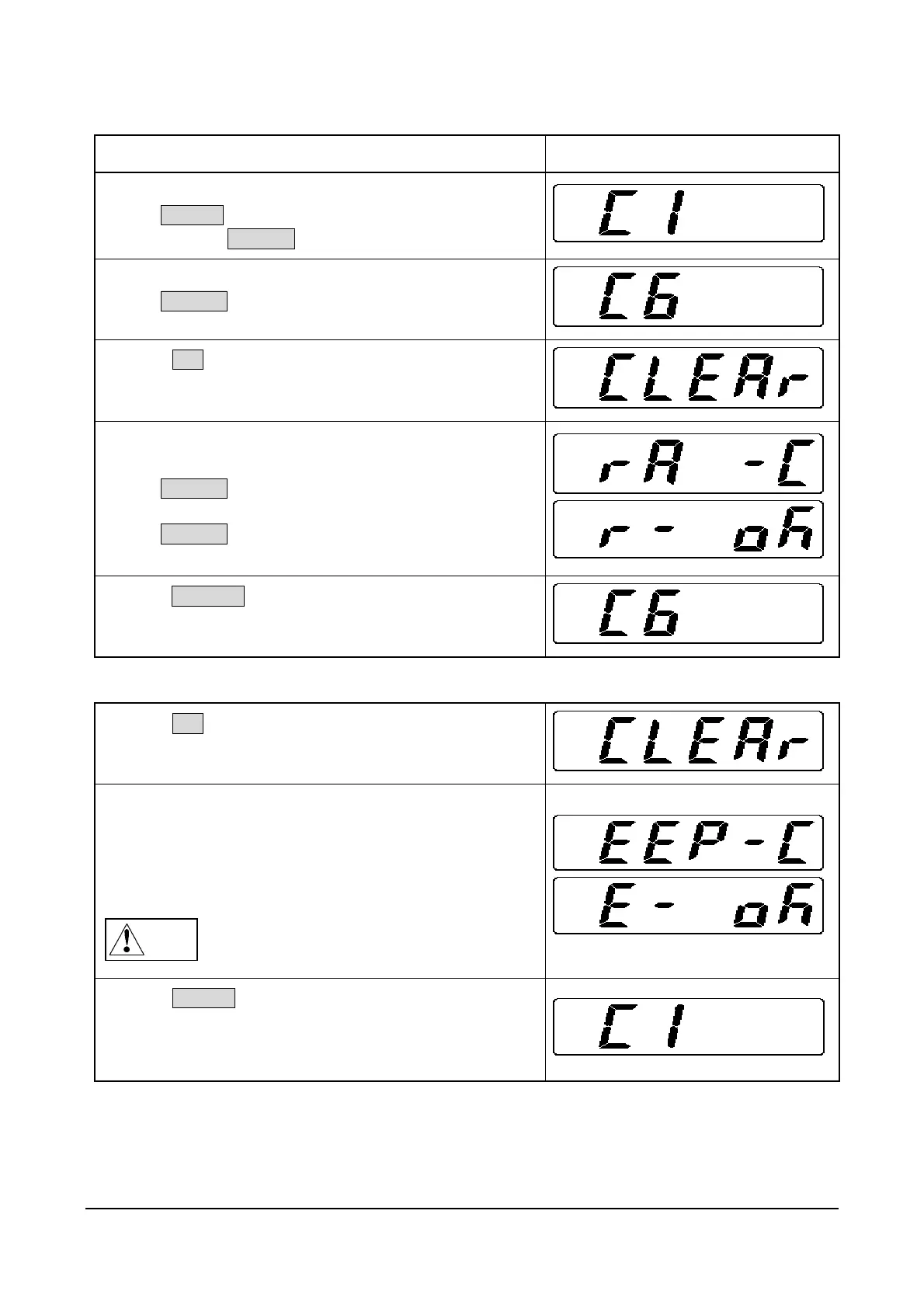
2.7 C6 Mode: RAM Clear and E2ROM Clear
Operation Display
1. Starting Test Mode
Press ON/OFF.
Press and hold ZERO(+) while all segments are lit.
2. Entering C6 Mode
Press ZERO(+) five times.
3. Press SET.
4. RAM Clear
(Preset data of Program Mode is cleared)
Press ZERO(+).
Press ZERO(+).
5. Press COLUMN to return to Test Mode.
E2ROM Clear (Initializing E2ROM data)
6. Press SET.
7. Push the Memory Switch (SW1) located on the main
board.
(This does not work when there has been no data
change)
Note
C1 data and setting data (F01toF17) have been
initialized.
Settings are required.
8. Press ON/OFF.
After initialization, nothing except “C1” will be displayed.
C1 data settings (Country No., Scale No., Zero point,
Span adjustment) are required.



 To Next Page